




One of the most important tech choices a school makes is what kind of school management software to use. The right platform can make admissions easier, automate academic processes, make communication better, and give you useful information. But if you make the wrong choice, you’ll end up with broken data, low adoption, and costly migrations in just a few academic cycles.
According to several studies on the implementation of EdTech, schools usually switch out their first management system within 2 to 3 years because it can’t grow, it doesn’t work well with other systems, or it doesn’t have enough reporting features. This shows how important it is to look at platforms in more depth than just their basic features.
Before making a choice, decision-makers should look at how well the solution will work in their business, how well it will grow over time, and how reliable the vendor is. The next ten questions will help you evaluate in a structured way.
1. Can the system support multiple campuses and academic structures?
A complete school management solution should allow institutions to run multiple campuses, departments, and academic calendars all from one platform, enabling them to have centralized reporting, while still allowing each campus to be able to operate independently.
As an example, large multi-campus institutions are typically looking for:
- An academic calendar for each campus that can vary (term dates, exam schedules, etc.)
- A grading scale for each campus that can vary (grades based on percentage, GPA or custom formats, etc.)
- Access rights for each department to Campus Admin, Faculty, or Management
- A centralized student database across all campuses that can produce reports based on that database.
If an institution is unable to meet these criteria, it will likely be forced to operate each campus manually, thereby making it more complicated to manage.
What to evaluate:
Look for a system that offers multi-campus dashboards, allows you to create your own academic structure and provides central analytics. A solution such as Classe365 can support a number of different academic models, making it ideal for the growing institution.
2. Will this platform join SIS, LMS, and admission into one system?
A single-platform solution, which combines an SIS (Student Information System), LMS (Learning Management System) & a CRM for admissions improves operational efficiency and eliminates data silos.
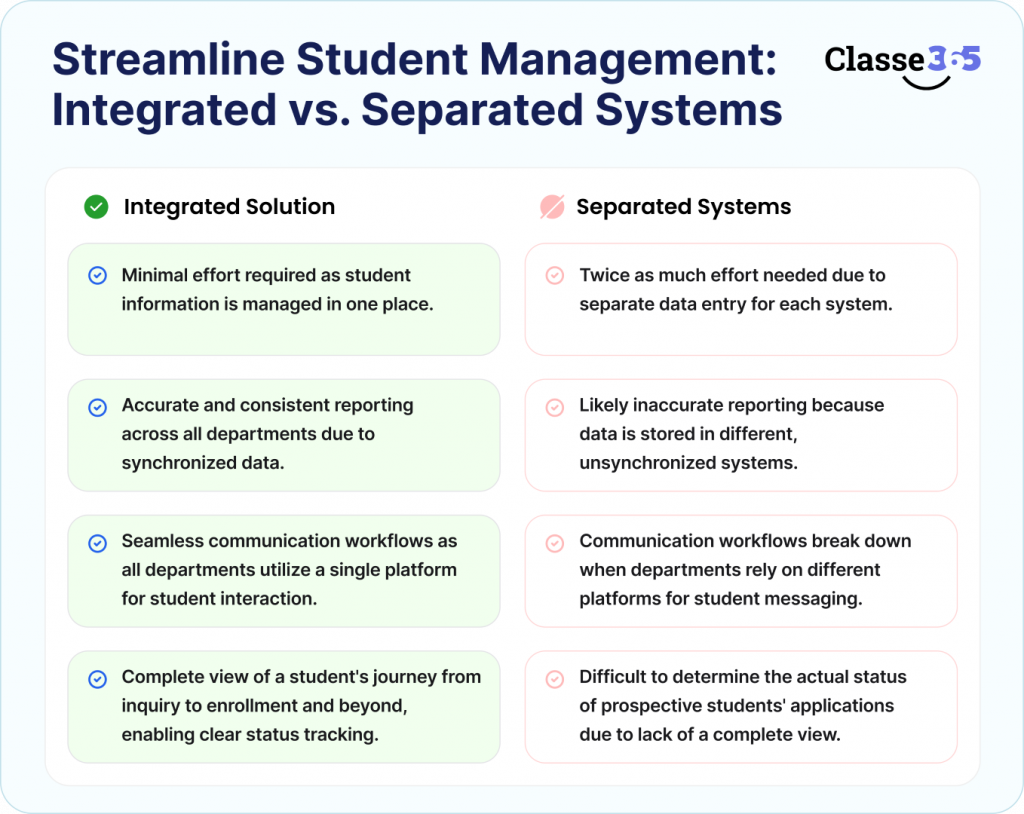
Here’s what you’re likely to see with separated systems:
- Training staff requires twice as much effort because student info will have to be entered into each system admissions, academic & communication tools separately.
- When admissions, academic & finance data is stored in different systems without synchronization, then the reporting will likely be inaccurate for each department.
- Communication workflows break when multiple departments depend on different platforms for emailing, notifications & updating students.
- If you do not have a complete view of a student’s journey from inquiry through enrollment (and beyond) then it will be difficult to determine the actual status of your prospective students’ applications.
Having a single solution that resides within a single platform will assist in streamlining your workflow by integrating admissions, academics, & engagement into one dashboard.
What to evaluate:
Make sure that the SIS, LMS, and admissions modules you are using are natively integrated into the solution and there’s no reliance on third-party add-ons. A complete, integrated solution like Classe365 allows you to manage the entire student lifecycle while having consistent data with an optimally streamlined workflow.
3. How quickly can staff and educators begin utilizing the platform with little to no training needed?
The ease-of-use of a platform affects adoption rates directly. If teachers and administrators find the system too sophisticated, they might go back to using spreadsheets or manual processes instead of reaping the benefits of an ROI.
A user-friendly platform should also allow for the following:
- Provide specific dashboards where teachers, administrators, and leadership see only those tasks they have been assigned.
- Have a simple navigation style that will allow teachers to spend less time during the day.
- Have minimal training requirements and enable teachers/staff to get started using core features quickly.
- Be mobile-friendly so that teachers can enter attendance, communicate with parents, and update students quickly.
- Enable teachers to finish quickly with common tasks such as entering attendance or sharing assignments.
Typically, educational platform solutions are specifically created for use in an educational environment, reducing the onboarding period and increasing the implementation rates across departments.
Expert Opinion
Many EdTech implementations fail due to poor user adoption, rather than missing features. Platforms designed to focus on intuitive design or role-based processes often deliver faster implementations and improved long-term utilization across the institution.
How to evaluate:
Request demonstration accounts from vendors, and keep track of how quickly the teacher can complete basic steps (i.e. mark attendance, create assignments).
Also Read: School management system simplifies administrative tasks
4. Is payment gateways, accounting and communication tools integrated within a School Management Software?
The degree of integration will determine how well your School Management Software fits within your current technology stack. Payment gateways, accounting software and communication tools are all used by schools regularly, and must work with the School Management Software(“SMS”).
If there are no integrations with your existing systems, then you will be doing the following;
- Manually entering fee data;
- Having a difficult time with financial reconciliations; and
- Having an ineffective way of communicating.
A School Management Software should provide support for APIs (Application Programming Interfaces), third-party integrations, and Single Sign-On.
What to evaluate:
Determine whether integrations are available natively or if they will be an added expense. Some platforms (i.e. Classe365) provide flexibility for integration through built-in Finance & Accounting and Fees & Invoicing modules to make it easier for schools to operate efficiently. Developers can also explore Classe365’s open API documentation to build custom connections.
5. What type of Data Security and Access Control measures are present?
School systems store sensitive student data, parent data, and financial information, therefore, security is a critical factor when deciding on a School Management Software. A good School Management Software should have safeguards in place to protect the information and to ensure that each user has the appropriate level of access.
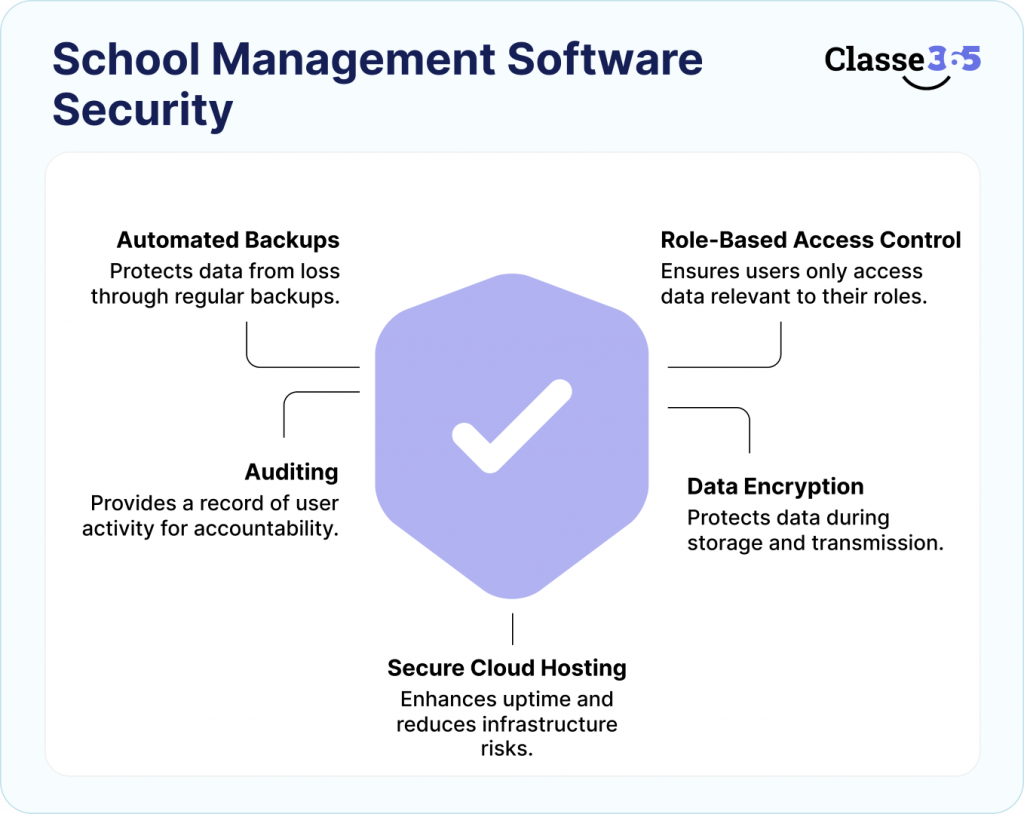
The following are key security features to investigate:
- Role-based Permission access for teachers, administrators and finance staff to only access data to which they are entitled to view.
- Encryption of data when stored and when in transit for student safety.
- Secure cloud hosting for improvements in uptime and reductions in infrastructure risk.
- Auditing provides a record of user activity for accountability and compliance.
- Automated backups to protect data.
Strong security measures reduce risk and ensure compliance with data protection standards.
What to evaluate:
Ask vendors where data is stored, how frequently backups are performed, and how granular permission controls are configured. Platforms such as Classe365 offer role-based access controls and secure cloud infrastructure designed for education institutions.
6. Can the system support growth in students without performance degradation?
As institutions grow by increasing enrollments, expanding campuses, or adding new programs, a scalable school management platform must be able to easily manage this growth without noticeably slowing down or require an eventual migration to a new platform due to performance degradation.
Here are a few reasons to evaluate the scalability of your School Management Software:
- The cloud-based infrastructure will allow the system to maintain growing student records while still maintaining consistent performance levels (i.e. No Performance Drops).
- The system can handle high volumes of data and allow for smooth access to that data during peak access times (e.g. admissions, exams).
- The system has the ability to add campuses without creating separate systems for each campus (i.e. multi-campus expansion).
- The modular design of the School Management Software allows an institution to add or activate modules as their needs change over time.
If the School Management Software does not have scalability, it will begin to slow down and create costly and disruptive issues if the institution needs to migrate to a new system.
What should you evaluate?
Determine if the School Management Software supports increased numbers of users, campuses, and data (including all of the above) without the need to upgrade to a different system. Learn how universities and higher education institutions can leverage scalable platforms to support long-term growth.
7. What types of reports and analytics can leadership access through the School Management Software?
Reports and analytics allow a leadership team to assess the performance of their institution (both academically, operationally, and financially), and make data-driven decisions based on objective evidence. An effective School Management Software should provide leadership with real-time access to all of the institution’s data across all three of the above domains.
Some examples of the reports and analytics to evaluate include:
- Analytics related to student performance in order to determine the level of academic success as well as where academic improvement is needed.
- Reports on student attendance for the purpose of tracking student engagement and to identify early warning signs of possible disengagement.
- Reports related to admission pipelines.
- Fee collection reports for financial tracking and revenue forecasting
- Faculty workload insights to balance teaching assignments and resource planning
Advanced analytics reduce reliance on manual spreadsheets and improve decision-making speed. Discover how AI-powered analytics can help leadership make smarter financial and operational decisions.
What to evaluate:
Check whether dashboards are customizable, exportable, and available in real time.
8. How long does implementation and data migration typically take?
The implementation timeline will vary due to institutional size, the complexity of the data being migrated, and any configuration requirements needed. School Management Softwares that are cloud-based will typically deploy in less time than on-premise solutions simply because they do not require the set-up of local infrastructure (ex. setting up servers).
Key factors that affect implementation timelines:
- Data migration complexity increases when historical student records, attendance data, and financial information need cleaning and formatting
- Custom configuration takes time if workflows, grading structures, or academic calendars must be tailored
- Training requirements depend on the number of users and their familiarity with digital tools
- Integration setup may extend timelines when connecting payment gateways, communication tools, or accounting systems
A structured onboarding process helps institutions transition smoothly without disrupting daily operations.
What to evaluate:
Ask vendors for a clear implementation roadmap, including data migration steps, training timelines, and post-launch support. You can also request a demo to evaluate the onboarding experience first-hand.
9. What is the total cost of ownership excluding just subscription pricing?
In order to fully understand what the total cost of ownership is you need to look past the monthly or annual cost of your subscription and understand what your long term costs will be.
Cost factors to consider:
- There are potentially set-up costs associated with initial configuration and set-up for support
- If there are multiple connections to existing payment gateways, communication tools, or accounting systems these connections will incur costs as well.
- Customization charges may apply for workflow or reporting modifications
- Support fees vary depending on priority support or dedicated assistance
- Upgrade costs may occur when adding users, campuses, or advanced modules
Transparent pricing helps institutions avoid unexpected expenses and plan budgets accurately.
Expert Insight
Many institutions focus only on upfront pricing, but hidden costs such as integrations, data migration, and scaling can significantly increase long-term expenses. Evaluating total cost over a three-year period provides a more accurate vendor comparison.
What to evaluate:
Request a detailed cost breakdown for at least three years and compare vendors based on long-term value, not just initial pricing. Review the Classe365 pricing page and use the ROI Calculator to estimate potential savings.
10. Does the vendor provide continuous updates and future-ready capabilities?
Education technology evolves rapidly, and institutions benefit from platforms that release continuous updates. A vendor with an active product roadmap ensures the system remains relevant as institutional needs grow.
Future-ready capabilities to look for:
- Automation workflows reduce manual administrative tasks
- AI-driven analytics provide deeper insights into student performance and operations
- Mobile-first improvements support access for staff, students, and parents
- Continuous feature releases keep the platform aligned with evolving education workflows
Choosing a vendor that actively invests in innovation helps institutions avoid switching systems later.
What to evaluate:
Check how frequently updates are released and whether the vendor shares roadmap visibility or product release notes.
Decision Framework: Evaluation Checklist
| Criteria | Must Have | Why It Matters |
| Academic flexibility | Yes | Supports multiple models |
| Scalability | Yes | Prevents migration |
| All-in-one platform | Yes | Eliminates data silos |
| Integrations | Yes | Improves workflows |
| Security | Yes | Protects data |
| Reporting | Yes | Enables insights |
| Easy UI | Yes | Improves adoption |
| Fast implementation | Yes | Reduces downtime |
| Transparent pricing | Yes | Budget planning |
| Future roadmap | Yes | Long-term value |
Common Mistakes to Avoid
- If you ignore quality and value, then you may end up purchasing an inappropriate system that will cost more over time due to higher operational expenses through inefficiency.
- Not considering the need for scalability may force you to make a switch to a different platform in the future if you have a large number of new students enroll or if you add a lot of new areas of campus to your venue.
- Not considering the need to integrate with other applications will result in unlinked activities amongst your various admissions, financial aid, communications, and academic applications.
- Not including multiple participants when making a selection may result in very low acceptance rates as the faculty and administrators will likely feel that the system is incompatible with their current processes.
- Underestimating the impact of implementation can lead to delays and interruptions in your college’s operation if data transition, training, and on boarding of new users is not planned properly.
FAQs
How do schools compare different School Management Softwares effectively?
Create a weighted comparison matrix based on scalability, integrations, usability, reporting, security, and implementation time. Scoring vendors across these criteria ensures an objective evaluation instead of feature-based decisions.
Should schools choose cloud-based or on-premise School Management Softwares?
The majority of schools currently prefer a cloud-based approach because it is more easily set up and automatically updates, and does not require a great deal of technical support. An on-premise system usually requires a lot of preventive maintenance and dedicated IT resources.
Who should be involved in selecting a School Management Software?
Academic leadership should be involved in selecting a School Management Software, this includes IT teams, admissions staff, finance teams, and faculty representatives.
What is the typical ROI of a School Management Software?
ROI is generally realized through reductions in administrative workload, better tracking of enrollment and retention, automated billing for fees, and a more accurate reporting process. Many institutions report measurable improvements in efficiency after only one academic year of using the School Management Software.
Why is mobile access so important for School Management Softwares?
Mobile access allows teachers to mark attendance; allows administrators to approve workflows; and allows parents to receive updates about their children immediately. School Management Softwares that prioritize mobile access tend to yield higher levels of engagement, and therefore, a more responsive operation.
Can a School Management Software improve student retention?
Yes School Management Softwares improve student retention by tracking the attendance, performance analytics, which help institutions identify at-risk students early and take proactive action.
What deployment mistakes should institutions avoid?
Institutions must avoid migrating unclean data, skipping staff training, and launching without pilot testing. A phased rollout reduces disruption and improves adoption.
When should schools assess their management systems?
Schools should evaluate the systems after each term (after each semester) to ensure the system functions properly and meets the operational needs of the institution.
How often should schools review their management system performance?
Institutions should review system usage, reporting accuracy, and user adoption at least once per academic term to ensure the platform continues meeting operational needs.
What are signs that a School Management Software is not the right fit?
Low usage rates by employees, continued reliance on spreadsheets, slow reporting, limited types of integration, and difficult scalability would suggest that the School Management Software does not fulfill the requirements of the school.