



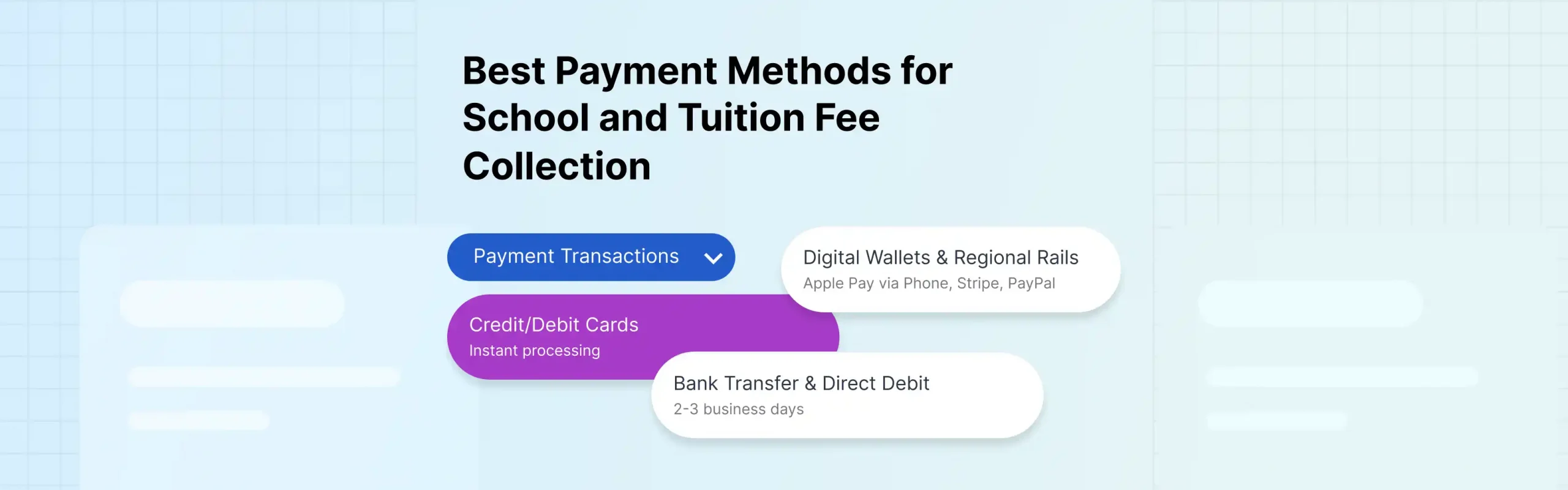
Schools and universities lose hours every month chasing fee payments, and the way they collect those payments is part of why. Offering the right mix of payment methods cuts friction for families and speeds up collection, but the method alone is not enough. Without fee management software connecting each payment to the right student and invoice, collection stays manual no matter how many options you offer. The methods parents expect have moved well past cash and cheque, and the system behind them has to keep up.
The Federal Reserve’s 2025 Diary of Consumer Payment Choice found that cash now accounts for just 14% of US consumer payments, while credit and debit cards account for 35% and 30%, respectively. Families pay everywhere else by card and phone, and they expect to pay school fees the same way.
What Makes a Payment Method Worth Offering
Before listing methods, it helps to judge them against what an institution actually needs. Five factors matter:
- Convenience for families. A method parents already use gets paid faster than one they have to learn.
- Cost. Every method carries a fee. The question is who absorbs it and whether the payment size suits it.
- Speed of settlement. How long until the money reaches the institution’s account.
- Security. Card payments must comply with the PCI Security Standards Council’s data security standards, which protect cardholder data.
- Reconciliation. How easily a payment can be matched to the right student and invoice without manual work.
The last factor is the one schools underweight, and it is where most of the hidden cost sits. Demand for digital options keeps climbing, with the global cashless payments market projected to nearly double from $152 billion in 2025 to $295 billion by 2032, so the pressure to offer modern methods will only grow.
The Best Payment Methods for School and Tuition Fees
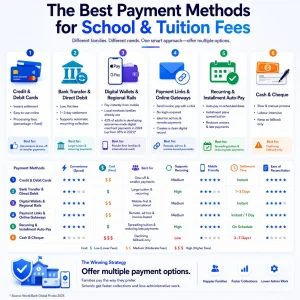
No single method suits every family or every fee. The strongest approach is to offer a few that cover different needs.
Credit and Debit Cards
Cards are the default for most families and the easiest to accept online. They settle instantly and suit one-off fees, activity charges, and smaller tuition payments. The trade-off is processing fees, typically a percentage plus a fixed amount per transaction, which matters more on large tuition bills.
Best for: convenience and one-off or smaller payments.
Bank Transfer and Direct Debit
Bank-based methods, including ACH in the US and SEPA direct debit in Europe, pull funds directly from a parent’s account. Fees are low and flat, which makes them well suited to large tuition payments where a percentage card fee would be costly. Settlement takes one to three days. Direct debit also supports automatic recurring collection.
Best for: large tuition and recurring payments.
Digital Wallets and Regional Rails
Mobile wallets like Apple Pay let families pay instantly from a phone, and regional bank rails do the same in many markets. These reflect how people increasingly pay for goods and services worldwide. The World Bank’s Global Findex 2025 found that 42% of adults in developing economies made a digital merchant payment in 2024, up from 35% in 2021. For institutions enrolling students across regions, supporting the wallets and local methods families already use removes a real barrier to payment.
Best for: mobile-first families and international reach.
Payment Links and Online Gateways
A payment link or hosted checkout page lets a school send an invoice that a parent can pay with a click, with no login required. This handles ad hoc charges and remote payments well, and it is the backbone of most online school payments. Online school payments through a gateway also create a clean digital record of every transaction.
Best for: remote, ad hoc, and invoice-based payments.
Recurring and Installment Auto-Pay
Scheduled auto-pay charges a saved method on set dates, and installment plans spread tuition across a term or year. Both reduce arrears because the payment happens automatically rather than relying on a parent to remember. Installments also make high tuition more manageable for families.
Best for: spreading tuition and reducing late payments.
Cash and Cheque
Cash and cheque still appear, particularly for unbanked families, but they are the slowest and most labor-intensive to process. Every cheque is handled, deposited, and reconciled by hand. Most institutions keep them as a fallback while steering families toward digital options.
Best for: a declining fallback only.
Comparing the Payment Methods at a Glance
| Method | How it works | Speed | Typical cost | Best for |
| Credit/debit card | Card paid online or in person | Instant | % + fixed fee | Convenience, smaller fees |
| Bank transfer / direct debit | Funds pulled via ACH or SEPA | 1-3 days | Low flat fee | Large tuition, recurring |
| Digital wallets / regional rails | Apple Pay, Google Pay, UPI | Instant | Low to moderate | Mobile-first, global reach |
| Payment link/gateway | Hosted page or link collects payment | Instant | Gateway fee | Remote, ad hoc invoices |
| Recurring / installments | Scheduled automatic charges | Automatic | Per-transaction fee | Spreading tuition, fewer arrears |
| Cash/cheque | Manual handover and deposit | Slow | Staff time | Legacy fallback |
How Classe365 Handles Fee Collection
Classe365’s fees and invoicing module accepts card, bank, and online payments through built-in gateways, supports recurring and installment plans, and automatically issues invoices and receipts. Because it runs inside the same platform as student records, every payment is logged against the right student without manual matching.
Why the Payment Method Is Only Half the Problem
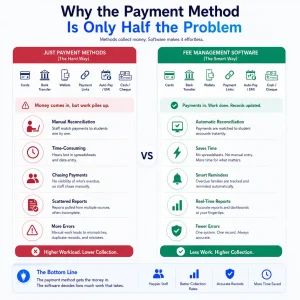
Offering six payment methods solves nothing if the back office still reconciles them by hand. The real cost of fee collection is rarely the transaction fee. It is the staff time spent matching payments to students, chasing late payers, and assembling reports from scattered records.
This is what fee management software exists to fix.
Good fee collection software does not just accept payments. It records who paid, what for, and when, then automatically reconciles it with the student’s account. When a payment arrives, the invoice closes, the receipt issues, and the ledger updates without anyone touching a spreadsheet.
The gap shows most with reminders and arrears. A standalone payment gateway takes money but does not know which families are overdue. A proper school fee management software system tracks every outstanding balance and sends reminders automatically, which is what actually moves collection rates. The method gets the money in. The software decides how much work that takes.
How Classe365 Solves School Fee Collection End to End
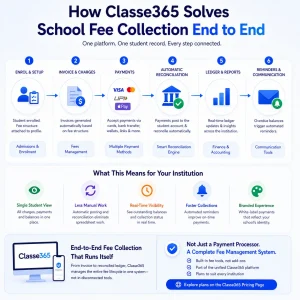
A payment method is one link in a chain that runs from invoice to reconciled ledger. As school fee management software, Classe365 manages the whole chain in one system rather than bolting a gateway onto a separate accounting tool.
Fees are tied to the student record from the start. When a student is enrolled through admissions and enrolment, their fee structure attaches to their profile in the student information system. Every charge, payment, and balance lives there, so staff see a single accurate view per student instead of cross-checking a payment processor against a spreadsheet.
Collection and reconciliation are automatic. Payments made through any supported method post directly to the student’s account and flow into finance and accounting, where they are reconciled against invoices without manual entry. Reporting draws from the same ledger, so a bursar can see outstanding balances across the institution in real time.
Reminders and communication are built in. Overdue balances trigger automated reminders via the connected communication tools, so chasing late fees is no longer a manual task. Institutions can also present a branded payment experience using the white-label module, so families pay on a page that reflects the school’s identity.
This end-to-end model is the difference between a fee management app that processes payments and a system that manages the entire fee lifecycle. For schools and universities handling thousands of payments per term, that integration turns fee collection from a monthly scramble into a routine that mostly runs on its own. The fee tools are part of the platform rather than a separate purchase, with plans shown on the Classe365 pricing page.
Collect Fees Without the Manual Work
If your team still reconciles payments by hand, book a Classe365 walkthrough to see fee collection, reconciliation, and reminders working in one system.
Start for free and set up your fees, invoicing, and payment methods in one place, or talk to our team to map it to how your institution collects fees today.
FAQ
Who pays the transaction fee on school payments, the school or the parent?
Either, depending on the institution’s policy. Some schools absorb processing fees as a cost of doing business, while others pass the fee on to the payer. Card fees are usually percentage-based, so many institutions route large tuition payments by bank transfer to avoid them.
Are convenience fees on tuition payments legal?
In many places, yes, but rules vary by country and card network, and some jurisdictions cap or prohibit surcharging. Institutions should confirm local regulations and card brand rules before adding a fee to card payments.
How are refunds and chargebacks handled for school fees?
Refunds are issued to the original payment method, and a good system automatically records the reversal against the student’s account. Chargebacks, in which a payer disputes a card charge, are handled by the payment processor, so keeping clear records of each transaction is important for resolving them.
Can families pay tuition in installments?
Yes, if the system supports scheduled auto-pay. Installment plans split a large tuition bill into smaller, scheduled charges, improving affordability for families and reducing arrears for the institution.
How do international families pay fees in a different currency?
Through payment gateways that support multiple currencies and regional methods. The parent pays in their local method while the institution receives the funds in its own currency, with the gateway handling conversion. Supporting regional rails reduces failed payments from families abroad.
What happens when a scheduled payment fails?
A capable system flags the failed payment, notifies the family, and retries on a schedule rather than silently missing the charge. This prevents a single declined card from quietly turning into an overdue balance.
Is it safe to store a card for recurring tuition payments?
Yes, when the provider is PCI-compliant and uses tokenization, which replaces the card number with a secure token. The institution never stores raw card data, which keeps recurring payments both convenient and secure.
How does fee collection connect to a school’s accounting?
In an integrated fee collection software system, every payment posts directly to the finance ledger and reconciles against the matching invoice. This removes the manual export-and-match step that separate payment and accounting tools require, and keeps financial reporting current.