




A student information system solves one core problem: student data scattered across too many systems. It pulls records, grades, attendance, and billing into one place. Update a student’s record once, and it updates everywhere. That single change is what separates a modern SIS from a folder full of spreadsheets. Most universities lose hundreds of staff hours a year to duplicate entry and manual reconciliation. An SIS exists to close that gap.
Below are ten specific ways a student information system changes how higher education institutions handle data day to day.
If you want to see how this looks in practice, you can book a demo with Classe365 at any point.
Manual Process vs. What an SIS Does Instead: Quick Overview
| The Manual Process | What an SIS Does Instead |
| Student records live across four or five disconnected systems, with versions that rarely match. | Centralizes every record under one student profile, updated in one place. |
| Admissions, registrar, and finance each re-enter the same student data separately. | Captures data once at admissions and pushes it into every downstream module. |
| Departments work off different data versions until the next overnight sync. | Updates every module in real time, within seconds of a change. |
| Any staff member with system access can see any field on a student’s record. | Restricts each user to only the fields their role requires. |
| Tracking who changed a record, and when, means digging through emails or asking around. | Logs every change automatically into an exportable audit trail. |
| Accreditation and state reports get built by exporting and reconciling data from multiple systems by hand. | Generates most reports directly from existing student data using pre built templates. |
| Enrollment, retention, and financial trends live in scattered spreadsheets nobody updates consistently. | Surfaces the same data on a live, role specific dashboard. |
| LMS, CRM, and finance systems don’t talk to each other, so staff reconcile data between them manually. | Connects all three systems through APIs, syncing changes automatically. |
| Sensitive student data sits on infrastructure most in house IT teams can’t fully secure or monitor. | Protects data with encryption, automated backups, and regular security audits. |
| Advisors spot struggling students only after grades or attendance visibly slip. | Surfaces risk signals early enough for advisors to intervene before a student falls behind. |
-
Creates a Single Source of Truth for Every Student Record
Universities run separate systems for admissions, academics, finance, and student services, and a student’s information often ends up scattered across four or five of them at once, with the versions rarely matching.
Update a student’s program, and that change flows to the gradebook, billing, and transcript system on its own, so no one has to touch three databases by hand. Errors from mismatched records drop to almost zero as a result.
Learn more about Classe365’s SIS →
-
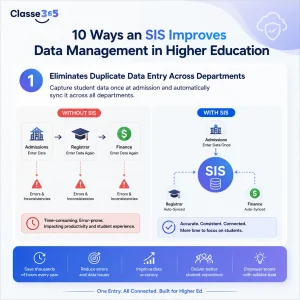
Eliminates Duplicate Data Entry Across Departments
There is a predictable pattern of data entry in the admissions, registrar, and finance divisions in higher education. Admissions enters students once, registrar enters students the second time, and finance enters students the third time. At each step of the process, there is a chance for error with misspelling, wrong IDs, and other issues.
A SIS captures student data at the admissions stage, and automatically populates downstream modules. Time saved from multiple data entry is reallocated to serve students, and for large universities, thousands of hours per year are saved.
-
Enables Real Time Updates Across Every Module
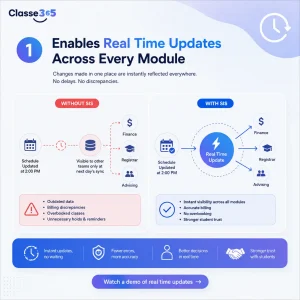
Batch updates and overnight syncs means that different teams may be using different versions of the same data at any given time without them realizing it. A scheduler may update a schedule at 2 pm, and the finance team may see it at the next day’s sync. That means that discrepancies in billing may go undetected for hours.
A grade change, attendance, or a fee adjustment occurs in all related systems almost immediately. This is critical during the registration process where the stale data can result in registering too many students for a particular class or creating unnecessary tuition hold. A finance team using a snapshot that is a few hours old may send an unnecessary payment reminder to a student who already paid and this type of error erodes trust.
Watch a demo of real time updates →
-
Enforces Role Based Access to Protect Student Data
Not every staff member needs to see every field on a student’s record, and an SIS makes sure they don’t. A teaching assistant does not need financial aid data. A finance officer does not need disciplinary notes. Role based access controls restrict what each person sees to what their job actually requires.
Under FERPA, universities must limit access to education records, and the U.S. Department of Education’s Student Privacy Policy Office requires reasonable methods to ensure school officials only access records for legitimate educational interest. Role based access is how modern SIS platforms turn that requirement into something enforceable day to day, rather than a policy that lives in a handbook no one checks.
Check how Classe365 comply with the FERPA →
-
Maintains an Audit Trail for Compliance and Accountability
Every change to a student record needs to be traceable: who made it, when, and what changed. That traceability is what gets tested during compliance audits, grade dispute investigations, and accreditation reviews, and manual records almost never hold up under that kind of scrutiny.
A Student Information System solves this by logging every change to every record automatically, building a full audit trail you can export the moment you need it. So when an accreditor asks who approved a grade change three years ago, the answer is already sitting in the system instead of somewhere in a filing cabinet.
-
Automates Reporting for Accreditation and State Compliance
Higher education institutions live under constant reporting requirements: accreditation reviews, federal IPEDS submissions, state performance metrics, and Title IV compliance, and pulling these together manually across disconnected systems can eat up weeks of staff time every cycle.
In an SIS, templates cover the common regulatory formats, and custom reports pick up the rest. A registrar pulling an IPEDS enrollment report no longer has to export data from three systems and reconcile it by hand, since the report builds itself from already accurate records.
Our complete SIS guide covers this in more depth for multi-level institutions. Read the complete SIS guide →
-
Powers Data Driven Decisions With Built In Analytics
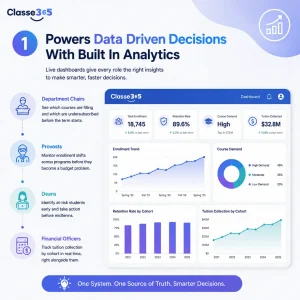
You can find enrollment trends, retention rates, course demand, and financial performance on a live dashboard in a student information software.
An interesting fact to note is that the same data works differently depending on who’s looking at it.
- Department chairs use it to see which courses are filling and which are undersubscribed before the term even starts.
- Provosts pull back further, watching for enrollment shifts across programs before they become a budget problem.
- Deans use the same dashboard to catch at risk students before midterms.
- Financial officers track tuition collection by cohort in real time, right alongside them.
Our post on how to use data analytics to improve student performance covers the specific metrics worth tracking.
-
Integrates With LMS, Finance, and CRM Systems
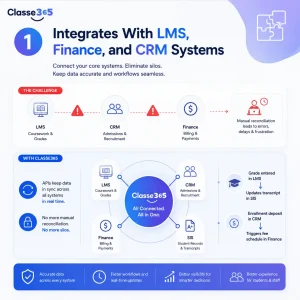
Most universities run a learning management system for coursework, a CRM for admissions, and finance software for billing, none of which naturally integrate to each other. When they don’t, someone has to reconcile the data by hand, and that reconciliation step is where most errors and delays start.
Through API integrations, a grade entered in the LMS updates the transcript in the SIS, and an enrollment deposit in the CRM triggers a fee schedule in finance, without anyone touching either system directly.
Classe365’s platform goes a step further and bundles SIS, LMS, CRM, and finance into one system, which removes the integration problem entirely.
-
Secures Sensitive Data With Cloud Backups and Encryption
Universities store social security numbers, financial aid records, health information, and disciplinary history. If that data is lost or exposed it in a breach, it becomes a serious problem on two fronts at once.
Cloud based SIS platforms use encryption at rest and in transit, automated backups, and regular security audits.
Keeping up with patching, threat monitoring, and audit schedules is a full time job most universities can’t staff for. The payoff shows up when something does go wrong: data restoration after an incident drops from days to hours, and with role based access already enforced, exposure risk from an internal mistake drops right along with it.
-
Supports Data Driven Student Success Interventions
An SIS shines most when it collects student data and provides a pathway to student success outcomes. Advisors have the ability to view students’ academic performance, attendance data, financial holds, and levels of engagement, which allows them to identify and support students that are at risk for dropping out or failing essential courses.
Here, SIS tools develop from basic administrative systems to efficient strategic systems. Schools that combine SIS data with advising interventions have often seen improvements in retention rates. All other schools, that use SIS data for record keeping only, miss most opportunities to realize the optimal potential of their student retention systems.
How to Get the Most From Your Student Information System
- Before using your new system, you should dedicate time to clean your data. Inconsistent data won’t correct itself.
- Train employees on only what they actually need. Training them by modules adds no value.
- Integrations should always be priority so gifts can start flowing from day one.
- Prioritize and automate reporting as this helps with compliance.
- Define data ownership for each type of record.
To see how a unified SIS handles this in practice, book a demo with Classe365 or explore university management features built specifically for higher education.
Frequently Asked Questions
How is a higher education SIS different from a K-12 SIS?
A higher education SIS handles credit hours, transcripts with transfer credits, degree audits, and multi campus enrollment. K-12 systems focus on grade level progression and standardized reporting.
Can an SIS integrate with an existing LMS like Canvas or Moodle?
Yes. Most modern SIS platforms integrate with major LMS tools through APIs. The integration typically covers roster syncing, grade passback, and single sign on. Confirm the specific integration with your vendor before committing.
How long does SIS implementation typically take at a university?
Implementation timelines run three to twelve months depending on institution size, data migration complexity, and how many external systems need to integrate. Universities with clean historical data finish faster than those needing extensive cleanup.
Does an SIS handle FERPA compliance automatically?
No system is automatically FERPA compliant. An SIS provides the tools, role based access, audit trails, consent tracking, but the institution is still responsible for configuring them correctly and training staff on FERPA requirements.
What is the difference between an SIS and Higher Education Software more broadly?
Higher Education Software is a broad category covering any technology used by universities. An SIS is a specific type of higher education software focused on student records and academic operations. Some platforms combine SIS with CRM, LMS, and finance into a full Education Management Software suite.
Can an SIS replace our existing Student Management System?
Most institutions use the terms interchangeably. A Student Management System typically covers the same functions as an SIS: records, enrollment, grading, and reporting. Migrating from an older SMS to a modern SIS is common and follows the same steps as any SIS implementation.
How much does SIS Software cost for a mid size university?
For a mid size university (5,000 to 15,000 students), commercial SIS platforms typically cost between $100,000 and $500,000 over three years including implementation. Cloud based subscription models spread this cost more evenly than traditional on premises deployments.
Is a cloud based SIS Software secure enough for sensitive student data?
Reputable cloud SIS providers offer encryption, role based access, and regular security audits that meet or exceed most in house IT setups. Verify certifications like SOC 2 and FERPA alignment, and ask specifically how sensitive fields are protected before storing data.