




An all-in-one school management software brings your institution’s core operations into a single platform. Admissions, attendance, academics, finance, and communication all live in one place. Data flows between functions automatically. Your staff spends less time on manual work and more time on students.
Key Takeaways
- A complete school management software takes your admissions, classroom teaching, student attendance, and financial records into one system and removes the data silos.
- OECD TALIS 2024 finds that teachers globally spend 3 hours a week on administrative tasks. Robotics cuts that down substantially.
- Integrated fee management automates invoicing and payment processing, reducing billing errors and labor-intensive follow-up.
- Integrated analytics enable early identification of student attendance and academic risk, so interventions can be put in place before kids fall behind.
Why Schools Are Moving to Unified Platforms
Five or six different instruments are used by several institutions. There is one for enrollment. Still another for showing up. An expense spreadsheet. An alternative platform for educational materials. Repeatedly, employees input the crucial data. Reports are time-consuming to create. When anything fails, pinpointing the exact system at fault can be challenging.
This is why schools are switching to all-in-one school management software. The global market was valued at USD 15.18 billion in 2024 and is projected to reach USD 41.46 billion by 2032, growing at a CAGR of 14.76%. Connected systems simply work better than fragmented ones.
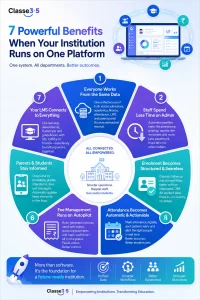
Here are seven benefits your institution gains when you make the switch:
-
Every Department Works From the Same Data
Imagine a medium-sized school with 800 kids. The admissions team tracks inquiries in a CRM program. The finance staff processes fees in a different accounting system. The teachers record attendance in paper registers and then enter it into a spreadsheet. The admissions team knows whether a student drops a course. But the invoice has already been sent out by the finance staff. And the parent portal still has the old schedule.
Nobody made a mistake. The systems just do not talk to each other.
This is what operational silos look like in practice. And they get worse as your institution grows. With 200 students, a manual handoff between admissions and administration is inconvenient. At 2,000 students, it is a full-time problem. Inquiry details get lost between the CRM and the admin team. Fee records fall out of sync with enrolment data. Attendance registers lag behind actual classroom activity. Every additional student adds another record that needs to be consistent across four or five separate systems.
This removes the handoffs altogether with one student information system. The record of an admitted student is instantly fed to attendance, invoicing, the LMS, and the parent portal. The finance team does not need a separate accounting entry. Teachers mark attendance online, and the updates are fast. Both teams are on the same system, so no inquiry slips are sent between the CRM and the admin team.
Every department works from one version of the data. And as your enrolment scales, that single source of truth scales with it.
-
Staff Spend Less Time on Admin
School administrators are increasingly overwhelmed. Globally, full-time lower secondary teachers spend an average of three hours per week on administrative chores, according to the OECD TALIS 2024 research. That number is more than six hours in South Korea. With 4.7 hours, it ranks fourth among OECD member nations. The percentage of educators citing administrative tasks as a major source of stress rose in eighteen school districts from 2018 to 2024.
The most effective school administration software takes this issue head-on by automating time-consuming chores. The following functions are performed: attendance recording, grading, notifying parents, creating reports, and fees and invoicing. Teachers can return to teaching once these are set to run automatically. Instead of chasing data, administrators should start using it.
Khaled B, Administrative Director at one Classe365 institution, put it simply: the platform made “student administrative and academic management streamlined and helps us save time and be more efficient.”
-
Enrolment Becomes a Structured Process
Most institutions see enrolling as a conversation. Student reaches out. Someone checks up. They’re in, or they’re out. No pipeline, no sight, no ability to see where things went wrong.” That averages up to 50 inquiries a year but snaps at 500.
A student asks a question on Friday night. It goes to a common inbox. No one is assigned. Your team has 12 new inquiries by Monday, and no way to know who’s been reached. That student is already registered somewhere. Not because of poor service; There wasn’t a procedure because there was no process.
And this is at every step. The student goes to an open day but does not apply straight away. That interaction then vanishes from your pipeline in a week, and there is no system tracking it. And a program died, waiting for a paper no one chased. An offer is made, but the follow-up never occurs since the counselor goes on leave without a handover record.
This is replaced by a structured, trackable workflow, an all-in-one CRM for schools. Each query is logged automatically, instantly assigned, and acted upon as per schedule. All team members may always see the entire conversation history, so no student is left behind when a counselor is not present.
From Individual Conversations to a Measurable Process
Here is what that looks like operationally inside Classe365’s Pre-Admissions and Enrolment module:
- Form Mapping to SIS: When a student submits an application, their data is transferred directly into the student information system. No manual re-entry. No risk of the same record being entered differently by two people.
- Customized admission workflows: Your institution defines its own pipeline stages. Every counselor follows the same structured process rather than improvising their own approach.
- Lead tracking with status visibility: Every inquiry has a status. Your team can see at any point how many leads are at each stage, where drop-off is highest, and which outreach sequences are converting.
- Automated follow-up sequences: Follow-ups run on a set schedule without anyone having to remember. If a counselor is unavailable, the next person picks up exactly where the conversation left off.
- One-click enrolment: Once a student is ready to enroll, the process is completed in a single step. Their record moves forward automatically to attendance, invoicing, and the LMS.
-
Attendance Tracking Becomes Automatic and Actionable
Manual attendance systems create two problems:
- Accuracy: errors build up in paper registers and spreadsheets over time.
- Speed: By the time an administrator spots a pattern of absences, weeks may have passed.
The stakes are real. According to the U.S. Department of Education, children who are chronically absent for multiple years between preschool and second grade are much less likely to read at grade level by third grade, making them four times more likely not to graduate from high school. And the problem is widespread. A 2024-2025 RAND Corporation survey found that in roughly half of urban school districts, more than 30 percent of students were chronically absent, missing at least 18 days of school.
Closing the gap is a consolidated platform with automated attendance tracking. Teachers digitally take attendance on any device. The technology calculates percentages, detects irregularities, and delivers real-time alerts to parents and administrators. The system can immediately flag children at risk when attendance data and academic records are on the same platform. A counselor can help before a pupil reaches a breaking point, not after.
-
Fee Management Runs Without Manual Input
Billing issues, late payment follow-up, and reconciliation gaps are among the most time-consuming finance tasks in any school. If you use a fee system separate from your student records and accounting software, you will need to manually cross-reference each invoice.
That is altered via integrated charge management. Everything from enrolling in a program to choosing a major to receiving financial aid is interdependent. Data from enrollment triggers the automatic generation of invoices. All transactions are handled digitally. Staff members do nothing to trigger reminders. In addition, the platform provides precise profit-and-loss statements and cash flow statistics that your financial staff can easily access.
For CFOs and finance leads, this is where online school management software shows its clearest return.
-
Parents and Students Stay Informed Without Extra Work From Staff
Parent communication is high-volume and low-efficiency in most schools. A parent calls about their child’s attendance. Another email asking for a fee receipt. A third wants to know their child’s grade from last week. Without a self-service portal, every one of these becomes a task for a staff member.
Students and their parents can access all of their important academic information in one convenient location: timetables, grades, attendance, and fee statements. Through the system, educators can send direct messages to parents. Dates of exams, payments, and absences are automatically handled with email and text message reminders.
Gabriela, an administrator at one institution using Classe365, described the difference since 2021: “Our teachers and students love Classe365 because they can access it through their mobile app, and teachers can communicate via the social platform. It has made a tremendous difference in the entire process, from intake and admission through to student management, LMS, reporting, and payments.”
-
Your LMS Connects to Everything Else
The absence of an integrated learning management system leaves room for improvement. Academic records are not immediately updated when a student completes a course. The school calendar does not include assignment due dates. The transcript is not linked to a teacher’s gradebook.
No additional work is required to establish links between your learning management system and your SIS, CRM, and financial tools when all of these applications are housed on the same platform. Within the same system that alerts parents of their children’s grades, teachers also conduct evaluations, provide comments, and plan lessons. The degree audit module tracks each student’s real-time progress toward graduation.
What to Look for Before You Choose an All-in-One School Management Software
Not all-in-one platforms deliver genuine integration. Some connect separate modules through third-party APIs that break when one component updates. Before you commit, run through this checklist:
| Question to Ask | What Good Looks Like | Red Flag |
| Does data move automatically between functions? | Admissions to SIS, SIS-to-LMS, and fees to accounting are all connected via native integrations. | Data must be manually exported or transferred between modules. |
| Can it scale with your institution? | Student-count-based pricing that grows with your institution without requiring a system rebuild. | Per-feature licensing becomes expensive and difficult to manage as you scale. |
| Does it serve your entire team? | A unified platform built for marketing, admissions, teachers, administrators, and finance teams. | The system only solves one department’s problem while others rely on separate tools. |
| Is the integration genuinely native? | All modules operate on a shared database with real-time synchronization. | Modules depend on third-party APIs that may fail during updates or maintenance. |
| What happens when you need support? | Onboarding, migration assistance, training, and ongoing support are included or transparently priced. | Support is limited to documentation with little or no hands-on assistance. |
Why 6,000+ Institutions Choose Classe365
Running a school is complicated enough without managing five different platforms. Classe365 brings everything together in one place: CRM and enrolment, student information system, learning management, fees and invoicing, finance and accounting, degree audit, alumni management, and AI-powered analytics. All connected. All working from the same data.
It is trusted by institutions across 130 countries, from the Asian Institute of Management and Houston Ballet Academy to the U.S. Air Force and PricewaterhouseCoopers. Alistair S, a System Architect at one institution, described it as “easy to use for our team and our students.” Joaquim B, CEO at Cascais School of Arts and Design, noted that Classe365 had “all the modules the school needs” and praised its intuitive design after using it since 2018.
Pricing starts at $100 per month for the core module. Each add-on module is $75 per month. You pay based on student count, not per user, so your teachers, administrators, and parents are all included at no extra cost. There is no setup fee, and no credit card is required to get started.
Start your 15-day free trial and see how Classe365 works for your institution before you commit to anything.
FAQs
What is all-in-one school management software?
Everything from enrollment to attendance tracking to course delivery to fee administration to general student communication is housed on one platform. With data automatically exchanged across all modules, your teams can be certain that they are working with up-to-date, correct information at all times.
How is it different from using separate tools?
Inaccuracies, delays, and duplicate records might result from using separate instruments that necessitate manual data transfers. Data is automatically transferred using an integrated platform. Attendance, invoices, the learning management system, and the parent portal all instantly reflect a student’s enrollment.
Is cloud-based school management system software secure?
Data encryption while in transit and at rest is a feature of trustworthy systems that adhere to rules like FERPA. Before making a commitment, ensure the vendor has published a data processing agreement and a cloud security policy.
Can small schools benefit from an all-in-one platform?
Yes. Smaller organizations can save money by using modular pricing. They pay for the features that they consume. You can begin with the core module and add tools as your school grows if you have fewer than 100 pupils.
How long does implementation take?
Consider the size of your institution and the data that is already available. You can get help with data migration and virtual onboarding with most platforms. Your team can try out the platform during the free trial period. Find out from the seller right away whether data migration is included in the setup price.
Does school management software work for different institution types?
Yes. Most platforms support K-12 schools, universities, academies, and corporate learning teams, with workflows that adapt to each institution’s structure.
Can parents and students access the system on mobile?
Yes. Most modern platforms offer mobile apps that let parents and students view grades, attendance, and fee statements anytime.
Does school management system software support multiple campuses?
Yes. A cloud-based platform lets you manage multiple campuses from one system, with centralized data and role-based access for each location.