



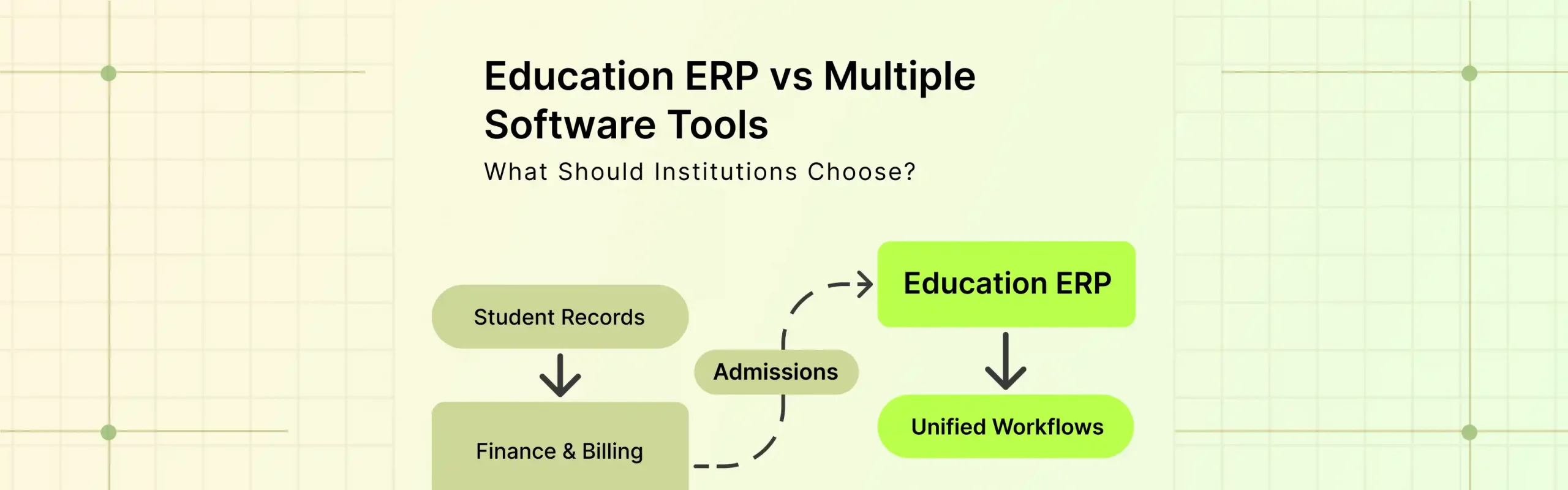
Education ERP software is the better choice when an institution needs one system to manage student data, admissions, fees, academics, and other connected processes. Separate software tools make more sense when a function requires specialized capabilities that do not need to share data with the rest of the institution.
The choice is rarely about replacing every tool with one platform. It is about how well those systems work together. An institution using separate tools for student records, admissions, billing, learning, and communication may eventually spend more time transferring data between systems than managing it.
That creates duplicate records, manual work, inconsistent information, and reporting gaps. An education ERP brings connected processes into a shared system, while a multi-tool approach gives institutions more flexibility to select specialized software for individual functions.
The right choice depends on the institution’s size, processes, integration requirements, and the amount of data shared across departments.
This guide compares the options, maps ERP features to what Classe365 provides, and gives you a five step way to decide.
What is education ERP software?
Education ERP software is a system that runs several institutional functions on one shared database. A typical suite covers admissions, student records, academics, finance and, in many products, HR and procurement.
Instructure’s LearnPlatform report found that US school districts accessed an average of 2,739 distinct edtech tools during the 2023 to 2024 school year. Most of those are classroom apps, not administrative systems. The number still shows how quickly tool counts grow when nobody owns the full picture.
The term gets used loosely, so here is how it relates to the other names you will see:
- Student information system (SIS): stores student records, attendance, grades and schedules. It is one part of an ERP.
- School management software and school management system: vendors use these for products that bundle an SIS with admissions, fees and communication. Some are close to a full ERP. Others are an SIS with extras.
- Education management software: the broadest label. It can mean anything from a single module to a full suite.
- LMS: delivers lessons and assessments. It usually sits beside the ERP, though some platforms include one.
How do ERP, an integrated platform and separate tools compare?
There are three realistic options, not two. Most articles on this topic skip the middle one.
| Category | Separate tools | Integrated education platform like Classe365 | Full ERP suite |
| Data | Each tool holds its own copy | One student record across modules | One database across all functions |
| Typical scope | Whatever you buy | Admissions, SIS, LMS, finance | Everything, including HR and procurement |
| Setup effort | Low per tool, high in total | Moderate | High |
| IT workload | Heavy: you maintain every connection | Light to moderate | Moderate to heavy |
| Flexibility | High: swap one tool at a time | Moderate | Lower: modules are tied together |
| Cost pattern | Many small subscriptions plus integration work | One subscription, priced by modules | Large license plus implementation |
| Best for | Specialized needs, very small teams | Schools and colleges wanting one record without a full ERP project | Large systems with HR, payroll and procurement under one roof |
Which ERP features matter, and what does Classe365 provide?
These are the capabilities institutions usually expect from an education ERP. The right column shows what Classe365 lists on its own site as of October 2026. Where a feature is not listed, the table says so.
| ERP capability | What it should do | What Classe365 provides | Where it sits |
| Admissions and enrolment | Capture leads, run applications, move accepted students into records | Custom online application forms, paperless admissions, lead management, data transfer from pre admission to the SIS | CRM add on |
| Student records | Hold demographics, enrollment status, health data | Student data management and health records | SIS |
| Academic management | Handle courses, credits, schedules | Course and curriculum management, electives and credits, class caps with waitlists, class schedule and timetable | SIS |
| Attendance and grading | Record attendance, grades and transcripts | Attendance tracking, gradebook and transcripts, automated assessment and grading | SIS |
| Family and student access | Give parents and students live access | Dedicated student and parent portal, dashboards for students, parents, teachers and admins | SIS |
| Learning delivery | Deliver and assess coursework | Virtual lectures, quizzes, discussions, blended learning | LMS add on |
| Finance and accounting | Post fees, run the ledger, report | Double entry general ledger, custom chart of accounts, forecasting, P&L, balance sheet, cash flow, inventory, fee and invoicing | Finance and Fee and Invoicing add ons |
| Degree tracking (higher ed) | Track progress against requirements | Degree audit with pathways and bulk assignment | Degree Audit add on |
| Alumni and fundraising | Manage donors and graduates | Alumni management, donation management, donor directory, campaign pages | Alumni and Fund Raising add ons |
| Analytics and AI | Surface patterns in attendance and performance | Attendance, performance and outcome analytics, writing assistance, summary comments on assessments | AI add on (usage charges apply) |
| Integration and access | Connect to other tools and devices | Open APIs, Google Workspace and Office365 sign in, iOS and Android apps | Platform |
| HR and payroll | Manage staff records and pay | HR recruitment forms only. Staff HR and payroll are not listed | Confirm in a demo |
| Procurement | Manage purchasing and vendors | Not listed | Confirm in a demo |
To see how admissions feeds the record, read our guide to admission CRM vs SIS.
What are the benefits of ERP for schools?
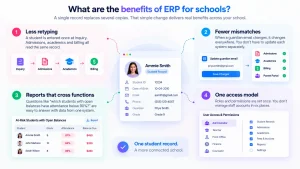
The benefits of ERP come from one source: a single record instead of several copies. In practice that shows up in four places.
- Less retyping. A student is entered once at inquiry. Admissions, academics and billing all read the same record.
- Fewer mismatches. When a guardian email changes, it changes everywhere. In a multi tool setup, someone updates each system and one is usually missed.
- Reports that cross functions. A question such as “which students with open balances have attendance below 90%?” needs finance and attendance data together. With separate tools, it means two exports and a lookup.
- One access model. Roles and permissions are set once. You do not manage staff accounts in six places.
What does each approach cost?
The total cost has four parts: subscriptions, implementation, integration upkeep and staff time spent on retyping and reconciliation.
Here is a simple way to estimate the staff time part (The figures below are illustrative. Replace them with your own.)
| Input | Example value |
| Students enrolled per year | 600 |
| Systems that need the same student data | 3 |
| Minutes to enter one student into one system | 6 |
| Staff cost per hour | $30 |
Entering 600 students into 3 systems at 6 minutes each takes about 180 hours. At $30 an hour, that is roughly $5,400 a year, before corrections and reconciliation. Integrated software does not remove this cost completely, but it cuts it to one entry per student.
For subscriptions, Classe365 publishes its prices. At the 1 to 100 student tier, Core is $100 per month. Add on modules such as CRM, LMS, Fee and Invoicing and Finance are $75 per month each. AI is also $75 per month, with usage charges on top. A school at that tier using Core plus CRM, LMS, Fee and Invoicing and Finance would pay $400 per month. Annual billing saves 10%. Setup, implementation and data migration start from $2 per student for virtual delivery.
Higher tiers cost more, and the pricing page does not show every tier’s price, so check the Classe365 pricing page for your size.
When are multiple software tools the better choice?
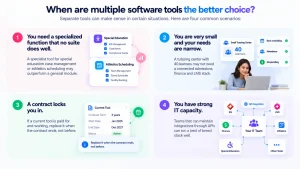
Separate tools are the right call in four situations:
- You need a specialized function that no suite does well. A specialist tool for special education case management or athletics scheduling may outperform a general module.
- You are very small and your needs are narrow. A tutoring center with 40 learners may not need a connected admissions, finance and LMS stack.
- A contract locks you in. If a current tool is paid for and working, replace it when the contract ends, not before.
- You have strong IT capacity. Teams that can maintain integrations through APIs can run a best of breed stack well.
Which option fits K-12 schools and which fits higher education?
The right choice depends on size and on how much your regulators and programs shape your data.
| Institution | What usually matters most | Likely fit |
| Single K-12 school or small group | Admissions to billing without retyping, parent portal, small IT team | Integrated platform |
| District or multi campus K-12 | State reporting, many campuses, HR and payroll in one place | Full ERP, or a district focused SIS with HR alongside |
| College or university | Credits, degree requirements, waitlists, alumni and fundraising | Integrated platform or higher education ERP systems, depending on HR and finance scale |
| Corporate or training academy | Enrollment, course delivery, payments | Integrated platform |
For ERP for schools, the main draw is removing retyping between admissions, the SIS and billing. Classe365’s K-12 solution is built around that flow.
Higher education ERP systems carry extra weight on credits, degree pathways and alumni giving. Classe365 lists degree audit, elective and credit management, class caps with waitlists, alumni management and fundraising, so the higher education solution covers those areas. Large universities that run payroll and procurement in the same system should compare it against full suites.
How do you decide between ERP and multiple tools in five steps?
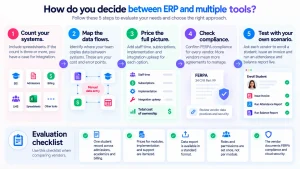
- Count the systems that hold student data. Include spreadsheets. If the count is three or more, you have a case for integration.
- Map the data flows. Draw each point where a person copies data from one system to another. These are your cost and error points.
- Price the full picture. Use the staff time formula above, then add subscriptions, implementation and integration upkeep for each option.
- Check compliance for every vendor. Under FERPA, 34 CFR Part 99 governs how education records are disclosed. The Department of Education’s Privacy Technical Assistance Center publishes guidance on vendors and student data. More vendors means more agreements to manage.
- Test with your own scenario. Ask each vendor to enroll a student, issue an invoice and run an attendance and balance report live.
Evaluation checklist
- The vendor shows one student record across admissions, academics and billing.
- Prices for modules, implementation and support are itemized.
- Data export is available in a standard format.
- Roles and permissions are set once, not per module.
- The vendor documents FERPA compliance and cloud security.
Where does Classe365 fit?
Classe365 is an integrated education management platform. It puts admissions, the SIS, the LMS and finance on one student record, and you switch on only the modules you need. That makes it a fit for schools and colleges that want ERP style integration without a full ERP project.
Here is how it works operationally. An applicant fills in a custom online form. The data transfers from the admissions CRM to the SIS when the student is accepted, so no one retypes it. From there the student appears in class schedules, attendance, the gradebook and the LMS. Fees and invoices attach to the same record.
What it does not claim: Classe365 does not list payroll, staff HR or procurement. If you need those in the same system, plan for a separate tool or a full ERP.
Want to test it on your own workflow?
Start with a 15 day free trial and set up one real scenario, such as enrolling a student and issuing an invoice. You can also estimate savings with the ROI calculator, or talk to the team about your setup.
FAQ
Can we move to an integrated platform one module at a time?
Yes, and it is often safer. Many institutions start with the SIS and admissions, then add finance and the LMS once staff are comfortable. Pick one system as the record of truth from day one so data does not split.
Can we keep our current LMS or payment tool and still use an integrated platform?
Often, yes. Classe365 lists open APIs and Google Workspace and Office365 sign in. Confirm in a demo that your specific tools connect and who maintains each connection.
Who owns our data if we leave an ERP vendor later?
You do. The practical question is how easily you can get it out. Ask for the export formats, the cost of a full export and the timeline before you sign.
Do we need a dedicated IT team to run an education ERP?
Not for a cloud based integrated platform. Full ERP suites usually need more IT support for configuration and upgrades. Ask each vendor who handles updates, backups and user administration.
Does using several vendors create FERPA problems?
It can add paperwork. Each vendor that handles education records needs an agreement that keeps the data under your control. Fewer vendors means fewer agreements to track and audit.
Do AI features work if our data sits in several tools?
They work less well. Attendance and performance analytics need connected data to find patterns. Classe365’s AI module is an add on with usage charges, and it draws on data held in the platform.
Is a full ERP overkill for a school under 100 students?
Usually, yes. A small school rarely needs procurement or payroll in the same system. Classe365’s Core module starts at $100 per month for 1 to 100 students, and you add only what you need.
How do we get staff to use a new system?
Train by role and start with the tasks each group does daily. Classe365 lists free virtual training and paid on site adoption and change management. Ask any vendor what training is included in the quote.