



The build vs buy student information system decision comes around every few years. A college or university looks at its current system and asks a fair question: why don’t we just build our own?
The reasons are real. Off-the-shelf systems can feel rigid. Your institution has its own processes, its own reporting needs and its own idea of what a good student experience looks like. You may already have talented developers on staff. And a custom system promises one thing no vendor can: full control.
Some institutions do build, and some of those projects work. Others discover, two or three years in, that the build was the easy part. This guide is meant to help you make the build vs buy student information system call with clear eyes. It covers when building makes sense, when buying makes sense, and a total cost of ownership (TCO) framework you can fill in with your own numbers.
In this guide
What a student information system actually has to do
It’s easy to underestimate the scope, so start any build vs buy student information system review here. A modern SIS is not one application; it is the record that every other process depends on. (For a broader primer, see our guide to what a student information system is.) At minimum it has to handle:
- Admissions and enquiries: capturing leads, managing applications, offers and acceptances.
- Student records: personal data, enrolment, programme and course history.
- Academic structure: programmes, courses, timetables, classes and staff allocation.
- Assessment and results: grading, report cards or transcripts, progression rules.
- Attendance.
- Learning: course content, assignments, online and blended delivery.
- Fees and finance: invoicing, payments, instalments, refunds, accounting.
- Communication: students, parents, staff, alumni; on web and mobile.
- Reporting and analytics: internal dashboards, regulators, accreditors, boards.
- Security and access: who can see and change what, by role.
Each of these areas has edge cases that only show up in production: a student who transfers mid-term, a fee waiver applied retroactively, a grading scale that changes between cohorts, a parent with two children on different campuses. An established vendor has usually already met many of these cases across its customers. An in-house team meets them one at a time.
When building can make sense
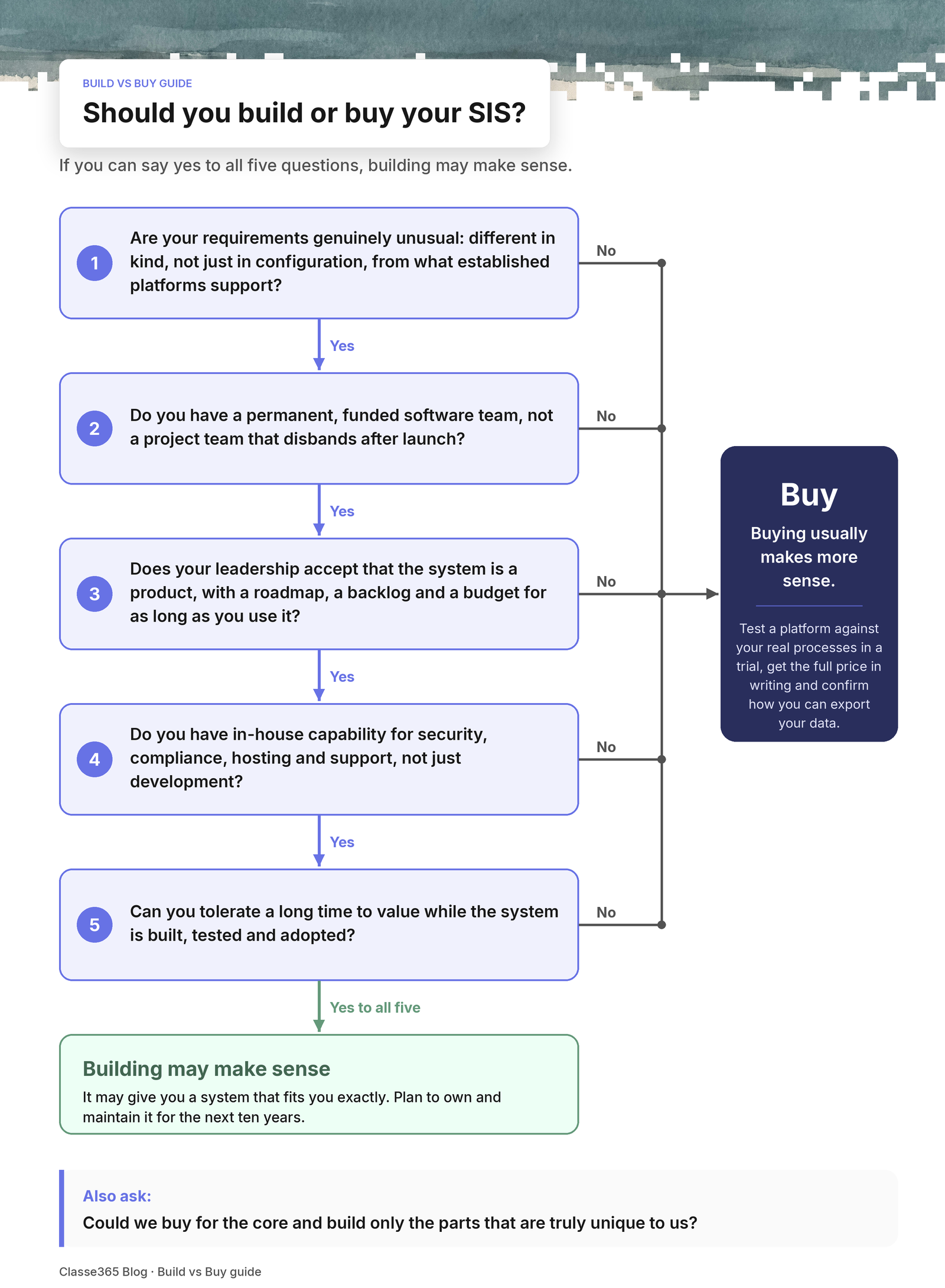
In a build vs buy student information system review, building your own system is a reasonable choice when most of the following are true:
- Your requirements are genuinely unusual: not just different in configuration, but different in kind from what established platforms support.
- You have a permanent, funded software team, not a project team that disbands after launch.
- Your leadership accepts that the system is a product, with a roadmap, a backlog and a budget for as long as you use it.
- You have in-house capability for security, compliance, hosting and support, not just development.
- You can tolerate a long time to value while the system is built, tested and adopted.
If you can say yes to all five, building may give you a system that fits you exactly.
When buying usually makes more sense
For the other half of the build vs buy student information system question, buying is usually the better choice when:
- Your processes are broadly similar to other institutions of your type, even if the details differ.
- You want staff and students on a modern system within months, not years.
- Your IT team is small, or already stretched.
- You want the cost and risk of security updates, new features and infrastructure to sit with a vendor.
- You want to move budget from maintaining software to improving teaching and student services.
The key question in a build vs buy student information system decision is not “can we build it?” Most capable teams can. The question is “do we want to own and maintain it for the next ten years?”
If you do lean towards buying, our article on choosing the right university management system covers the factors to weigh up.
The hidden costs of building
On the build side of a build vs buy student information system comparison, budgets tend to focus on the first release. The larger costs often come later.
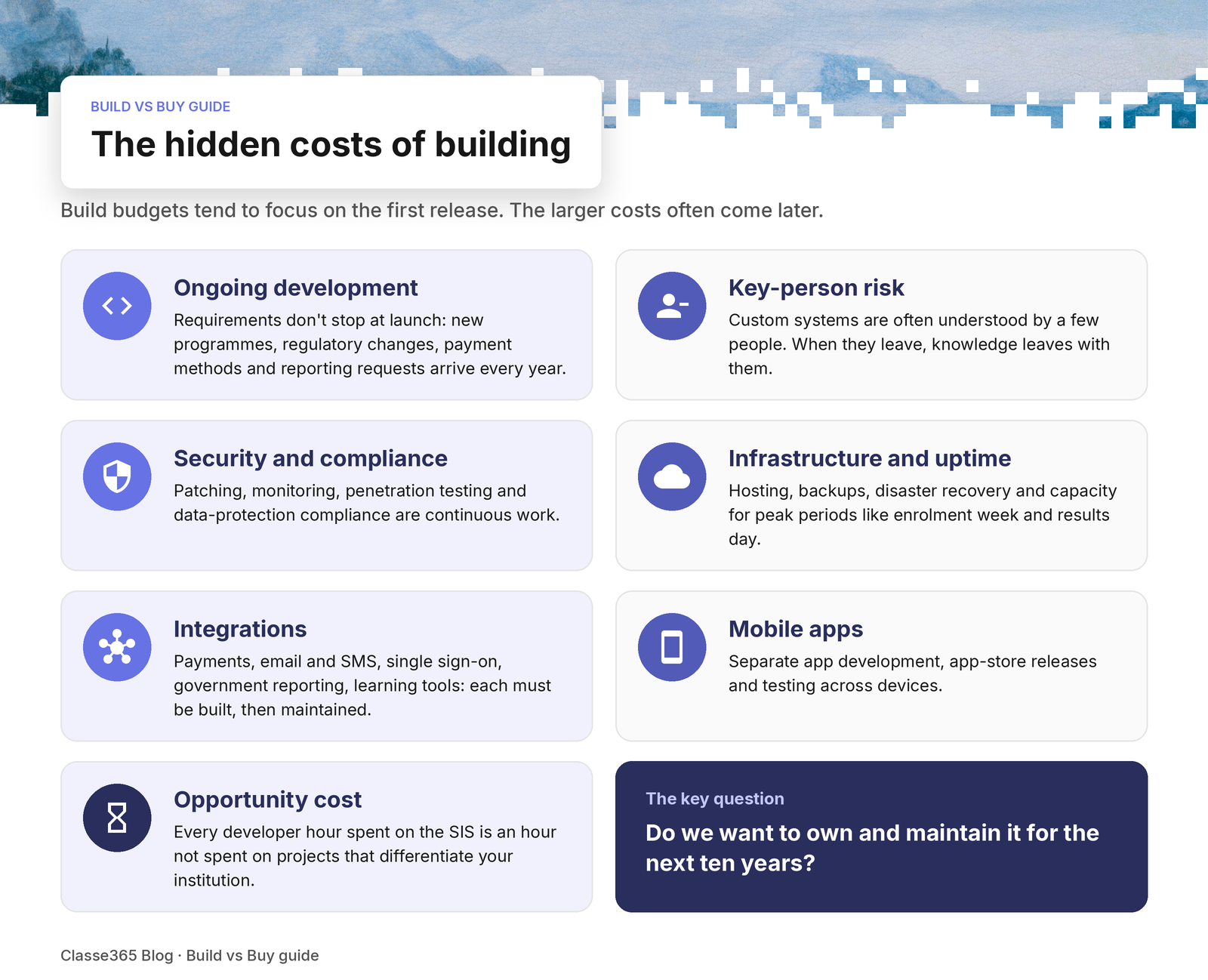
Ongoing development. Requirements don't stop at launch. New programmes, regulatory changes, new payment methods and new reporting requests arrive every year.
Key-person risk. Custom systems are often understood deeply by a small number of people. When they leave, knowledge leaves with them.
Security and compliance. Student data includes personal, financial and sometimes health information. Keeping a custom system patched, monitored, penetration-tested and compliant with data-protection law is continuous work.
Infrastructure and uptime. Hosting, backups, disaster recovery and capacity for peak periods, such as enrolment week and results day, all need planning and paying for.
Integrations. Payment gateways, email and SMS, identity and single sign-on, government reporting, learning tools. Each integration must be built and then maintained as the other side changes.
Mobile apps. Students and parents expect a mobile experience. That usually means separate app development, app-store releases and testing across devices.
Opportunity cost. Every developer hour spent on the SIS is an hour not spent on projects that differentiate your institution.
The hidden costs of buying
Buying is not free of trade-offs, and an honest build vs buy student information system comparison should name them.
Subscription fees recur every year and can rise.
Fit gaps. No platform will match every process. You will change some processes to fit the software, or configure workarounds.
Implementation and migration. Moving data, configuring the system and training staff take time, even with a cloud platform.
Vendor dependence. You rely on the vendor's roadmap, support quality and continued existence. Check data-export options and contract terms before you sign.
Integration with what you keep. If you keep some existing systems, you still need to connect them.
A good buying decision deals with each of these up front: get the full price in writing, test the platform against your real processes during a trial, and confirm how you can export your data.
A 5-year TCO framework for the build vs buy student information system decision
Compare building and buying over the same period. For a build vs buy student information system comparison we suggest five years, because that’s long enough to include maintenance, upgrades and staff turnover. Fill in your own estimates. Where a line doesn’t apply, enter zero, but don’t delete it.
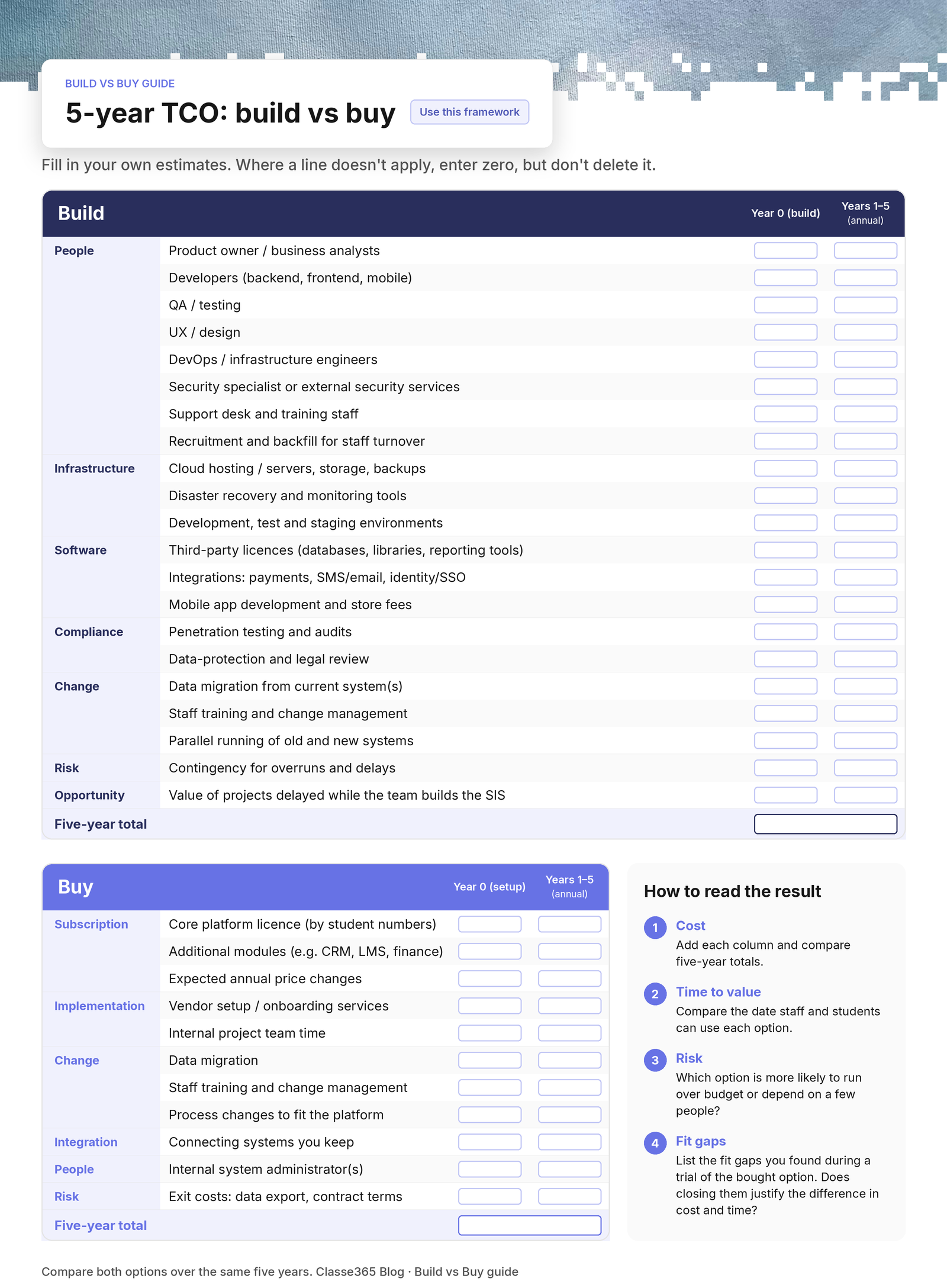
Build: cost lines
| Category | Cost line | Year 0 (build) | Years 1–5 (annual) |
|---|---|---|---|
| People | Product owner / business analysts | ||
| People | Developers (backend, frontend, mobile) | ||
| People | QA / testing | ||
| People | UX / design | ||
| People | DevOps / infrastructure engineers | ||
| People | Security specialist or external security services | ||
| People | Support desk and training staff | ||
| People | Recruitment and backfill for staff turnover | ||
| Infrastructure | Cloud hosting / servers, storage, backups | ||
| Infrastructure | Disaster recovery and monitoring tools | ||
| Infrastructure | Development, test and staging environments | ||
| Software | Third-party licences (databases, libraries, reporting tools) | ||
| Software | Integrations: payments, SMS/email, identity/SSO | ||
| Software | Mobile app development and store fees | ||
| Compliance | Penetration testing and audits | ||
| Compliance | Data-protection and legal review | ||
| Change | Data migration from current system(s) | ||
| Change | Staff training and change management | ||
| Change | Parallel running of old and new systems | ||
| Risk | Contingency for overruns and delays | ||
| Opportunity | Value of projects delayed while the team builds the SIS |
Buy: cost lines
| Category | Cost line | Year 0 (setup) | Years 1–5 (annual) |
|---|---|---|---|
| Subscription | Core platform licence (by student numbers) | ||
| Subscription | Additional modules (e.g. CRM, LMS, finance) | ||
| Subscription | Expected annual price changes | ||
| Implementation | Vendor setup / onboarding services | ||
| Implementation | Internal project team time | ||
| Change | Data migration | ||
| Change | Staff training and change management | ||
| Change | Process changes to fit the platform | ||
| Integration | Connecting systems you keep | ||
| People | Internal system administrator(s) | ||
| Risk | Exit costs: data export, contract terms |
How to read the result
- Add each column and compare the five-year totals for each side of the build vs buy student information system decision.
- Then compare time to value: the date staff and students can use each option.
- Then compare risk: which option is more likely to run over budget or depend on a few people?
- Finally, list the fit gaps you found during a trial of the bought option. Ask whether closing those gaps justifies the difference in cost and time.
Build vs buy student information system: questions to ask before you decide
- What specific requirements can’t an existing platform meet? Have we tested that in a trial, or assumed it?
- Who will maintain the custom system in year five, and what will it cost?
- How will we handle security patches, data-protection changes and audits?
- What happens if two key developers leave?
- How long until students and staff use the new system?
- Could we buy for the core and build only the parts that are truly unique to us?
That last question often settles the build vs buy student information system debate. Many institutions buy a platform for the shared, standard work (records, admissions, fees, learning) and focus in-house effort on a small number of things that are distinctive.
How Classe365 approaches this
Classe365 is a cloud platform that brings the student information system, learning management, admissions CRM, fees and finance together in one system.
It is modular, so you can start with the core SIS and add modules such as CRM, LMS and finance when you need them. To fill in the “buy” column of the framework above, ask us for a quote based on your student numbers and the modules you need.
If you’re weighing up a build vs buy student information system decision, test us against your real requirements first:
Frequently asked questions
Should a university build its own student information system?
Building can work when requirements are genuinely unusual and the institution can fund a permanent software team, with in-house capability for security, compliance, hosting and support. Otherwise, buying a platform is usually the more practical choice. Compare five-year total cost of ownership and time to value before making the build vs buy student information system decision.
What are the hidden costs of building an in-house SIS?
Common hidden costs include ongoing development after launch, security patching and audits, hosting and disaster recovery, integrations with payments and messaging, mobile apps, staff turnover and key-person risk, and the opportunity cost of developer time not spent on other projects.
How do I calculate total cost of ownership for a SIS?
List all costs over five years: licences or development staff, infrastructure, integrations, security and compliance, migration, training, internal administration, and exit costs. Compare the build and buy options on the same lines, then compare time to value and delivery risk.
Can we buy a platform and still build some parts ourselves?
Yes. Many institutions buy a platform for shared, standard work such as records, admissions, fees and learning, and focus in-house development on a small number of things that are distinctive to them.