




A Student Information System (SIS) is more than just software. It’s the backbone of a modern K‑12 school. The increased need for data accuracy, streamlined administrative processes, and instant interaction with parents and students means that a best-practice SIS is a critical foundation for institutions looking to sustain growth.
In this guide, we delve into common-sense, battlefield‑tested best practices for K-12 schools using a student information system. You will discover how you can centralize student information; streamline academic processes and administrative systems, ensure best practice/compliance; and engage everyone successfully with in-context insight to action.
What is SIS in K12 Education?
A Student Information System (SIS) is a web-based programme that schools are using to collect, manage and organise data related to student. In the K–12 sector, this encompasses student demographics, attendance tracking, grades & schedules, academic history, discipline record & school fees and communication logs.
Other school data management platforms are generic in nature, while an SIS is built as a system of record the official source of student information. Within high‑performing K‑12 districts, SIS platforms also tie into other systems like LMS (Learning Management System), reporting tools and communication software to form a comprehensive education-first ecosystem.
The Importance of SIS Best Practices in K-12 Education
Using a Student Information System without best practices establishes a culture of creating duplicate records, confusion, ineffectiveness, and inaccuracies, which is frustrating to the teachers, administrators, students, as well as the parents.
As stated in the “Educause 2025” report regarding educational technology, “Campuses that embrace a structured approach to SIS implementations achieve positive outcomes related to the quality of their data and the efficiency of their administrative operations.”
- Data accuracy improvements of up to 40% within the first year
- Administrative time savings of 30–45% on routine tasks
- Faster reporting cycles for compliance and decision‑making
Such results have implications not only for the operational optimization but also for adherence to regulations such as FERPA in the USA or equivalent regulations concerning the protection of student data in the global markets.
Good SIS practice can help schools achieve a source of truth and minimize discrepancies while maximizing accuracy and efficiency for real-time decision-making.
Explore Classe365’s Compliance Features:
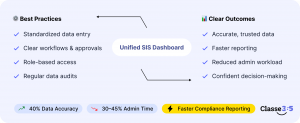
Best Practices for Implementation and Management of Student Information Systems in the K-12 Setting
1. Centralise All Student Data in One Unified System
Centralising student data is foundational for consistency and reliability. Many schools still operate with disparate spreadsheets, isolated databases, and standalone attendance tools. These fragmented systems lead to inconsistent records and lost time.
A centralised SIS helps maintain the complete record of all the scholars regarding their academic, attendance, and communication activities at a centralised location. This centralised and automated SIS reduces the issues of the possibility of the presence of conflicting data and the need for manual comparison and resolution. A centralized SIS allows teachers, administrators, and other staff members access to the same verified data.
In this way, since the data exists in one place, it is possible to create reports more easily and quickly, particularly during auditing processes.
2. Standardise Data Entry and Record Management
Another important best practice is the standardization of the data format throughout the school. Without clear conventions on student number notation, date notation, course naming conventions, or grade scales, the data would become irregular and more difficult to merge.
For instance, if the recording of attendance entries differs from one level of grades to another, the figures reported may be erroneous. This is because data entry into the computer follows a standardized process where, upon report generation, the accurate figures are reported.
The use of standard data entry formats will also facilitate seamless connectivity with third-party tools such as Learning Management System software and state/iOS reporting software.
3. Use Role‑Based Access Controls for Security and Compliance
Both security and student privacy are major concerns in the K-12 school community. A school management solution (SIS) best practice requires the implementation of secure access mechanisms, where users have access based on a set of permissions assigned as per a particular role in the school.
This method promotes privacy law regulation, such as FERPA in the US, which is aimed at preserving student information privacy. Role-based access, for example, secures sensitive information of students and allows administrators to gauge responsibility in terms of access and change by users.
4. Automate Attendance, Scheduling, and Grade Management Workflows
This course will teach students how to automate workflows in terms of attendance, scheduling, and grade management.
Paperwork is still one of the most time‑consuming administrative burdens in K‑12 schools. Handwritten record keeping, especially attendance and grading, can be laborious and ultimately prone to human error. Automation of everyday workflow inside your SIS will reduce the amount of time your staff spends on repetitive jobs and improve the accuracy of your records.
The automated attendance systems record the student’s presence directly from the classroom inputs. Scheduling engines optimize class timetables and automatically adjust in case of changes. Grade management tools allow teachers to quickly enter marks and generate reports without manual calculations.
When attendance, scheduling, and grading are automated, staff can spend more time with instructional support and engaging with students, instead of clerical tasks.
5. Integrate SIS with Learning Management Systems and Other Tools
An SIS on its own is powerful; however, its value multiplies when integrated with other educational tools. The most impactful integration is that with an LMS, which would manage instructional content, assignments, assessments, and course interactions.
SIS-LMS integration will facilitate the smooth flow of data, such as:
- Enrolled students synced to courses
- Grades and assessment results pushed back into SIS
- Attendance data informed by LMS participation
Other integrations with finance, communication tools, or scheduling software make everything run more smoothly. In an integrated business environment, the flow of data is instantaneous and does not have to be copied between different systems.
6. Maintain Data Privacy and Security
Data privacy and security for students simply has to be non-negotiable. This includes encryption, data audits for security, data logs for access documentation, reporting to law.
Despite the existence of differing international guidelines for the privacy of student data, certain regulations like FERPA in the USA or GDPR in the EU, among others, set guidelines for institutions to handle student data.
The implementation of these privacy practices at an SIS level promotes trust and safeguards schools against any legal weaknesses.

SIS Feature Impact on K‑12 School Operations
| SIS Feature | Operational Impact | Outcome |
| Centralised data repository | Eliminates duplication and inconsistencies | Improved reporting accuracy |
| Standardised data entry | Consistent records across departments | Better interoperability |
| Role‑based access | Secure, compliant access | Reduced privacy risk |
| Automated attendance | Reduces manual entry | Higher attendance accuracy |
| Scheduling automation | Optimises class planning | Lower admin workload |
| SIS + LMS integration | Seamless data flow | Enhanced learning continuity |
| Security and encryption | Protects student data | Meets FERPA / local law requirements |
Best Practices for K‑12 SIS Implementation
Implementing a Student Information System is a major institutional initiative. Best practices ensure smoother adoption and minimise post‑implementation issues.
1. Define Clear SIS Requirements Before Vendor Selection
Before evaluating SIS software, document your school’s specific needs. This includes:
- Academic workflows
- Attendance requirements
- Reporting and compliance needs
- Communication expectations
- Integration requirements
Defining requirements early accelerates vendor evaluation and ensures you select a solution that aligns with your school’s operational goals.
2. Involve Teachers and Administrative Staff Early in the Process
Successful SIS deployment depends on user adoption. If staff feel excluded, adoption lags. Involve teachers, office staff, and administrators during requirements gathering, pilot testing, and feedback sessions.
Engaged users are more likely to embrace the SIS and help refine workflows.
3. Prepare, Clean, and Migrate Student Data Carefully
Data migration is often the most challenging aspect of SIS implementation. Legacy systems may contain duplicate records, outdated entries, and inconsistent formats. Clean data before migration by removing duplicates, standardising formats, and validating records with relevant departments.
A thorough data migration strategy eliminates confusion and builds confidence in the new system.
4. Train Staff Thoroughly and Provide Ongoing Support
Training that encompasses all user types including admins and teachers will ensure your SIS is fully utilized. Offer role‑targeted training sessions, walk-throughs, and help desks. Continued support after go‑live takes care of questions and keeps the system from being abandoned.
Training also enables teachers and staff to maximize the full value of sophisticated SIS features rather than relying on just keeping to the basics.
How to Measure SIS Success in K‑12 Schools
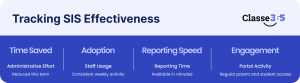
It’s important to monitor the success of your SIS deployment. Define KPIs (key performance indicators) sort of like:
- Less admin time spent on paperwork
- Dependability of record keeping of attendance and grades
- Staff adoption rates
- Reporting turnaround time
- Parent and student portal engagement (Direct notice to parents)
- Schools can use these measures to showcase the return on their SIS investment and opportunities for improvement, both before and after implementing the solution.
Ready to Transform Your School’s Operations?
A K‑12 Student Information System is a strategic investment for schools and districts. Built and run the right way, it takes away manual data work; it improves students’ identifying information, instruction workflows, and communications with staff and parents.
A school operating well and remaining compliant with data security can manage discipline issues, or a lack thereof, when seamlessly integrated SIS platforms connect with their LMS and other tools utilized in education to continue supporting the effective operation of schools. Following the steps in this guide can help K‑12 schools and districts achieve maximum value from the their SIS investments, setting a foundation for making decisions based on data and improving student outcomes.
FAQ
How should you use a SIS (Student Information System)?
Model procedures involve collecting student data, normalizing methods of data input, securing availability with role‑based access, converting workflows to automated ones, LMS integration and ensuring that the privacy of the data is preserved.
On what basis does a K‑12 school decide to select an SIS?
Schools should establish needs and criteria, assess vendors for scalability, security, integration and support – and engage end users in the decision-making process.
How long does it take to implement an SIS?
Implementation Schedules And Costs Typical time frames for implementation of an SIS vary between 4-9 months, depending on complexity of data migration and the amount of training and integrations necessary.
Will my SIS interface with other school software?
Yes. A contemporary SIS is also configurable with Learning Management Systems, financial and accounting applications, scheduling solutions, communication systems — the list could go on!
Does an SIS positively impact students?
I mean, an SIS is not a learning experience!” agreed another participant, Although it is true that an SIS does not deliver instruction or resources, it can facilitate decision‑making; minimize administrative errors and changes of data; enable real‑time interaction for faculty members and students; all of which contribute indirectly to better experiences and outcomes for students.
Do you need an SIS for K‑12 compliance?
Not a legal requirement, but an SIS is useful for ensuring accurate reporting to remain FERPA compliant and comply with other local student data protection laws.