



PowerSchool and Alma both provide core K-12 SIS capabilities, but they are designed around different priorities. PowerSchool offers broader administrative and district-level functionality, while Alma emphasizes usability, academic workflows, and support.
The bigger question is whether either platform fits your institution’s full requirements. If you need higher education capabilities, integrated admissions and LMS workflows, or transparent pricing, Classe365 offers another option to evaluate.
TL;DR
- PowerSchool is the incumbent with the deepest feature set. It covers HR, finance, applicant tracking, and state reporting at district scale. Reviewers rate it 4.3/5 on Capterra but flag a convoluted interface and slow support.
- Alma scored higher on usability and support. Rated 4.6/5 across 455 Capterra reviews with a 90% recommendation rate, and G2 reviewers find it easier to use, set up, and administer than PowerSchool. It is K-12 only.
- But, neither publishes pricing. Both require a sales call for a quote. Classe365 publishes its pricing openly, and serves K-12 and higher education on the same platform. It offers a base subscription with additional modules available based on institutional requirements.
PowerSchool vs Alma: Quick comparison
| Feature | PowerSchool | Alma |
| Best for | Large districts, state agencies, HR-heavy operations | K-12 schools and districts prioritising usability |
| Founded | 2000 | 2012 |
| Capterra rating | 4.3/5 (181 reviews) | 4.6/5 (455 reviews) |
| Recommendation rate | 80% | 90% |
| Ease of use | 4.1/5 | 4.5/5 |
| Customer support | 4.0/5 | 4.7/5 |
| Pricing model | Per feature, not published | Per user, not published |
| Built-in LMS | Learning management module | Built-in LMS |
| AI features | Embedded across the platform | BeaconAI analytics layer |
| Languages | Varies by regional edition (e.g., Arabic RTL in MEA) | 47 languages |
Still deciding between PowerSchool and Alma? See how Classe365 compares for your institution.
What is PowerSchool?
PowerSchool is a cloud-based K-12 platform founded in 2000 and headquartered in Folsom, California. It describes itself as the leading provider of cloud-based software for K-12 education in North America, covering school operations, educator support, and student engagement from the office to the classroom to the home.
Its scope goes well beyond a typical student information system. Alongside attendance, grading, and enrollment, PowerSchool includes HR management, compensation management, applicant tracking, financial management, performance management, and training management. It is closer to an education ERP than a pure SIS.
Who is PowerSchool best for?
PowerSchool targets K-12 school districts, private and charter schools, education service agencies and consortia, and state education agencies across North America. It suits organisations that need one vendor covering student records, staff HR, payroll-adjacent functions, and state compliance reporting at the same time.
It may be a fit for schools prioritising state reporting at small and midsize scale. It is a weaker fit for small schools without technical support, which is where most of its negative reviews originate.
How PowerSchool works
PowerSchool operates as a modular suite. You license the modules your district needs- student information, HR, finance, learning management, analytics- and they share a common data layer.
Deployment is flexible: cloud, SaaS, and web-based, with Windows on-premises available, plus Android, iPhone, and iPad apps. That on-premise option matters for districts with data residency requirements that rule out cloud-only vendors.
What is Alma SIS?

Alma is a K-12 student information system founded in 2012 by Alma Technologies. It supports education organisations serving more than 6 million students across 44 states and 61 countries.
Alma positions itself as a connected education platform rather than a standalone SIS, bringing together student information, teaching and learning, enrollment, communications, payments, analytics, AI, and family engagement in one interface.
Who is Alma SIS best for?
Alma serves individual schools and districts of every size, plus state agencies and departments of education. It has dedicated offerings for large districts over 25,000 students, midsize districts between 3,000 and 25,000, small districts under 3,000, charter schools, independent schools, international schools, and school networks.
How Alma SIS works
Alma is cloud-native and designed so administrators can configure grading, reports, and student records without relying heavily on technical staff. Its Spreadsheet Data Editor also supports bulk record updates.
PowerSchool vs Alma SIS: Features compared
Both platforms cover the SIS fundamentals. PowerSchool goes wider. Alma has no equivalent for HR management, compensation management, applicant tracking, or performance management. If you want one vendor for both student data and staff data, PowerSchool is the only option of the two.
Alma goes deeper on the academic side. Its feature list includes a built-in LMS, curriculum management, competency and proficiency grading, discipline management, incident tracking, transcripts, and waitlist management. It also lists over 125 integrations against PowerSchool’s 75+, including Canvas, Blackboard, ClassLink, and Google Classroom.
PowerSchool supports over 120 languages through MyPowerHub, its family and student engagement hub, with the same 120-language figure also listed for its eSchoolPlus SIS product. Alma supports 47 languages across 61 countries. Its multilingual support may be particularly relevant for international schools.
PowerSchool offers broader administrative functionality, while Alma emphasizes academic workflows, usability, and multilingual support.
Which is more affordable?
Neither company publishes pricing.
PowerSchool uses a per-feature pricing model. Alma uses a per-user model and directs prospects to a customised product tour. G2 lists no entry-level pricing and no free trial information for either platform. To get a number from either, you book a call.
G2 reviewers report that PowerSchool is more expensive than Alma and slower to reach ROI. Alma’s Capterra value-for-money score is 4.5/5 against PowerSchool’s 4.1/5.
Based on the cited reviewer ratings, Alma receives a higher value-for-money score, but neither platform publishes an entry price.
Pricing comparison table: PowerSchool vs Alma SIS Vs Classe 365
| PowerSchool Pricing | Alma SIS Pricing | Classe365 Pricing | |
| Pricing published | No | No | Yes |
| Pricing model | Per feature | Per user | Per student |
| Entry price | Quote required | Quote required | From approximately $100/month for up to 100 students |
| Free trial | Not listed | Not listed | Yes |
| Modules included | Licensed separately | Package-based | Modules included: Base subscription; additional modules available |
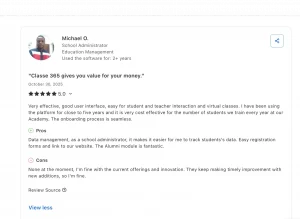
Classe365 review on Capterra
Which has better AI automation capabilities?
Alma’s AI is BeaconAI, built directly into the platform. It converts existing student data into views across attendance, enrollment, grading, family engagement, and behaviour, surfacing patterns before they become problems. The positioning is predictive: see what is coming, not just what happened. It ships as part of Alma rather than as a separate purchase.
PowerSchool markets AI capabilities across its product suite, but its public materials stay largely conceptual, using broad language about powering the education ecosystem with integrated technology without naming specific AI-driven features the way Alma does with BeaconAI. Alma’s AI is a named, dedicated layer built directly into the platform, turning existing student data into predictive views across attendance, enrollment, grading, and behaviour before problems surface.
Verdict: Alma has a more clearly documented AI implementation through BeaconAI, while PowerSchool’s public materials provide less detail on specific AI-driven features.
Popular use cases for PowerSchool vs Alma
Best use cases for PowerSchool:
- District-wide HR and student data on one vendor: managing staff records, applicant tracking, and compensation alongside student information
- State agency reporting: consortia and education service agencies handling compliance across multiple districts
- On-premises deployment: districts with policies preventing cloud-only systems
Best use cases for Alma:
- Competency and proficiency-based grading: customizable grading scales and report cards without developer involvement
- International schools: 47 languages across 61 countries
- Switching from a legacy SIS: migration support is the most consistently praised part of the onboarding experience
Common themes in customer reviews from Capterra
PowerSchool: Reviewers highlight broad functionality, search, and administrative capabilities, while some report challenges with navigation and support.
Alma: Reviewers frequently mention usability, grading customization, bulk editing, and support, while some note setup and configuration challenges.
Switching from PowerSchool or Alma to Classe365
Switching your SIS doesn’t have to mean rebuilding your workflows from scratch. Before migrating from PowerSchool or Alma, evaluate how student records, admissions data, academic information, LMS workflows, and integrations will transfer.
Classe365 supports bulk data imports and connects admissions directly with student records, reducing manual re-entry during enrollment. It also combines SIS and LMS capabilities on one platform, helping institutions keep student and academic data connected.
Meet Classe365: the all-in-one alternative to PowerSchool and Alma SIS for schools and universities
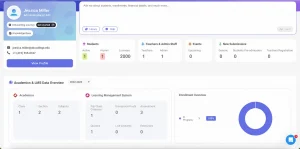
Classe365’s interface
PowerSchool and Alma are both K-12 platforms. If your institution includes higher education or you prefer publicly available pricing, Classe365 provides another option to evaluate.
Classe365 runs the full learner journey, from admissions to alumni, on one platform: CRM and admissions, student information system, learning management system, fees and invoicing, e-commerce, fundraising, degree audit, and alumni engagement. It serves 6,000+ institutions across 130 countries and holds 4.8/5 across 165 Capterra reviews.
-
One platform, modules you switch on
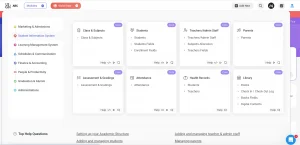
Classe365’s modules map to the learner journey rather than to separate product lines. A K-12 school switches off degree audit. A university switches off fundraising. Everything else stays connected: a student enrolled through the CRM appears in the SIS with their data intact, and their grades flow to the transcript automatically.
-
Paperless admissions that feed the SIS directly
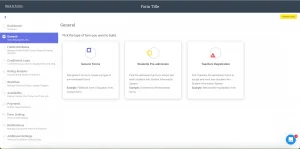
Admissions runs on a drag-and-drop form builder with three form types: generic forms, student pre-admission forms, and teacher registration forms. The critical step is field mapping, where each form field links to a student profile field in the student information system. When an applicant is enrolled, their data populates their SIS record with no re-keying. Submissions move through a Kanban board with custom workflow stages, automated notifications, linked forms, and task assignment to specific staff members.
-
AI that evaluates, not just reports
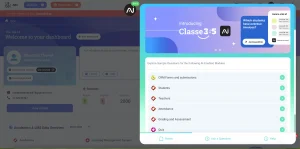
Classe365 runs AI in two places. A conversational search bar answers plain-language questions about institutional data, such as how many students enrolled in the last 30 days, and exports the answer. More significantly, AI assessment evaluation analyses every score, quiz, homework submission, and teacher comment against a subject’s learning objectives, then generates a written evaluation per student. Teachers add their own comments and refine the wording. Work that normally consumes hours of end-of-term reporting is completed in a few clicks.
-
A full LMS, not just a records system
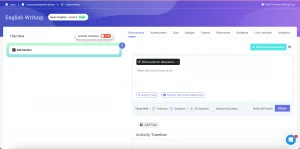
The learning management system auto-populates subjects from your academic structure, so you don’t need a second setup. Each subject gets flip-class content (sections, lectures, video, audio, SCORM, LTI), discussions, assessments, and quizzes. Activity tracking enforces minimum watch times and reports per-student completion percentages. Analytics show top and bottom performers, bell curve distributions, and per-assessment views that reveal whether a concept needs reteaching. Live lectures integrate with Zoom, Teams, and Google Meet.
-
Pricing and 24/7 support
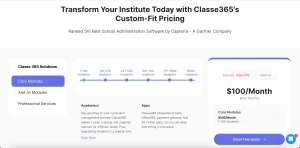
Classe365 publishes its pricing. It starts at roughly $100 per month for up to 100 students and scales by student count, with a free trial available. Support runs 24/7 through a globally distributed team, what Classe365 calls follow-the-sun support, meaning someone is available regardless of your time zone. Payment collection supports around 130 gateways, and the white-label module lets you replace Classe365 branding entirely with your own domain and colours.
Classe365 uses a modular pricing structure. The base subscription starts at $100 per month, while institutions can add modules such as LMS, CRM, or Degree Audit based on their requirements.
Classe365 add-on modules: pricing and features
| Add-on module | What it does | Typical price |
| CRM – Enrol & Forms | Manages leads, admissions forms, and enrollment workflows; reduces paperwork for staff and applicants | ~$75/month |
| LMS | Delivers online courses, quizzes, discussions, and flipped-class content alongside the SIS | ~$75/month |
| Fees & Invoicing | Automates fee categories, invoicing, and payment processing to reduce billing errors | ~$75/month |
| E-Commerce | Sells merchandise, course registrations, and school store items with inventory tracking | ~$75/month |
| Fund Raising | Runs donation campaigns with real-time tracking and donor reporting | ~$75/month |
| Degree Audit | Tracks academic progress against degree requirements for higher education institutions | ~$75/month |
| Alumni | Maintains an organised alumni directory and re-engagement tools after graduation | ~$75/month |
| White Label | Replaces Classe365 branding with the institution’s own logo, domain, and colour scheme | ~$75/month |
| Task Module | Assigns and tracks administrative tasks across admin and teaching staff | ~$75/month |
See these workflows in your own environment.
Finish Your Classe365 Setup 15-Minute Help Call
PowerSchool vs Alma vs Classe365: which one should you choose?
When to choose PowerSchool
Consider PowerSchool if you run a large district or state agency and need student data, HR, applicant tracking, and finance under one vendor. It is also the only one of the three offering on-premises deployment. You should have dedicated IT staff. Schools with limited technical support should account for its configuration and implementation requirements.
When to choose Alma
Consider Alma if you are a K-12 school or district that prioritises ease of use and responsive support over module breadth. It may be a fit for state reporting at small and midsize scale, for competency-based grading, and for international schools needing multilingual support. Budget setup time at the start of your first year.
When to choose Classe365
Consider Classe365 if you need one platform covering K-12 or higher education, including degree audit and alumni management that neither PowerSchool nor Alma offers. It is the right fit if you want published pricing rather than a quote process, AI capabilities that include institutional data queries and assessment evaluation.
You can book a demo and ask them to run your grading model, or compare pricing against your current contract. Our guide to must-have LMS features for higher education covers the academic side in more depth.
FAQs
Is Alma better than PowerSchool?
Alma rates higher on Capterra (4.6 vs 4.3), and G2 reviewers find it easier to use and support. PowerSchool covers more ground, including HR and finance modules Alma lacks.
How much does PowerSchool cost?
PowerSchool does not publish pricing. It uses a per-feature model requiring a sales conversation. G2 reviewers report it costs more than Alma.
Does Alma work for universities?
No. Alma is built for K-12 schools, districts, and state agencies. For higher education with degree audit and transcript requirements, you need a platform built for that.
Can PowerSchool be hosted on-premises?
Yes. PowerSchool offers Windows on-premise deployment alongside cloud and SaaS, which is unusual in this category and matters for districts with data residency policies.
Which has better customer support?
Based on the Capterra ratings cited in this comparison, Alma has the higher customer-support score.
Does either platform include a built-in LMS?
Both list learning management. Alma’s Capterra profile explicitly lists a built-in LMS. PowerSchool includes learning management within its broader module suite.
How long does migration take?
Both require planning. Alma reviewers describe migration support positively. Classe365 has migrated institutions with 8,000 students in roughly two weeks using bulk import templates.
Ready to compare SIS options for your institution?
See how Classe365 handles admissions, student records, LMS, assessments, fees, and more in one platform.
Do these platforms support languages other than English?
PowerSchool’s language support varies by regional edition, its Middle East & Africa edition includes Arabic in right-to-left format. Alma publishes one global figure: 47 languages across 61 countries. Classe365 offers multilingual settings letting each user pick their language.