



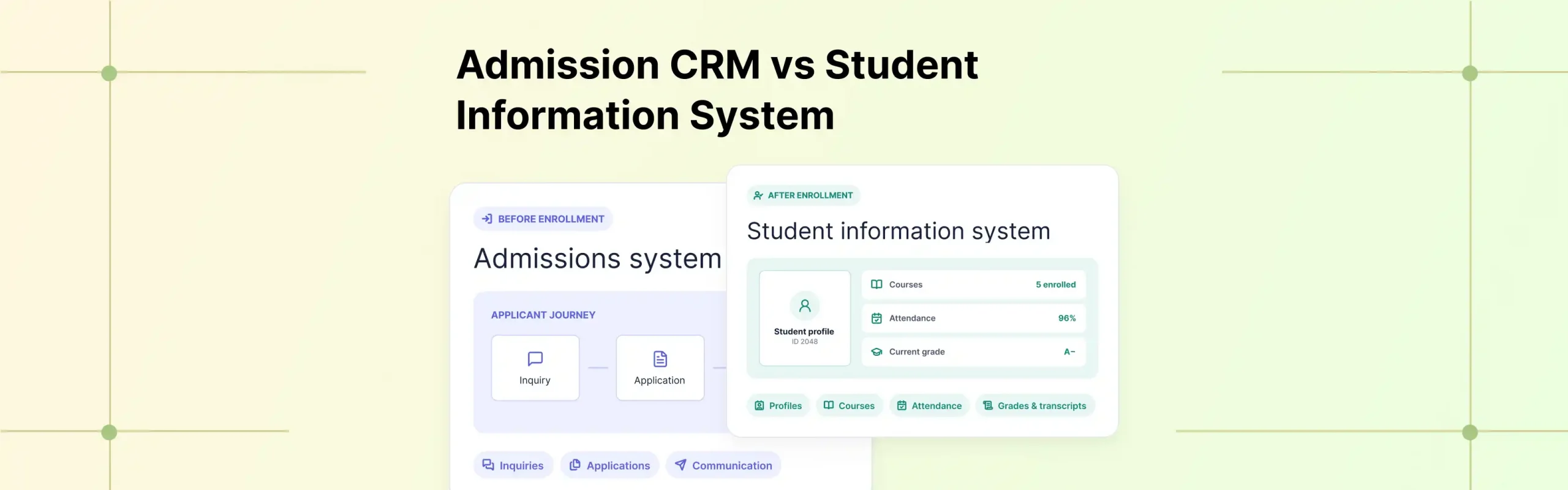
If you’ve been comparing student management tools, you’ve probably noticed that “admission CRM” and “student information system” keep showing up as separate product categories. They sound like they do the same thing. They don’t.
An admission CRM handles everything before a student enrolls: inquiries, applications, communication, and the decision to admit. A student information system takes over after enrollment: student profiles, courses, attendance, grades, and transcripts.
Think of it this way. The CRM asks: “Where is this applicant in the admissions journey?” The SIS asks: “What do we need to know about this enrolled student?” Two different questions, two different systems, one student caught in the middle.
That middle part is where things get interesting (and often messy). The higher education CRM software market hit roughly $3.77 billion in 2026, growing above 15 percent annually, according to Business Research Insights. About 34 percent of new CRM deployments now include integration with a learning management system or student records platform.
This guide breaks down what each tool actually does, where they overlap, where they don’t, and why a growing number of institutions are looking for a single platform that handles both.
TL;DR
- Admission CRM: Manages prospective students through lead capture, communication, applications, and enrollment workflows.
- Student information system (SIS): Manages enrolled students, including academic records, attendance, grades, and transcripts.
- The gap: When these systems are separate, applicant data has to move from one to the other. Classe365 connects the CRM and SIS so application data flows into the student record through form mapping, without re-keying.
Admission CRM vs SIS: quick comparison
| Parameter | Admission CRM | Student Information System |
| Primary purpose | Manage prospective students and applications | Manage enrolled student records |
| Primary users | Admissions, recruitment, marketing | Registrars, academic and administrative teams |
| Data focus | Leads, inquiries, applications | Records, grades, attendance, transcripts |
| Data scope | Pre-enrollment | Post-enrollment |
| Data ownership | Prospect and application data | Official student record |
| Communication | Lead nurturing and applicant outreach | Student, family, and institutional messaging |
| Application management | Core capability | Usually limited |
| Academic records | Limited | Core capability |
| Enrollment | Application and enrollment workflow | Active student record |
| Reporting | Funnel and admissions performance | Academic, operational, and compliance |
| Key question | “Where is this applicant in the journey?” | “What do we know about this enrolled student?” |
What is an admission CRM?
An education CRM is software built to manage prospective students from first contact through enrollment. It handles the recruitment funnel: capturing inquiries, nurturing leads, collecting applications, and moving applicants through a decision process.
The workflow looks like this:
Lead → Inquiry → Application → Review → Offer or Waitlist → Enrollment
Everything the CRM does revolves around moving a prospect through that journey. It tracks where each applicant sits, automates follow-up communication, and gives the admissions team visibility into the pipeline. If you manage a large volume of inquiries, run campaigns across multiple channels, or need your team to see lead-stage activity at a glance, this is the tool that handles it.
Who is an admission CRM best for?
Institutions that treat recruitment as a growth channel. Universities and colleges with competitive intake processes rely on one heavily. If your admissions workflow is simple and most students come through established channels, you might not need a dedicated CRM at all. But if you’re running marketing campaigns, tracking lead sources, and managing hundreds of applications through a structured pipeline, a CRM for educational institutions earns its place quickly.
How an admission CRM works
- The CRM captures a prospect’s details through a form, an inquiry, or a campaign.
- From there, it assigns the applicant to a pipeline stage and triggers communication: application reminders, status updates, follow-ups.
- Admissions staff move applications through the stages, review documents, and record decisions.
- Depending on the platform, it can support decision workflows like offers, waitlists, and status changes.
What is a student information system?
A student information system is the system of record for enrolled students. It holds everything the institution needs to know about a student for the entire time they’re enrolled: their profile, courses, attendance, grades, report cards, and transcripts.
The workflow looks like this:
Enrolled student → Profile → Courses → Attendance → Grades → Transcript
Where the CRM tracks a prospect through a funnel, the SIS tracks a student through their academic life. Registrars, teachers, and administrative staff work inside it daily. It’s also where compliance and regulatory reporting happens, which means the data it holds carries institutional accountability that CRM data typically doesn’t.
Who is a student information system best for?
Every institution that enrolls students needs one in some form. It’s the backbone. A student database management system becomes the single source of truth for student records, which is why it carries reporting obligations that a CRM never touches.
How a student information system works
- Once a student is enrolled, the SIS creates their record.
- From there, it tracks academic activity: which courses they’re taking, their attendance, their grades across assessments, and eventually their transcript.
- It also handles communication with students and families, manages report cards, and produces the operational and compliance reporting institutions are required to maintain.
Admission CRM vs SIS: features compared
Both tools manage students, but at different stages and for different reasons. Here’s how the differences actually play out across the areas that matter.
-
Lead and inquiry management
The CRM captures inquiries, tracks lead sources, and keeps a running record of every prospect who’s shown interest. An SIS starts working once a student is enrolled. If you need to track where prospective students come from and how they move through your pipeline, that’s a CRM function.
-
Application and form building
The CRM handles applications as a core function: building forms, collecting submissions, attaching documents. Most standalone SIS platforms offer limited application handling because the application belongs to the pre-enrollment stage the CRM owns. The SIS receives the outcome of the application process; it doesn’t run it.
-
Communication and nurture
The CRM communicates with people who aren’t students yet: nurture sequences, application reminders, status updates. The SIS communicates too, but with a different audience (enrolled students, families, stakeholders) about different things (academic matters, schedules, fees). The CRM communicates to convert. The SIS communicates to inform.
-
Application decision workflows
The CRM moves applicants through stages: pending, interview, offer, waitlist, denied, enrolled. This is where admissions decisions get made and recorded. An SIS doesn’t manage this decision process. It receives the result. Workflow management before enrollment is CRM. Record management after enrollment is SIS.
-
Data scope
The CRM covers pre-enrollment: leads, inquiries, applications. The SIS covers post-enrollment: the active student record and everything attached to it. One covers the funnel. The other covers the record.
-
Data ownership
The CRM owns prospect and application data, information about people who may or may not become students. The SIS owns the official student record, the data the institution is accountable for. This matters for compliance, because the two data sets carry different obligations. The SIS is the system of record. The CRM is the system of recruitment.
-
Enrollment workflow
The CRM manages the steps that get a prospect to the point of enrolling. The SIS manages what happens after: the active student record, course enrollment, academic activity. Enrollment is the exact point where one system hands off to the other. How clean that handoff is depends entirely on whether the two systems are connected.
-
Reporting focus
The CRM reports on the funnel: inquiry volume, conversion rates, admissions performance. The SIS reports on academics, operations, and compliance: grades, attendance, regulatory reporting.
Do you need an admission CRM, an SIS, or both?
You may primarily need an SIS if:
- Your admissions workflows are relatively simple.
- Most students come through established channels.
- You don’t run lead-nurturing campaigns.
- Academic administration is the primary system requirement.
A dedicated admission CRM becomes more relevant when:
- You manage a large volume of inquiries.
- Recruitment is an active growth channel.
- You run campaigns across multiple channels.
- Your admissions team needs lead-stage visibility.
- You need automated applicant communication.
You may want an integrated platform when:
- Admissions and academic teams need the same student data.
- Application data needs to become the student record without manual transfer.
- You want to reduce duplicate data entry.
- You want admissions and academic workflows connected.
The real challenge: when the CRM and SIS don’t connect
Duplicate data entry. The applicant already typed their name, contact details, and documents into the application form. If the systems don’t connect, someone types that same information again to create the student record.
Data inconsistencies. A phone number gets corrected in the CRM after enrollment. The SIS still has the old one. Nobody notices until a parent doesn’t receive a notification.
Lost context. The academic team gets the student record but not the application history. The notes, the communication trail, the reason the student was admitted, none of it necessarily travels with the record.
Delayed enrollment. The student can’t fully enter downstream workflows (course registration, attendance, grading) until their record is created correctly in the SIS. If the handoff is slow or error-prone, everything downstream waits.
How Classe365 connects admissions and student records
Classe365 runs the admission CRM and the student information system as modules of one platform. Because they share the same data layer, an applicant’s information doesn’t have to move between systems. It stays in place and becomes the student record.
Here’s how that actually works, step by step, based on how the platform runs in practice.
Capture applicant data once
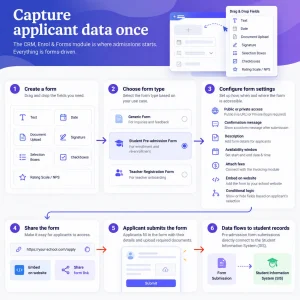
The CRM, Enrol & Forms module is where admissions starts. Everything is forms-driven. You create the form by dragging and dropping fields: text, date, document upload, signature, selection boxes, checkboxes, and even rating scales or net promoter scores if you’re running evaluations.
There are three form types: a generic form for inquiries and feedback, a student pre-admission form for enrollment and re-enrollment, and a teacher registration form. The pre-admission form is the one that matters here, because it’s the form type that connects directly to the student information system.
You set the form to be public (accessible via URL) or private (requiring a login). You add a confirmation message, description, and availability window. You can attach fees from the invoicing module, embed the form on your website, and add conditional logic so fields appear or hide based on what the applicant selects.
As a student lifecycle management software, Classe365 treats that first form submission as the start of the record.
Map application data directly to the SIS
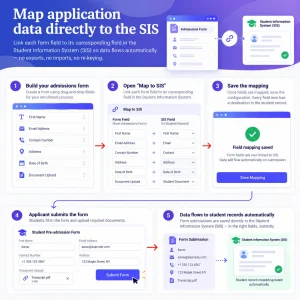
While building the admissions form, you open the “Map to SIS” section. Each form field gets linked to its corresponding field in the student information system. First name maps to first name. Contact maps to contact. Address maps to address. Every field knows exactly where it belongs in the student record before anyone fills out the form.
Because the mapping is set up in advance, there’s no export step, no import step, and no re-keying. The data has a defined destination the moment it’s submitted.
Move the applicant through the enrollment workflow
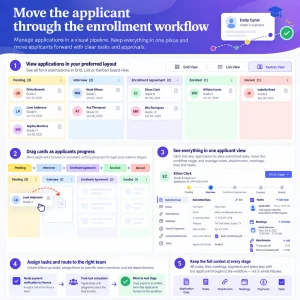
Once applications come in, you manage them in a pipeline. Submissions appear in grid, list, or Kanban board view, where each application card sits in its workflow stage. You build the stages yourself: pending, interview, enrollment agreement, denied, enrolled, or whatever your process requires. Color-code each stage. Drag cards forward as applicants progress.
Click into any application and you get everything in one place: the submitted data on the left, the workflow stage at the top (movable forward or backward), and on the right side, notes, attachments, scheduled meetings, linked submissions from prior years, fees paid as part of the application, and a task module where you can assign follow-ups to specific team members.
You can route a payment verification to the finance team, and the application only progresses once the task is done. The context stays with the applicant through every stage rather than living in someone’s email inbox.
Turn the applicant into an active student record
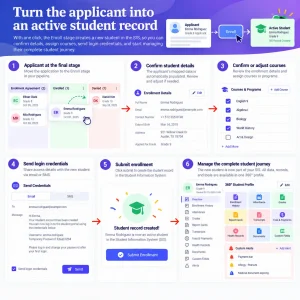
Enroll is the final, fixed stage. Click it, and the applicant’s mapped data populates their new SIS profile automatically. Confirm or adjust their courses, send login credentials by email or SMS, and submit.
At that moment, the applicant becomes an active student record in the student management system. Everything the SIS manages now applies to them: a 360-degree profile with enrollment history going back to day one, attendance, grades, report cards, transcripts, fees, health records, and document storage. Custom fields you’ve built (drag-and-drop, with visibility rules for students, parents, or teachers) capture whatever additional data your institution needs. Custom alerts (payment due, allergies, anything you configure) flag what needs attention.
The original application submission stays linked to the student’s profile, so the admissions context doesn’t get left behind in a separate system. Click the submission ID inside the student record and you’re back in the original application.
If you want to see this run against your own admissions workflow, you can book a Classe365 demo and ask them to walk through the form-mapping and enrollment steps with your data. Our guide to how a student information system improves data management in higher education goes deeper on the SIS side.
FAQ
Can an SIS replace an admission CRM?
Usually not fully. Most SIS platforms have limited lead and application management. Institutions with active recruitment needs typically want dedicated CRM functionality alongside the SIS.
Does an admission CRM store student records?
It stores prospect and application data, not the official academic record. Grades, attendance, and transcripts belong in the SIS.
Do schools need both an admission CRM and an SIS?
It depends on how you recruit. Simple admissions may work with an SIS alone. Active recruitment campaigns usually need both, ideally connected so application data becomes the student record.
Can an admission CRM integrate with an SIS?
Yes, through exports, imports, or integrations. The quality varies. Some institutions use separate products linked by middleware. Others use a single platform where the CRM and SIS share the same data.
What happens when an applicant becomes an enrolled student?
The application data needs to become the student record. In separate systems, this often means re-entering or transferring data. In a connected platform, mapped fields populate the student record automatically at enrollment.
Can Classe365 connect admissions data directly to the SIS?
Yes. You map form fields to student profile fields in advance. When an applicant is enrolled, their data populates the SIS record automatically.