




The five clearest signs are staff retyping the same student data into multiple tools, reports that require spreadsheet exports instead of running directly, parents calling the front office for information a portal should show, enrollment that still depends on manual data entry, and vendor pricing you can’t find without sitting through a sales call.
This guide covers each sign in detail, explains what to look for in student information system software that solves these problems, and links to the SIS migration checklist for schools ready to make the move.
If two or more of those describe your school, your current system costs more time than a replacement would. According to the National Center for Education Statistics, US public schools serve over 49 million students. At that scale, even ten minutes of wasted time per record per year adds up to thousands of staff hours across a district.
Quick diagnostic: Rate your current SIS
Before you read the five signs, score your system. Give yourself one point for every statement that’s true.
| S.No | Statement | Yes/No |
| 1 | Staff enter the same student data into two or more tools | |
| 2 | Generating an attendance or grade report takes more than 15 minutes | |
| 3 | Parents regularly call or email for information that should be in a portal | |
| 4 | Enrollment requires manual data entry or paper forms | |
| 5 | You don’t know exactly what your SIS costs per student per year |
0 to 1: Your system is working. Keep it. 2 to 3: You’re compensating for gaps. Start evaluating. 4 to 5: The system is costing you more than a switch would. Move now.
Sign 1: Your team retypes the same student data into multiple tools
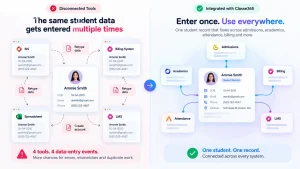
This is the most common sign, and the hardest to notice because it feels normal.
A student enrolls. Someone enters their name, date of birth, and contact details into the SIS. Then someone else types the same information into the billing system. The admissions office updates a spreadsheet. The LMS needs a new account. That’s four separate data entry events for a single student, repeated with every new enrollment.
When your student information system doesn’t connect to your other tools, staff become the integration layer. They copy data between screens, fix mismatches by hand, and risk typos that don’t surface until report cards go out.
The Common Education Data Standards initiative exists precisely because disconnected systems create exactly this problem at scale. When systems don’t share a common data structure, every handoff is a chance for errors.
What fixes it? Integrated school software that runs admissions, academics, attendance, and billing on one student record. Not four tools with an API connector you have to maintain. One record that a student enters at inquiry and carries through to graduation. That’s the difference between a collection of tools and an actual SIS for schools.
Sign 2: Running a report takes a spreadsheet and an hour
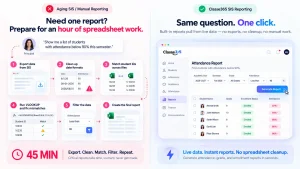
Your principal asks for a list of students with attendance below 90% this semester. In a working SIS, that’s a filter and a click. In an aging system, it’s an export to Excel, a cleanup pass to fix the date formats, a VLOOKUP to match student IDs across two files, and forty-five minutes of your registrar’s morning.
If your reporting workflow involves the word “export” more than once, the system isn’t reporting. It’s dumping raw data and making you do the work.
Why this matters more than it seems. Reports aren’t just for administrators. Teachers need grade distributions. Counselors need at-risk student lists. The business office needs outstanding balance summaries. When every report requires a manual build, only the most urgent ones get made. The rest, the ones that catch problems early, never happen.
State reporting makes this worse. US schools submit data to their state education agency on fixed deadlines. The US Department of Education’s Privacy Technical Assistance Center sets out what schools must report and protect. If your SIS can’t produce that data in the right format, someone builds it by hand every cycle. That’s using a person as a reporting system.
What fixes it? SIS software with built-in reports that pull from live data. Not a dashboard that looks impressive in a demo but can’t filter by grade level. Classe365’s student information system generates attendance, grade, and enrollment reports from the same record, with no export step.
Sign 3: Parents call the front office for information a portal should show
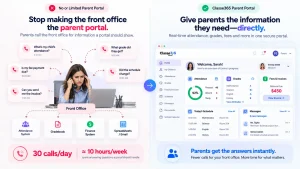
Count the calls your front office gets in a week. How many are parents asking about grades, attendance, fee balances, or schedule changes?
Every one of those calls means the same thing: your parent portal either doesn’t exist, doesn’t work well, or doesn’t show what parents actually need. The front office becomes customer service for a software gap.
The real cost is staff time. A front office team that fields 30 parent calls a day about information a portal should display is spending roughly ten hours a week on a problem the system should solve. That’s ten hours not spent on enrollment, compliance paperwork, or the other things the front office is actually responsible for.
What good looks like. A parent portal that shows attendance, grades, invoices, and messages in one login, with real-time data that matches what staff see on their end. When Classe365 records an absence, it shows in the parent portal immediately, along with posted grades and invoices. Parents get the information directly, and the front office handles fewer calls. That’s what a portal built into the student information system software is supposed to do.
Sign 4: Enrollment season means weeks of manual data entry
Enrollment should be the smoothest process your school runs. It happens every year. The fields are predictable. The workflow is the same: inquiry, application, acceptance, enrollment.
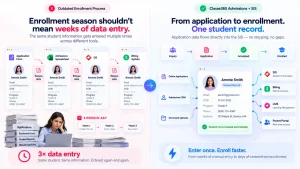
And yet, at schools with outdated SIS software, enrollment season still means stacks of paper forms, a shared spreadsheet someone emails around, and a registrar who spends three weeks in July typing everything into the system by hand.
This is the sign that your student information system wasn’t built for the full student lifecycle. It holds records, but it doesn’t manage how students get into those records.
What breaks. An applicant fills out a form. Someone transfers that data into the admissions tracker. When the student is accepted, someone retypes it into the SIS. If the school uses a separate billing tool, someone enters it again there. By day one, the record has been manually created three times, and nobody is sure which version is current.
What fixes it. A system where the application becomes the student record. When the admissions team marks a student as accepted, the SIS record is already there. That’s what an admissions CRM connected to the SIS actually does. Our admissions CRM vs SIS guide explains where each one starts and where they should overlap.
For K-12 schools and higher education institutions alike, the enrollment bottleneck is the gap between admissions and the SIS. Close it and enrollment goes from weeks to days.
Sign 5: You can’t budget the switch because pricing isn’t published
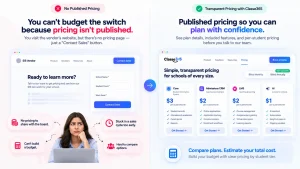
You’ve recognized signs one through four. You’re ready to evaluate new SIS software. You visit a vendor’s website to compare pricing, and there’s no pricing page. Just a “Contact Sales” button and a form asking for your school name and student count.
Now you’re in a sales cycle before you’ve decided. Your business office can’t build a budget line item. The evaluation stalls because there’s no number to bring to the board.
Why this matters for SIS implementation. The cost of a new SIS isn’t just the software. It’s implementation, training, data migration, and ongoing support. If a vendor won’t publish the base price, you can’t estimate the total. And if you can’t estimate the total, you can’t build the case for switching even when every other sign is flashing red.
What to look for. The best student information system vendors publish pricing by tier so you can budget before you call. Look for a pricing page that lists what’s included in each plan, what’s an add-on, and what the per-student cost looks like at your size. Classe365 publishes pricing by student tier. Core, admissions CRM, LMS, and AI are listed separately so you can model the cost before your first conversation.
What to do once you spot the signs
If you scored three or higher on the diagnostic, or recognized your school in two or more signs above, here’s a practical path forward.
Step 1: Document the pain. “Reports take too long” is a feeling. “Our registrar spends six hours a week building attendance reports in Excel” is a business case. Write down the specific problems before you talk to any vendor.
Step 2: List what you use today. Every system that touches student data: the SIS, the LMS, the billing tool, admissions spreadsheets, parent communication apps. Note which ones sync and which don’t.
Step 3: Decide what “fixed” looks like. Name the outcome, not the feature. One system instead of four? A portal that works? Enrollment that doesn’t require retyping?
Step 4: Compare with published information first. Start with vendors who show pricing publicly. You’ll spend less time in sales cycles and more time evaluating.
Step 5: Run a test. Bring your actual pain point and ask each vendor to solve it on screen. Our product demo walkthrough shows what that looks like.
What the best student information system software actually looks like
The best SIS for schools isn’t the one with the longest feature list. It’s the one that eliminates the five signs above. That means one student record across admissions, academics, attendance, and billing. Reports that run on live data instead of exporting to Excel. A parent portal that updates in real time. Enrollment that flows from the admissions CRM to the SIS without retyping. And published pricing so your business office can model the cost before anyone picks up the phone.
When these things work together, you stop managing your tools and start managing your school. That’s the bar your current SIS should meet. See how the major platforms compare in our breakdown of Classe365, Skyward, Blackbaud and Infinite Campus, and our look at PowerSchool vs Alma.
How Classe365 handles the switch
Classe365 is built on the idea that all five signs point to the same root problem: disconnected tools that force manual work.
The platform puts the SIS, admissions CRM, LMS, and finance on one student record. When a student applies, that application becomes their academic record, attendance record, and billing record without any retyping or manual sync between tools.
Here’s what the switch looks like in practice:
Migration is template-driven. Export a structured file, clean it in a spreadsheet, import it back with field matching and a confirmation count. No custom code. The same workflow in the SIS migration checklist and the product demo walkthrough.
Custom fields carry over. Build them in Manage Student Fields before importing. Drag a text, date, dropdown, or checkbox field into any section, set permissions, and the data has somewhere to land.
Pricing is public. Core starts at $100 per month for the 1 to 100 student tier. CRM, LMS, and AI are separate add-ons, all listed on the pricing page by tier.
Ready to see if it fits?
Bring the pain points you documented in Step 1 and see how they’re handled on screen. Book a Classe365 demo or contact the team to talk through your specific setup.
FAQ
How do I convince my board that switching the SIS is worth the cost?
Document the staff hours your team spends on workarounds: retyping data, building manual reports, fielding parent calls a portal should handle. Convert those hours into a dollar amount. Compare that annual cost to the price of a new system. Boards respond to numbers, not frustration.
Can we switch SIS mid-year, or do we have to wait for summer?
Most schools switch during a summer break or term gap when daily load is lowest. A mid-year switch is possible for smaller schools with clean data, but it adds risk because staff are learning a new system while actively using it. Plan for a parallel run if you go this route.
What’s the difference between a student information system and school ERP software?
A student information system manages student records, attendance, grades, and enrollment. School ERP software adds finance, HR, and operations on top. Some platforms combine both. If your school runs billing and payroll alongside academics, look for integrated school software that covers it all.
How long does SIS implementation take for a typical school?
Small schools with clean data can go live in four to eight weeks. Mid-size institutions usually need eight to sixteen weeks. Large or multi-campus schools should plan for three to six months. These assume data cleanup is done before you start. If it isn’t, add time.
What happens to our historical data if we switch?
Migrate recent active records into the new system. Archive older data in secure, accessible storage you can still reach when an auditor asks. Most schools bring five to ten years of records and archive the rest. The goal is a fast live system, not a warehouse of every record you’ve ever created.
Will switching break our LMS and payment gateway integrations?
It can if you don’t test them. Before go-live, list every connected tool and reconnect each one during a parallel run. An integrated platform that includes the LMS and billing reduces this risk because you have fewer external connections to maintain.
How do I evaluate an SIS if I can’t see pricing upfront?
Ask every vendor for a written quote that itemizes software, implementation, training, and ongoing support separately. If they won’t provide it, include that in your evaluation. Transparent pricing signals how the vendor operates, not just how they sell.
Is a cloud-based SIS better than an on-premise one for schools?
For most schools, yes. Cloud-based systems handle updates, backups, and security patches without your IT team having to manage servers. They also allow remote access for staff and parents. Check that the vendor encrypts data in transit and at rest, and confirm they meet your state’s data residency requirements.