




An applicant tracking system for schools is software that collects job applications, moves each candidate through your hiring stages, and keeps every record in one place. If your applications currently arrive in a shared inbox and live in a spreadsheet, an ATS replaces both.
Most schools don’t need a heavy recruiting platform. You need one clear path from “applied” to “hired”, and a record of who reviewed each candidate and what they decided.
This guide covers what an ATS does, how the teacher hiring process runs inside one, and how to build that process in Classe365 with the CRM Enroll and Forms module. It’s the same tool schools use for student admissions.
One thing to know before you read on. Classe365 isn’t sold as a standalone recruiting product. It handles staff applications through a Teacher Registration form type, and the sections below explain what that covers and where a dedicated ATS does more.
What does an applicant tracking system do for a school?
An ATS handles six jobs that otherwise land on whoever runs your hiring inbox:
- It collects applications through one online form.
- It stores each candidate’s answers, documents, and notes in a single record.
- Moves that record through the stages you define.
- It sends emails when a stage changes.
- Keeps interview notes where the next reviewer can read them.
- Exports the data when leadership asks how hiring is going.
In the 2024 to 2025 school year, 74% of US public schools had difficulty filling one or more teaching vacancies with a fully certified teacher, according to the National Center for Education Statistics.
How does an applicant tracking system work?
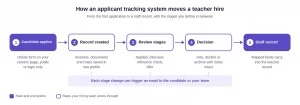
The flow is similar across ATS platforms. A candidate submits a form, and the system creates a record and places it in your first stage. Reviewers open the record, add notes, and move it forward or close it, and the system emails the candidate or your team at each change. Once you hire someone, the record becomes the starting point for their staff file.
Why do schools need an applicant tracking system?

The same NCES data shows what makes hiring difficult. Schools pointed to a lack of qualified candidates (64%) and too few applicants (62%) as the top reasons. The Learning Policy Institute found at least 411,549 US teaching positions were vacant or held by teachers who were not fully certified, roughly 1 in 8 positions nationally.
An ATS can’t create applicants, but it protects the ones you do get. A shared inbox buries applications under other mail. A spreadsheet goes out of date the moment two people edit separate copies. If a strong candidate waits weeks for a reply because nobody knew whose turn it was, they may accept another offer. A system with clear stages makes it obvious where each person is and who owns the next step.
How do schools recruit teachers?
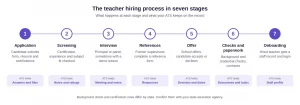
Most schools follow some version of seven stages. The names vary, but the order rarely changes. Background check and certification requirements differ by state, so confirm the details with your state education agency.
| Stage | What happens | What the ATS holds |
| Application | Candidate submits a form, résumé, and certifications | Form answers, uploaded files |
| Screening | Reviewer checks certification, experience, and subject fit | Notes, stage, ratings |
| Interview | Principal or panel interviews, sometimes with a demo lesson | Meeting time, interviewer notes |
| References | Former supervisors complete a reference form | Reference responses |
| Offer | School sends an offer; candidate accepts or declines | Decision, dates |
| Checks and paperwork | Background and credential checks, contracts | Documents, task status |
| Onboarding | Hired teacher gets a staff record and login | Staff profile |
Take a middle school science opening as an example. A single form collects the résumé and certification. The principal screens it and rates it, and a panel runs the interview. References come in through a linked form. If you hire, the same record carries into onboarding, and if you don’t, it’s archived with the notes intact.
Federal rule 29 CFR 1602.14 requires employers to preserve hiring records for one year from the date of the record or the action, whichever is later. Holding everything in one system makes that much easier than chasing files across inboxes.
How does an ATS differ for K-12 and higher education?
An applicant tracking system for education must support two hiring models. K-12 hiring centers on teachers, aides, and substitutes, usually reviewed by a principal or a small team. Higher education adds faculty searches, which run through committees and several rounds of review.
What changes in a higher education applicant tracking system?
Both need the same foundation of a form, stages, notes, and messages. The difference is how much weight falls on structured scoring. If a committee needs to rate every finalist on the same criteria, rating and opinion scale fields become essential.
| Area | K-12 school | Higher education |
| Typical reviewers | Principal, HR lead | Search committee, department chair |
| Main documents | Résumé, certification, references | CV, teaching statement, publications, references |
| Roles | Teachers, aides, substitutes, support staff | Faculty, adjuncts, research and admin staff |
| Review style | One or two rounds | Multiple rounds with scoring |
| What matters most | Speed and certification fit | Structured scoring and committee access |
What should school recruiting software include?
When you compare tools, start with how your hiring really runs and check each tool against it. These are the capabilities that matter most for school hiring:
- A custom application form with document upload and signature fields
- Conditional questions, so candidates see only what applies to their role
- Hiring stages you can name and reorder
- Automatic emails when a candidate reaches a stage
- A linked form for reference checks
- Notes, attachments and interview scheduling on each record
- Tasks you can assign to HR, finance or a principal
- A way for candidates to check their own status
- An embed code, so the form can sit on your own careers page
- Export and archive, for retention and future openings
- A clear route from “hired” to a staff record
Automated resume ranking deserves a note of caution. Tools that score candidates by keyword can push down strong applicants whose wording doesn’t match your terms. If you use ranking, keep a person reviewing every shortlist.
Does Classe365 work as an ATS for schools?
Classe365 handles teacher hiring through the CRM Enroll and Forms module. Its help center lists three form types: general, student pre-admission, and teacher registration. The teacher registration form is described as the type used for “teacher self-registration, with options to map form fields with teacher information system.” The pre-admission page also mentions creating generic admissions or HR recruitment forms.
| Capability | Dedicated ATS | Classe365 CRM forms | Spreadsheet and email |
| Online application form | Yes | Yes, drag and drop builder | No |
| Custom hiring stages | Yes | Yes, custom workflow | Manual |
| Automatic stage emails | Yes | Yes, template per stage | Manual |
| Reference check form | Usually | Yes, form linking | Manual |
| Job board posting | Common | Not described in the documentation [VERIFY] | No |
| Résumé parsing and scoring | Common | Not described in the documentation [VERIFY] | No |
| Link to staff records | Varies, often an integration | Field mapping to the teacher information system [VERIFY] | No |
| Same system as admissions and the student information system | Rarely | Yes | No |
If you already run admissions and student records in Classe365, hiring doesn’t need another login, another vendor, or another set of data to reconcile. The trade-off is that you won’t get job board distribution or automatic résumé scoring.
How do you run teacher hiring in Classe365, step by step?
The steps below follow the CRM Enroll and Forms demo. That demo walks through the student pre-admission form. The teacher registration form uses the same builder, so the steps apply to hiring.
- Open the module. Go to Marketing, then CRM Enroll and Forms, and choose the Teacher Registration form type. For roles outside teaching, such as aides or office staff, use a general form.
- Set the form basics. Enter a title and a keyword, which becomes the end of the public form URL. Choose a public form, or a private one that requires a login, and add a description and confirmation message.
- Build the application. Drag and drop the fields you need: text, long text, date, selection box, checkbox, document upload, and signature. For interview feedback, you can add a rating, an opinion scale, or a net promoter score field.
- Map fields to the teacher record. The mapping section links form answers to the teacher information system, so no one has to retype details after a hire.
- Add conditional logic. Show a field only when an earlier answer calls for it. For example, ask for a certification number only if the candidate says they hold one.
- Define your hiring stages. Create a custom workflow with your own names and colors. The demo’s admissions example ran from pending to interview to agreement prepared to enrolled or denied. A school might use Applied, Phone Screen, Interview, Reference Check, Offer, Hired, and Declined.
- Set availability. Choose when the form goes live and when it closes. With no end date, it never expires, so set one for each opening.
- Link a reference form. Turn on form linking and pick a second form. When a candidate reaches the trigger stage, they receive an email with the link, and the completed form appears in the linked submissions tab. The demo describes this for reference checks.
- Set notifications. Build email templates and attach them to stages. Recipients can be administrators, teachers, a custom address, or an email field from the application.
- Add a status check and publish. Candidates enter their submission ID to receive their status by email. Copy the embed code to place the form on your own careers page. If you charge an application fee, embedded forms support only Stripe and Authorize.net, and payments need the fee and invoicing module.
- Review in the Kanban view. Submissions appear in grid, list, or Kanban. Drag a card to the next stage, or open it to see answers, notes, attachments, scheduled meetings, linked submissions, and the candidate’s other submissions. You can also assign tasks, such as a follow-up call or an approval from the finance team.
- Move the hired candidate to staff records. In the student flow, the last step is Enroll, which creates the record and sends login details. For teachers, the documented route is field mapping to the teacher information system, followed by subject allocation and a login invitation.
- Keep your stages to the few you really use, and give each one an owner so applicants don’t wait with nobody responsible.
- Ask for the basics on the first form and collect references later through the linked form, since a long application loses candidates.
- Before you share the link, submit a test application on a phone and a laptop, then check the confirmation message, the stage emails, and the status check.
- Finally, decide how long you keep declined applications and who archives them.
What does it cost?
Pricing last checked October 25, 2026, on the Classe365 pricing page.
The Core plan starts at $100 per month for 1 to 100 students. CRM Enrol and Forms is a $75 per month add-on and includes up to 2,000 submissions, and the Task module is another $75 per month. Annual billing saves 10%; there is no setup fee, and the free trial runs for 15 days with every module and no credit card.
Optional onboarding starts at $2 per student for virtual setup. If you want to weigh the cost against the hours your office spends on hiring paperwork, the ROI calculator can help.
Which setup fits your school?
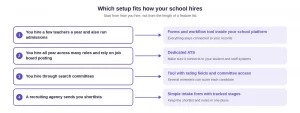
If you hire a few teachers a year and also run admissions, a forms and workflow tool inside your school platform covers the need, and everything stays connected to your records. If you hire year-round across many roles and rely on job board postings, a dedicated ATS is a better fit, as long as it connects to your student and staff systems. Schools that hire through search committees should prioritize rating fields, several reviewers per candidate, and committee access. If a recruiting agency sends you shortlists, a simple intake form with tracked stages may be all you need.
For a wider view of admissions tools, read our guide to the best education CRMs. If you’re comparing whole platforms, see the 20 essential school management software features and the best K-12 school management software.
If you’d like to see the workflow on your own forms, book a Classe365 demo and ask the team to build your teacher application with you. You can also read what other schools say first.
FAQs
Can we charge an application fee for teaching roles?
Yes, if you subscribe to the fee and invoicing module, because payment settings depend on it. If you embed the form on your own site, only Stripe and Authorize.net are supported for online payment.
Does Classe365 post jobs to boards like Indeed?
The documentation and pricing page don’t describe job board posting. Most schools place the embed code on their careers page and share the link in their own listings. Confirm any posting needs with sales.
Do small schools need an ATS?
If you hire a few staff a year, a shared inbox can work, until two people review the same applicant without knowing it. A form with stages and notes is a modest step up. Dedicated platforms make more sense once you hire year-round for many roles.
Can one form serve teachers, aides, and office staff?
Use the Teacher Registration form for teaching roles and a general form for other staff. Each form has its own URL keyword, fields, and workflow, so a principal’s review of a teacher stays separate from an HR review of an office hire.
What happens to candidates we don’t hire?
You can archive submissions, filter by form type, and export to CSV. That lets you keep a record for the retention period and pull the data when you need it.
Can we reuse past applicants for future openings?
The applicant record shows the candidate’s other submissions, so you can see earlier applications. You can filter and export submissions to build a list of strong past candidates for the next opening.
How does applicant tracking differ for a college or university?
Faculty hiring usually needs scoring by several reviewers and committee access. Rating, opinion scale, and NPS fields support structured feedback, but confirm that multi-reviewer scoring fits your process before you commit.