




The most important school management software features are student records, attendance, gradebook, fee collection, admissions, communication tools, and data security. Everything else on a vendor’s feature list either supports these core functions or extends them for a specific institution type. If a platform cannot do these seven things well, no amount of extra modules will make up for it.
“Essential” still looks different depending on whether you run a 200-student private school or a five-campus district. What every school needs is clarity on which features are foundational, which are situational, and which are simply nice to have.
This guide breaks down 20 school management software features into five categories: academics, admissions, finance, communication, and security. Each section explains what the feature does, why it matters operationally, and what a genuinely useful version looks like, not just a checklist item.
Read More:
What Do School Student Management System Features Actually Cover?
School student management system features fall into three overlapping categories vendors often use interchangeably: student information system (SIS), school management software, and school ERP software.
An SIS focuses narrowly on student records: enrollment, demographics, grades, and attendance. School management software adds operational layers on top, such as fee collection, timetabling, and communication.
School ERP software is the broadest term, describing a platform that connects academics, finance, HR, and admissions in one database.
Every one of those institutions runs on some combination of records, money, and communication. The features below map to those three pillars, plus the security layer that holds them together.
Classe365 approaches this by unifying SIS, LMS, CRM, and finance in a single Student Admin OS rather than bolting separate tools together. You can see the full module breakdown on the Classe365 platform to compare it against your own checklist.
The United States has close to 100,000 public elementary and secondary schools and roughly 18,000 public school districts, according to the National Center for Education Statistics, which maintains the federal statistical database covering nearly all of them.
A Quick Checklist for Evaluating Education Management Software
- Ask to see real student data flow from admissions through to a report card, not a canned demo script.
- Confirm attendance triggers an actual parent notification, not just an internal log entry.
- Request the exact list of live integrations, not a general claim of API availability.
- Test the mobile app yourself on your phone before trusting a vendor’s screenshots.
- Ask how FERPA and COPPA-related access controls are configured, not just whether they exist.
- Check whether financial reports export in a format your board or auditor already uses.
- Read verified customer feedback, such as the reviews on the Classe365 testimonials page, for specifics on support and setup time.
- Confirm what happens to your data if you switch vendors later.
Academic and Student Record Features Every School Management Software Should Have
-
A Centralized Student Information System Keeps Every Record in One Place
A student information system stores demographics, contact details, health notes, disciplinary history, and academic records in a single searchable profile. When a teacher, registrar, and nurse pull the same student’s file, they should see the same data, updated in real time.
Classe365’s SIS ties every module, gradebook, attendance, billing, and communication back to one student record, so a fee hold or an attendance flag shows up automatically wherever staff is working.
See the complete SIS guide on the Classe365 blog for a deeper look at multi-level institutions.
-
A Digital Gradebook Standardizes Grading Across Every Classroom
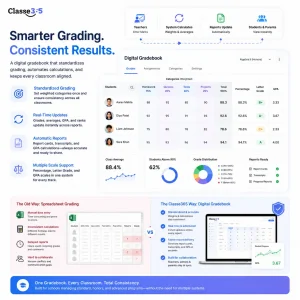
A digital gradebook lets teachers enter marks against weighted categories and have report cards, transcripts, and GPA calculations update automatically. Manual grade entry across dozens of classrooms produces inconsistent weighting, transcription errors, and delayed report cards.
Classe365’s gradebook supports percentage, letter grade, and GPA scales side by side, so a school running both a standard and an honors track does not need two separate systems. See Digital Gradebook vs Spreadsheet Grading for more on how this plays out in practice.
-
Automated Attendance Tracking Flags Absences Before They Become Patterns
Attendance tracking should do more than log who showed up. It should trigger a parent notification the moment a student is marked absent, roll that data into compliance reporting, and surface chronic absenteeism trends before they turn into a bigger problem.
-
Timetable and Scheduling Tools Remove the Manual Spreadsheet Work
Automated timetabling accounts for teacher availability, room capacity, and subject conflicts, turning a task that can take a registrar’s office several weeks into a process measured in hours. Good scheduling tools also handle shared resources, like a science lab, without double-booking them across sections.
Admissions and Enrollment Features That Fill Seats Faster
-
Online Admission Management Turns Applications Into a Trackable Funnel
Admission management software replaces paper applications and email attachments with an online form that tracks each applicant from inquiry to decision. For schools processing hundreds of applications a season, this is the difference between a registrar drowning in folders and an admissions team working from a live dashboard.
-
A Built-In CRM Nurtures Prospective Families Through the Decision
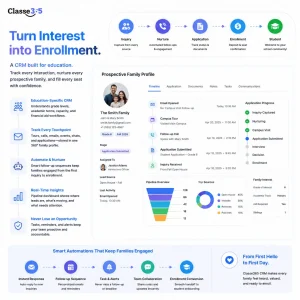
A CRM built for education tracks every touchpoint with a prospective family: tour requests, follow-up calls, application status, and enrollment deposits. This differs from a generic sales CRM because it needs to understand academic terms, grade level capacity, and financial aid workflows. Classe365’s CRM module automates follow-up sequences so an inquiry from a fall open house does not go cold before spring decisions are due.
-
Digital Enrollment and Registration Workflows Cut Paperwork at the Front Desk
Enrollment and registration are often used as synonyms, but they describe different steps: enrollment is the broad status of being admitted, while registration confirms a specific term’s course load or grade placement. Digital workflows for both remove duplicate entry, since an admission record should carry directly into a registration profile. We cover this distinction fully in Difference between Registration and Enrollment.
-
Document Collection and Verification Tools Close Admissions Gaps
Transcripts, immunization records, and identification documents should upload directly into the applicant’s file with status tracking, so staff knows at a glance which files are incomplete instead of chasing paperwork by phone.
Financial Management Features That Keep School ERP Software Accurate
-
Fee Collection and Online Payments Reduce Late Payments
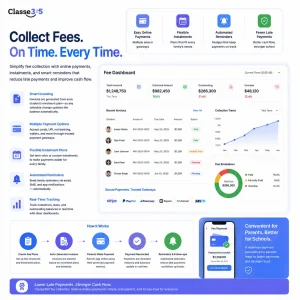
Online fee collection with installment plans, multiple payment gateways, and automated reminders consistently reduces late payments compared to mailed invoices or in-person collection. Parents pay faster when the friction to pay is lower.
Classe365’s fees and invoicing module generates invoices tied directly to each student’s enrollment plan, so a mid-year schedule change automatically adjusts the balance due instead of requiring a manual correction. Our payment methods guide breaks down which gateways work best for different school sizes.
-
Finance and Accounting Modules Connect Billing to the General Ledger
A finance and accounting layer should reconcile fee collection with the school’s broader books, track expenses by department, and generate the reports a board or finance committee actually asks for, without a separate spreadsheet export each month.
-
Scholarship and Discount Management Automates Exceptions
Sibling discounts, need-based scholarships, and staff tuition waivers are common enough that manually tracking them in a spreadsheet becomes a liability. Automated discount rules apply the correct adjustment at invoice generation and keep an audit trail for each exception.
-
Financial Reporting Gives Leadership Real-Time Visibility
Real-time financial dashboards let a CFO or head of school see collection rates, outstanding balances, and cash flow projections without waiting for a monthly close.
Communication and Engagement Features Parents Actually Use
-
Parent and Student Portals Reduce Phone Calls to the Front Office
A self-service portal where parents check grades, attendance, invoices, and announcements cuts down significantly on routine phone calls and walk-ins. Students get a parallel view for assignments and schedules. Every question a portal answers on its own is one less interruption for office staff during peak periods like report card week.
-
Automated Messaging Keeps Every Stakeholder Informed
SMS, email, and push notifications for absences, fee reminders, and emergency alerts should come from inside the platform rather than a separate tool, so the communication log ties back to the student record automatically.
-
Mobile Apps Put School Management Software Features in Every Pocket
A native mobile app matters because most parents check school updates on a phone. A mobile experience that only poorly mirrors the desktop site, with tiny buttons and slow load times, defeats the purpose. Test this yourself during evaluation.
-
Alumni and Community Modules Extend the Relationship Past Graduation
For institutions that track alumni for fundraising, mentorship, or admissions referrals, a dedicated alumni module keeps contact details and engagement history current long after a student’s records would otherwise go dormant.
Security, Compliance, and Advanced Features Behind the Best School Management Software
-
Role-Based Data Security Protects Student Records
Role-based access controls ensure a teacher sees only their own students’ grades, a finance staffer sees billing but not disciplinary notes, and administrators see the full picture. Encryption at rest and in transit, plus regular security audits, should be standard, not an add-on tier.
-
FERPA and COPPA Aligned Compliance Tools Reduce Legal Risk
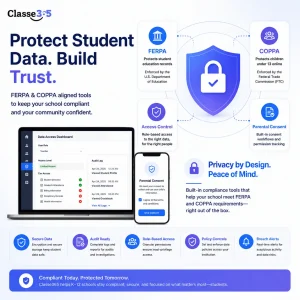
US schools handling student data need to align with the Family Educational Rights and Privacy Act, which governs access to education records and is administered and enforced by the U.S. Department of Education.
For platforms used by children under 13, the Children’s Online Privacy Protection Act, which the FTC enforces, gives parents control over what information websites and apps can collect from kids.
A school management platform should support the access controls and consent workflows both laws require out of the box, not as a custom project. Our COPPA Compliance Checklist for K-12 Schools covers the practical steps in more depth.
-
Reporting and Analytics: Turn Raw Data Into Decisions
Pre-built reports for enrollment trends, grade distributions, attendance patterns, and fee collection save an administrator from building the same spreadsheet every month. Custom report building matters too, since every school eventually needs a view its vendor did not anticipate, and this same data underpins tracking individual student progress over time.
-
Open APIs and Integrations Connect the Rest of the Tech Stack
Few schools run on a single platform for everything. API access and pre-built integrations with tools like Google Workspace, Microsoft 365, and accounting software prevent a new system from becoming another data silo. Ask any vendor for a specific list of live integrations, not just a claim of “open API,” before you sign a contract. See how Classe365 compares against other platforms on our PowerSchool alternative comparison page.
How to Decide Which School Management Software Features Matter Most for Your Institution
The table below maps common school profiles to the features worth evaluating hardest during a demo.
| Institution Type | Prioritize First | Can Wait |
| Small private school (under 300 students) | SIS, gradebook, parent portal, fee collection | Advanced analytics, alumni module |
| Mid-size K12 school (300 to 1,500 students) | CRM for admissions, automated attendance, financial reporting | Custom API integrations |
| Multi-campus network or district | Role-based security, centralized reporting, open APIs | None, all features apply at scale |
| Higher education or academy | Degree audit, registration workflows, alumni engagement | Transportation management |
Administrators can also run their own numbers through the Classe365 ROI calculator to see how time savings across these categories translate into budget impact.
To see how a unified SIS, CRM, LMS, and finance platform handles this in practice, book a demo with Classe365 or explore pricing details to compare against your current budget.
Frequently Asked Questions
Do small private schools need all 20 features, or just a subset?
Most small schools only need the academic and financial core to start: SIS, gradebook, attendance, and fee collection. Features like alumni management or multi-campus reporting can wait until enrollment or complexity grows. Choosing a platform with all 20 available, but activating only what you need now, is generally safer than switching systems later.
What is the difference between a student information system and a full school ERP?
A student information system focuses narrowly on student records: enrollment, grades, and attendance. A school ERP is broader and connects academics with finance, HR, and admissions in one database. Many vendors, including Classe365, offer both under one platform so a school does not have to choose between depth and breadth.
How long does it typically take to implement a new school management system?
Implementation timelines usually run two to eight weeks depending on school size and how much historical data needs migrating. Larger institutions or multi-campus districts should plan closer to the higher end, especially if data cleanup is needed first.
Can school management software integrate with tools we already use, like Google Workspace or QuickBooks?
Most established platforms support integrations with common productivity and accounting tools through APIs or pre-built connectors. Always confirm the specific list of live integrations during evaluation rather than assuming compatibility from a marketing page.
Is cloud-based school management software safe for storing student health records?
Reputable cloud platforms use encryption, role-based access, and regular security audits that meet or exceed what most schools can maintain on local servers. The key is verifying the vendor’s specific security certifications and asking how access to sensitive fields like health records is restricted by role.
What should a school budget for switching from one system to another mid-year?
Beyond the new license cost, budget for data migration, staff retraining, and a parallel running period where both systems operate together for a few weeks. Switching mid-year is possible, but many schools prefer to time a transition around a semester or academic year break to reduce disruption.
Do school management platforms support multi-campus or multi-language operations?
Platforms built for district or multi-campus use typically support centralized reporting across locations alongside campus-level permissions, and many support multiple languages for parent-facing portals. Confirm this specifically if your institution serves a multilingual community, since support varies significantly between vendors.
How do we get teacher buy-in when rolling out new school management software features?
Role-based training that starts with administrators, then teachers, then support staff tends to work better than a single all-staff walkthrough. Collecting feedback in the first month and fixing pain points quickly matters more for adoption than the initial training session itself.