




As institutions grow, their management of student data also increases in complexity. The separate systems that have been created for handling admissions, academics, communication, and reporting become disconnected from each other. A student information system is a central system that manages all these processes, allowing for full management of the student lifecycle.
This guide is intended to assist universities and schools in determining when to implement an SIS, how to choose the best SIS for their needs, and what to look for in the best SIS.
Do You Need a Student Information System?
In the beginning, managing student records is fairly simple. However, as the institution’s enrollment increases, so does the amount of complexity involved in the management of the institution’s admission, academic achievements, financial obligations, and communication with students. That is when many institutions begin searching for a system that will assist them in managing the entire student lifecycle.
Most institutions experience a gradual transition to SIS; it occurs when small inefficiencies begin to negatively impact the institution’s daily operations. Teams spend an increasing amount of time updating spreadsheets, reconciling fees, and searching for trustworthy data. Reporting becomes slower, and communication gaps continue to widen. At that point, having a single student database management system would not only improve efficiency but it would also create clarity of operational processes.
If the institution is scaling, then you are most likely experiencing the above challenges.
Common Indicators
- Student data is spread among several different spreadsheets. Therefore, keeping accurate data can be very labour intensive as many staff members are using outdated data to make decisions.
- To record attendance takes tremendous amounts of time, with the potential for two to three people recording attendance per student at different times, creating inconsistency in reporting when creating reports.
- Delay in reconciling payments leads to slow processing of payments against student activity, especially at peak times during the admissions cycle, as payments received can’t be allocated to student activity until the funds are cleared and reconciled.
- Notice of changes in status or other updates regarding students are often not distributed properly to the appropriate parents/students, as notices are sent through different methods and sometimes are missed.
- Generating reports to assist with decision-making often takes time to compile, and the data has to be collected manually to generate reports.
- Multi-campus institutions have multiple campuses generating data from multiple locations with little or no access or visibility from a central location.
Institution Size Decision Matrix
Most agencies or institutions don’t require a full SIS when they start their business, but will develop their needs as their enrollment increases; their operations become more complex; and departments become more specialized in their functions. Smaller agencies may need only basic functions of a database to support them, while larger agencies will require to fully automate processes throughout the entire life cycle of each student.
The following table serves as a guide to assist agencies determine what level of SIS they should have, given their current size and expected future growth.
| Institution Size | Recommended Approach | Why |
| Under 100 students | Basic student database | Low complexity |
| 100–500 students | SIS software for schools | Manual tracking becomes difficult |
| 500–2000 students | Full student lifecycle management system | Multi-department workflows |
| 2000+ students | Enterprise SIS for higher education | Multi-campus operations |
This matrix helps institutions evaluate the level of student database management system required.
Student Information System vs LMS vs ERP
When evaluating a variety of solutions, many institutions will compare a student information system (SIS), a learning management system (LMS), and an enterprise resource planning (ERP) solution altogether. Many people make the assumption that all three types of solutions overlap; however, each solution serves a completely different purpose within an institution.
An SIS facilitates the management of the student lifecycle, an LMS delivers learning experiences through digital platforms, and an ERP solution supports the administration and management of an entire institution’s finances, human resources, and other operational processes.
Because of this, many times institutions will not replace one solution for another but will use all three to be successful in meeting their operational requirements. Understanding how each of these solutions works provides insight into how an institution can avoid purchasing the wrong solution and overinvesting in the wrong solution.
| System | Primary Role | Used By | Example Use |
| Student Information System | Student lifecycle management | Admin teams | Admissions, records |
| LMS | Learning delivery | Faculty | Assignments, content |
| ERP | Institutional operations | Finance & HR | Payroll, procurement |
An SIS will typically be the operational foundation for managing the following components:
- Admissions and Enrollment Workflows
- Academic Records / Transcripts
- Attendance Tracking
- Fee Management / Billing
- Administrative Approvals / Processes
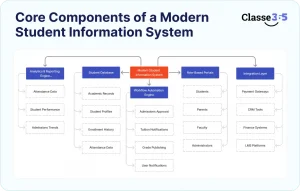
Core Components of a Modern Student Information System
A modern student information system (SIS) is designed as a multi-tiered, multi-use system. There are multiple solutions or layers comprising the data required by an institution and multiple uses for each of the layers of the SIS. What is important for an institution to understand about the operation of a multi-tiered, multi-use SIS is that an institution cannot operate in a disconnected environment.
Student Database (Base) Layer
The Student Database (Base) layer is the foundation of the SIS and consists of a single, centralized repository or database for all critical student-related data, which ultimately provides a single source of truth when extracting data and running reports. In the majority of cases, the student database contains the following critical components:
- Student Profiles
- Enrollment History
- Academic Records
- Attendance Data
Workflow Automation Engine
Traditional manual approval processes are slow and time-consuming. Through the use of automation, both efficiency (through reduced time delays) and consistency across organizational departments can be greatly enhanced. Learn how workflow automations can supercharge your educational institution.
Examples of processes typically contained within this automation layer include:
- Approval of admissions,
- Notification of upcoming due dates for unpaid tuition
- Publishing of grades, and
- Providing notifications to users.
Role-Based Portals
Different stakeholders in an organization need varying levels of access to the Student Information System (SIS). A role-based portal will provide secure and pertinent levels of visibility.
Access is typically granted to:
- Students
- Parents
- Faculty
- Administrators
Integration Layer
Most educational institutions currently utilize a number of different software applications or systems. Therefore, a strong SIS will integrate with the current platforms used by an institution, rather than replace them. Explore Classe365’s open API to understand how custom integrations can be built seamlessly.
Commonly, integrations are found with:
- LMS platforms
- Finance systems
- CRM tools
- Payment gateways
Analytics & Reporting Engine
When all data is centralized, decision-making can be more efficient and accurate. The built-in analytics engine gives decision-makers current operational visibility to all aspects of an organization.
Typically, the analytics engine will provide:
- Historical trend data and to current admissions and enrollment,
- Historical trends and insights related to student performance through final grades, and
- Historical attendance-related data through attendance records.
Here is an example of how a student will benefit from the Admissions Workflow once an SIS is implemented: A student applies for admission (the student submits the application), the SIS creates a profile for the student in the database, the admissions staff will review the application, an offer letter will be automatically generated, and when the student accepts the offer, the student’s profile will be modified to indicate that the student has accepted an offer to enroll.
SIS for Higher Education vs K12 Student Information System
Universities and higher education institutions and schools operate differently. Their workflows, reporting needs, and communication models vary. That’s why SIS requirements also differ. Choosing a solution designed for your institution type typically improves adoption and usability.
| Feature | SIS for Higher Education | K12 Student Information System |
| Course structure | Credit-based | Class-based |
| Scheduling | Complex | Fixed timetable |
| Communication | Student-focused | Parent-focused |
| Reporting | Academic analytics | Report cards |
| Admissions | Multi-stage | Annual intake |
In most cases, higher education institutions prioritize flexibility and integration. K-12 schools, on the other hand, focus more on communication, attendance, and simplicity in reporting.
How to Choose the Right Student Information System
Selecting the right SIS software for schools or universities isn’t just about features. It’s about long-term operational fit. A platform that works today should also support future growth, integrations, and reporting needs. In most cases, institutions that follow a structured evaluation avoid costly migrations later.
Before shortlisting vendors, define your operational priorities. Are you solving admissions bottlenecks? Trying to centralize student data? Improving reporting? Clarity at this stage helps you compare the best SIS platforms more objectively.
Key Evaluation Factors
- Scalability for growth: The system should support increasing enrollment without performance issues.
- Integration capabilities: It should connect with LMS, finance, and CRM tools without heavy customization.
- Security standards: Look for role-based access, data encryption, and compliance readiness.
- Customization flexibility: Workflows should adapt to your institution’s structure, not the other way around.
- Reporting capabilities: Real-time dashboards and exportable reports improve decision-making.
- User experience: If it’s hard to use, adoption drops quickly across departments.
SIS Selection Scoring Checklist
Choosing the right Student Information System isn’t just about features—it’s about how well the platform fits your institution’s long-term needs. A structured scoring checklist helps you compare vendors objectively rather than relying on gut feeling or sales demos.
Start by defining key evaluation criteria and assigning weights based on importance. In most cases, factors like scalability and ease of use carry more weight because they directly impact adoption and future growth.
How the scoring works
Each criterion is rated on a scale of 1–5 (1 = poor, 5 = excellent).
Weights can be mapped as:
- High = 3
- Medium = 2
- Low = 1
Multiply the score by the weight to get a weighted score. This makes it easier to see which solution delivers the most overall value.
Example: SIS scoring table
| Criteria | Weight | Score (1–5) | Weighted Score |
| Scalability | High | 5 | 15 |
| Integration | High | 4 | 12 |
| Reporting | Medium | 3 | 6 |
| Customization | Medium | 4 | 8 |
| Ease of use | High | 5 | 15 |
| Total | 56 |
This example shows how a system that performs well in high-weight areas quickly stands out.
Implementation Timeline for Student Information Systems
Deployment speed varies, but structured implementation usually improves adoption. Rushing configuration often leads to workflow gaps. A phased rollout allows teams to adjust gradually. Request a demo to see how Classe365 structures its onboarding process.
| Phase | Duration |
| Requirement Analysis | 1–2 weeks |
| Data Migration | 2–4 weeks |
| Configuration | 2 weeks |
| Training | 1 week |
| Go Live | 1 week |
Most institutions complete implementation within 6-10 weeks. Larger universities may take longer, especially when migrating historical student data.
Common Challenges When Implementing SIS
Even the best student lifecycle management system requires careful rollout. Anticipating challenges helps prevent delays and resistance.
Data Migration
Legacy data is often inconsistent. Cleaning duplicates and standardizing formats improves accuracy after import.
User Adoption
Staff may resist switching systems. Role-based training and phased onboarding usually increase confidence.
Integration Complexity
Existing tools don’t always connect seamlessly. Choosing integration-ready SIS platforms reduces development time.
Budget Constraints
Customization can increase costs. Phased implementation typically keeps budgets under control.
Cost of Student Information System Software
Pricing varies depending on institution size, feature depth, and implementation complexity. Cloud-based SIS platforms generally reduce infrastructure costs and ongoing maintenance overhead.
| Cost Component | Description |
| Per student pricing | Monthly subscription |
| Implementation fee | Setup cost |
| Customization | Workflow configuration |
| Integration | Third-party connections |
| Support | Ongoing maintenance |
In most cases, institutions underestimate implementation and training costs. Planning for both ensures smoother deployment.
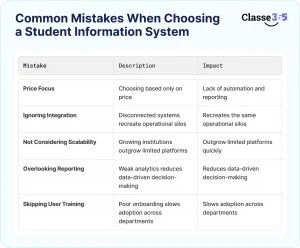
Common Mistakes When Choosing a Student Information System
Institutions often focus heavily on short-term requirements. That approach usually leads to scalability issues later. Avoiding these common mistakes improves long-term adoption.
- Choosing based only on price, lower-cost systems may lack automation and reporting features.
- Ignoring integration requirements, disconnected systems recreate the same operational silos.
- Not considering scalability, growing institutions outgrow limited platforms quickly.
- Overlooking reporting capabilities, weak analytics reduces data-driven decision-making.
- Skipping user training planning, poor onboarding slows adoption across departments.
Avoiding these pitfalls typically leads to faster implementation and better ROI from your SIS investment.
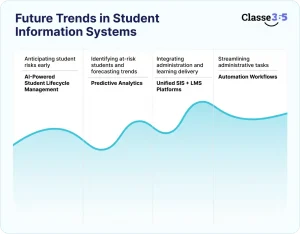
Future Trends in Student Information Systems
Student information systems are evolving beyond basic record management. Institutions now expect automation, analytics, and deeper integrations. As enrollment grows and hybrid learning models expand, SIS platforms are becoming more intelligent and proactive.
AI-Powered Student Lifecycle Management
Artificial intelligence is gradually transforming how institutions manage student journeys. Instead of reacting to issues, systems can now anticipate them. AI-driven SIS platforms analyze attendance, engagement, and academic performance to highlight potential risks early.
In most cases, this helps administrators intervene before small issues impact retention.
Predictive Analytics
Data-driven decision-making is becoming standard. Predictive analytics uses historical data to identify patterns across enrollment, performance, and attendance. Institutions can spot at-risk students, forecast admissions trends, and plan resources more effectively.
Typically, this reduces manual reporting while improving institutional planning.
Read more about retaining at-risk students in K-12 using data-driven approaches.
Unified SIS + LMS Platforms
The line between administration and learning delivery is narrowing. Many institutions prefer unified SIS and LMS platforms to avoid switching between systems. This integration improves data consistency. It also ensures academic performance and engagement metrics flow directly into student records.
Automation Workflows
Automation is expanding across the student lifecycle. From admissions approvals to fee reminders, workflows reduce repetitive tasks. Staff spend less time on manual updates and more on strategic activities.
In most cases, automation also improves communication consistency and reduces operational delays.
Are You Ready to Find Your Ideal Student Information System?
When properly implemented, a student information system will help to streamline your operational process and provide a unified view of student data across departments. As an institution grows in size and reach, it will run into problems due to inefficient use of disconnected tools resulting in operational bottlenecks. A centralized SIS makes it possible for institutions to manage their entire admissions, academic, communication, and reporting processes from one platform.
Classe365 does this, as it provides a complete solution to manage student lifecycle, LMS capabilities, CRM capabilities, financial capabilities and automation all within one integrated SIS. Instead of trying to support the entire student lifecycle by using multiple different software, a school or university can now manage the entire process from one software system. This is especially beneficial for academies and corporate learning institutions that are looking for ease of scalability without the complexity.
If you are searching for an SIS solution for a K12 education or higher education, it is important that you find a solution that integrates with other systems, is adaptable with current processes, and can provide automation for the various functions needed to support an ever expanding student population. Most of the institutions that have migrated to an all-in-one solution have found that their implementations and adoption have been significantly faster than expected.
Would you like to enhance your student lifecycle management functionality?
Contact us today to schedule a personal demonstration and experience how Classe365 can assist your institution!
FAQs
Can a student information system manage multi-campus institutions?
Yes. A modern student information system supports centralized data across multiple campuses while allowing location-based access. Administrators can standardize workflows, compare campus performance, and generate consolidated reports.
What integrations should a student information system support?
A robust SIS should integrate with LMS platforms, payment gateways, accounting software, CRM tools, and communication systems. These integrations ensure seamless data flow across admissions, academics, and finance operations.
How does a student information system improve admissions workflows?
An SIS automates application tracking, document verification, approvals, and offer letter generation. This reduces manual follow-ups and ensures student data moves directly into enrollment records.
What role-based access should an SIS provide?
A Student Information System typically offers role-based portals for administrators, faculty, students, and parents. Each role accesses relevant data while maintaining data security and operational control.
How does SIS help with student data accuracy?
Centralized data storage reduces duplicate entries and manual errors. Automated workflows ensure updates across attendance, academics, and finance are reflected in real time.
Can a student information system automate fee management?
Yes. Most SIS platforms automate fee structure setup, invoicing, payment tracking, reminders, and reconciliation. This improves transparency and reduces delays in fee collection.
How does a student information system support reporting and analytics?
An SIS provides dashboards for enrollment trends, attendance analytics, academic performance, and financial reports. These insights help institutions make data-driven decisions.
What should institutions check before implementing a student information system?
Institutions should evaluate data migration requirements, integration needs, user training plans, scalability, and reporting capabilities before implementation.