




A student progress tracker is a tool that records and monitors a student’s grades, attendance, and assignments in one place, then flags when a student is falling behind. It turns scattered data into a clear view of who is on track and who needs support, early enough to act.
This guide covers what a student progress tracker does, the benefits for everyone who uses it, and the situations where it earns its place.
The case for tracking is evidence-based. In a randomized study of 73 high schools, the U.S. Department of Education’s research arm found that an early-warning monitoring system reduced both chronic absence and course failure among students (IES). Monitoring academic progress is not administrative overhead. It changes outcomes.
What a Student Progress Tracker Does
A good tracker does more than store grades. It connects data points indicating how a student is doing and surfaces those that need attention. These are the features that separate a useful academic tracker from a digital gradebook.
| Feature | What it does | Why it matters |
| Real-time dashboards | Live view of grades, attendance, and assignments | Staff see issues as they happen, not at term end |
| Attendance tracking | Logs sessions and flags absence patterns | Chronic absence is one of the earliest dropout signals |
| Grade and assessment tracking | Records scores across every course | Shows performance trends, not isolated results |
| Early-warning flags | Alerts on risk indicators like low grades or absence | Triggers support while there is still time to act |
| Student and parent portals | Shared access to academic progress | Keeps families informed without manual reports |
| Reporting and analytics | Aggregates data across classes and cohorts | Reveals patterns that leadership can act on |
| SIS and LMS integration | Pulls from the official record and coursework | One source of truth, no duplicate data entry |
The last feature determines how well the others work. A tracker fed by manual data entry is out of date the moment a grade changes. One that reads from the student information system and the learning management system reflects each grade and absence as it is recorded.
The Indicators a Tracker Should Watch
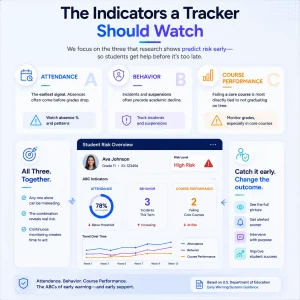
Not every data point predicts trouble equally. Decades of school research have converged on a small set of indicators that reliably flag a student heading off track. The U.S. Department of Education’s guidance on early-warning systems centers on three, often called the ABCs: attendance, behavior, and course performance.
Attendance is the earliest signal. A student missing class is usually disengaging before grades reflect it, which is why absence patterns deserve their own flag rather than a line on a report card.
Behavior, such as suspensions or repeated incidents, correlates with disengagement and often precedes academic decline.
Course performance, particularly failing a core course, is the indicator most directly tied to not graduating on time.
A strong student progress tracker monitors all three together, because any one in isolation can be misleading. A capable student with a single low grade is not the same as one failing a core course, missing class, and accumulating incidents. The combination is what separates a real risk from a blip, and catching it continuously, rather than at the end of the term, gives staff time to intervene.
The Benefits of Tracking Student Progress
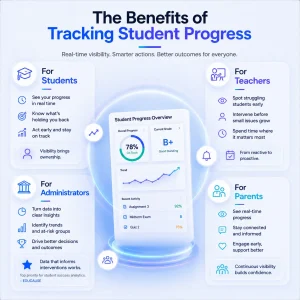
The value of school student tracking varies for each group that touches it.
For students: A tracker removes guesswork. They see their own standing in real time, know which assignments or courses are pulling them down, and can act before a weak grade becomes a failed term. Visibility into their own academic progress puts ownership back with the learner.
For teachers: It shifts work from reactive to proactive. Instead of discovering a struggling student at report-card time, a teacher sees the warning signs in week three and intervenes. The early-warning function does the watching, so staff spend their time on the students who need it rather than on building spreadsheets.
For administrators: Tracking turns individual records into institutional insight. Patterns that are invisible at the classroom level, a course with high failure rates, or a cohort with declining attendance, become clear in aggregate. This is where the data earns its keep: EDUCAUSE found that institutions rank data to inform interventions as their top priority for student success analytics, ahead of every other use.
For parents: A tracker replaces the once-a-term update with continuous visibility. Through a portal connected to the communication tools a school already uses, families see progress in real time and engage earlier when something slips.
Use Cases for a Student Progress Tracker
Tracking is most useful when tied to a specific decision or action. The common use cases are:
- Identifying at-risk students early. Combine grades, attendance, and behavior flags to surface students who need support before they disengage.
- Acting on attendance problems. Spot absence patterns as they form, since attendance is a leading indicator of academic trouble.
- Keeping parents engaged. Give families live access so they are partners in a student’s progress, not bystanders informed after the fact.
- Supporting academic advising. Give advisors a current view of each student’s standing, including progress toward graduation tracked through a degree audit.
- Reporting to leadership and boards. Turn aggregated tracking data into the performance reporting administrators need for planning and accountability.
- Personalizing support. Use individual trends to match each student with the right intervention rather than a one-size response.
- Monitoring cohort and program performance. Compare outcomes across classes, programs, or campuses to find what is working and what is not.
Built-In vs Bolted-On Student Progress Tracking
How a tracker connects to your data decides how much it can do. A standalone academic tracker or a shared spreadsheet depends on someone exporting grades and attendance into it, which means the data is always a step behind and prone to entry errors. By the time a flag appears, the moment to intervene may have passed.
A tracker built into the platform that already holds the student record works differently. It reads attendance, grades, and assessment data where they are created, so the dashboard a teacher opens reflects the grade posted an hour ago. There is no export, no reconciliation, and no second version of the truth to keep in sync.
In Classe365, student tracking is part of the student information system rather than a separate add-on. Attendance logged in class, grades entered in coursework, and progress toward requirements all feed the same view, and the platform’s analytics surface the patterns automatically.
For schools, universities, and academies alike, that integration makes academic progress visible in real time rather than at the end of term. It also keeps tracking within the student record from first enrolment through to graduation and the alumni stage, so a student’s full history sits in one place.
Privacy sits underneath all of it. A progress tracker handles education records, so access is governed by laws such as FERPA in the United States, and institutions control who can view which student’s data.
See Student Tracking in Action
If your team still tracks progress in spreadsheets, book a Classe365 walkthrough to see live grade, attendance, and risk tracking built into the student record.
Frequently Asked Questions
What is a student progress tracker?
A student progress tracker is a tool that monitors a student’s grades, attendance, and assignments in one place and flags when they fall behind. It gives students, teachers, and administrators a current view of academic standing, enabling early action.
How is a progress tracker different from a gradebook?
A gradebook records scores for one class. A progress tracker combines grades, attendance, and risk indicators across all of a student’s courses and surfaces trends, not just individual marks. The tracker is built to prompt action, not only to store results.
What data should a student progress tracker pull?
At a minimum, grades, attendance, and assignment completion. Stronger trackers add behavior flags and progress toward graduation requirements, and they read this data directly from the student information system rather than relying on manual entry.
Does school student tracking work for both K-12 and higher education?
Yes. The indicators differ, with K-12 leaning on attendance and course failure and higher education adding credit progress, but the principle is the same: monitor academic progress continuously and intervene early.
Can parents see a student’s progress?
Through a parent portal, yes, where the institution grants access. This keeps families informed in real time rather than waiting for a report card, improving engagement and enabling early intervention.
How does an academic tracker help reduce dropouts?
It flags early signs of disengagement, such as declining grades and rising absenteeism, while there is still time to intervene. Research on early-warning monitoring has linked it to reduced chronic absence and course failure. The earlier a student is flagged, the more options a school has to change the trajectory, which is why continuous tracking outperforms a once-a-term review.
Is student tracking data secure?
It should be. A progress tracker handles protected education records, so it must comply with privacy laws like FERPA and limit access to authorized staff, advisors, and the student or their guardians.
Is a built-in tracker better than a standalone one?
A built-in tracker reads live data from the student record, keeping it always current and avoiding manual re-entry. A standalone tracker depends on exported data, which is slower and more error-prone. For continuous monitoring, integration matters.