




Asking the appropriate strategic questions is the greatest method to find the finest LMS for schools in 2026. Instead of looking at feature lists, school administrators should look at how effectively a platform fits in with academic workflows, works with current systems, keeps student data safe, enables hybrid learning, and grows with the school.
This blog is all about the 10 most important questions that every school should ask when looking at an LMS system. Each inquiry is meant to reveal real strengths and weaknesses, so that decision-makers may look past marketing claims and find a solution that will provide long-term academic, operational, and financial benefit.
Table of Contents
10 Strategic Questions to Ask When Evaluating an LMS
Here are the main questions that schools should ask while evaluating LMS platforms, along with clear explanations and characteristics that set sophisticated LMS platforms apart from simple ones.
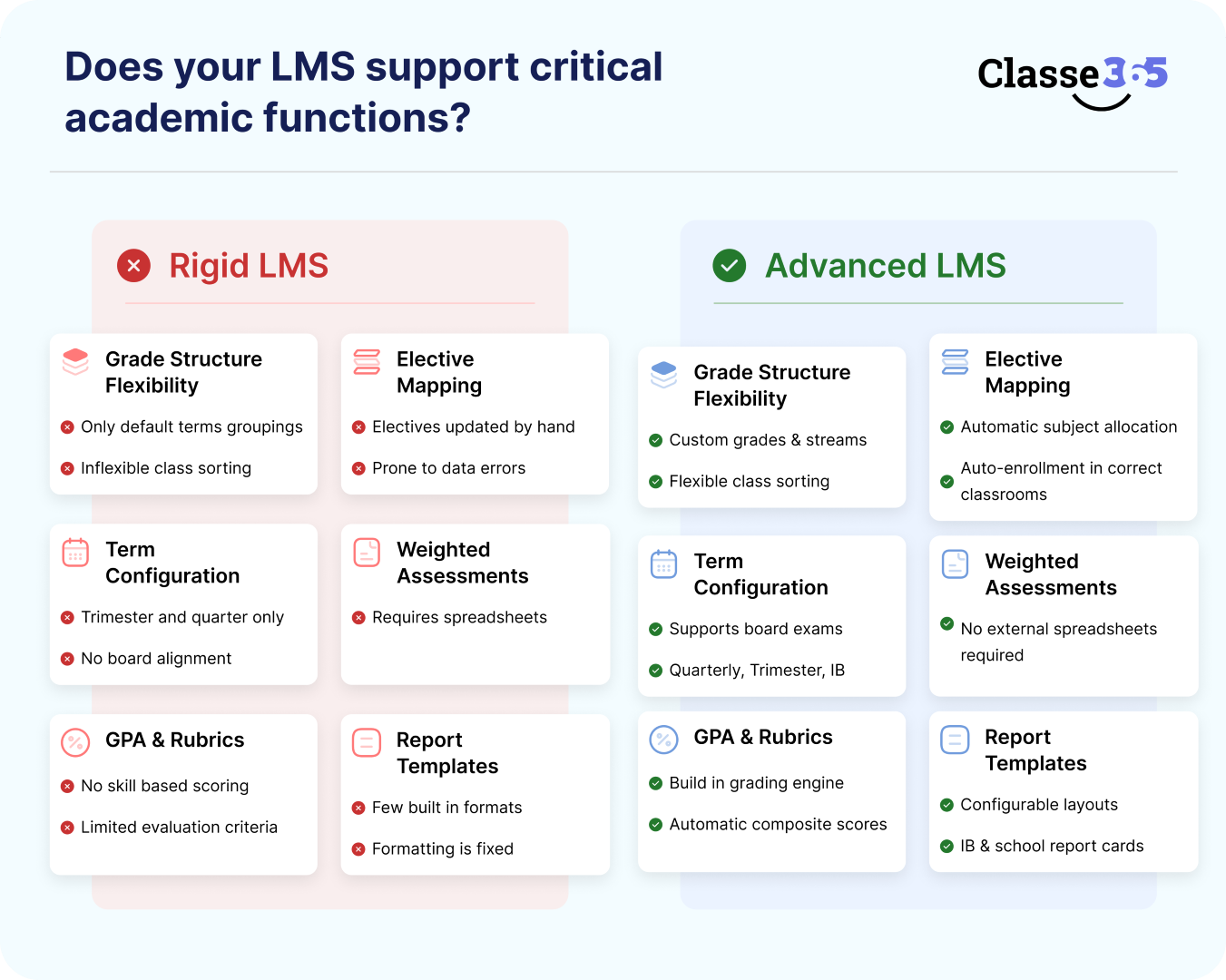
1. Can the LMS Adapt to Our Academic Structure?
Your LMS should be based on your board’s academic logic, not make your school stick to a set semester-GPA framework. Schools that follow the CBSE, ICSE, IB, IGCSE, Cambridge, or state boards need flexible grading, weighted examinations, and report formats that are specific to each board. Academic correctness decreases if the system can’t provide internal assessment splits, optional streams, or rubric-based grading.
What Advanced LMS Platforms Must Support
- Grade levels and portions that can be changed
The system should let you set up grades, sections, streams, and topic groups in the same way as your school does. This makes sure that attendance, grading, and report generation match your school’s rules and not a default template. - Mapping of elective subjects
When students choose optional subjects, they should automatically be put in the right classrooms and gradebooks. This gets rid of mistakes that happen when you do it by hand and makes sure that academic records are correct. - Custom structures for terms and semesters
The LMS must let you make an academic schedule that fits with your board, no matter if your institution has trimesters, quarterly tests, or board-driven exam cycles. - Weighted tests (exams given by the board and by the school)
Internal tests, projects, and practicals often make up a certain percentage of the final grade. The LMS should be able to figure up composite grades on its own, without the need for outside spreadsheets. - GPA systems and skill-based rubrics
IB and Cambridge schools need to use criterion-based evaluation. The LMS needs to be able to handle rubric scoring, descriptors, and grade conversion frameworks. - Templates for report cards that you can change
Report cards should be able to rapidly and accurately show board layouts, grading scales, and the school’s branding.
What to Test During Demo
- Create an academic calendar aligned to your board structure.
- Configure a 7-point or 9-point grading scale.
- Generate a report card with subject-wise weightage calculations.
If these actions require backend coding or vendor intervention, the system lacks true flexibility.
Why Integrated Systems Win
Platforms that combine LMS with SIS, such as Classe365, make it possible to automatically set up promotion rules, create transcripts, and keep track of students’ academic progress over several years. Because grading logic and student data are all in the same system, schools don’t have to set things up twice or have records that are hard to find.
2. How does the LMS protect data and keep it private?
An LMS keeps track of attendance, grades, payments, student IDs, and parent contact information. Security can’t be just a surface level thing; it has to be built in. Schools should check to see if the platform secures data when it is being sent and while it is not being used, and that it follows local rules.
Security Benchmarks to Verify
- SSL/TLS encryption
Protects data during login, grade access, and system communication. - Role-based access control (RBAC)
Makes ensuring that instructors, parents, students, and administrators can only see information that is useful to them. - Authentication using more than one factor
Adds an additional identity verification layer, reducing unauthorized access risk. - Encrypted cloud backups
Protects data against accidental loss or cyber incidents. - Audit logs
Tracks user actions for accountability and compliance audits. - Data retention policies
Defines how long student records are stored and when archived or deleted.
Compliance Questions to Ask
- Is the LMS aligned with FERPA (US)?
- Does it comply with GDPR (EU)?
- Does it meet regional data protection regulations?
Warning Sign
If the provider can’t properly explain where the hosting is, how backups are made, or how internal access controls work, the danger is considerable.
Classe365 protects student and institutional data across regions by using encrypted storage, limited access restrictions, and a secure cloud hosting architecture.
Read More:
3. Is the LMS easy for teachers, students, and parents to use?
ROI is based on adoption. Even LMS solutions with a lot of features won’t work if teachers don’t use them. A system should not make labor harder; it should make it easier.
Teachers usually stop using systems that are hard to navigate, have too many buttons, or make grading harder.
Conduct a Real Usability Test
Ask a teacher to:
- Create a course
- Upload content
- Create an assignment
- Grade submissions
- Send a parent update
Set a timer for the process. If everyday tasks seem slow or hard to understand, people will stop utilizing them over time.
What High-Adoption LMS Platforms Offer
- Role-based dashboards that only show the tools you need
- Quickly share content by dragging and dropping it.
- Grading in-line without sending in submissions
- Reminders for assignments and due dates that are sent out automatically
- Parent portals that show information in real time
Classe365 Insight: Classe365 focuses on making dashboards easier to use for all stakeholders. Instead of depending on feature lists, institutions should do real usability tests during demos.
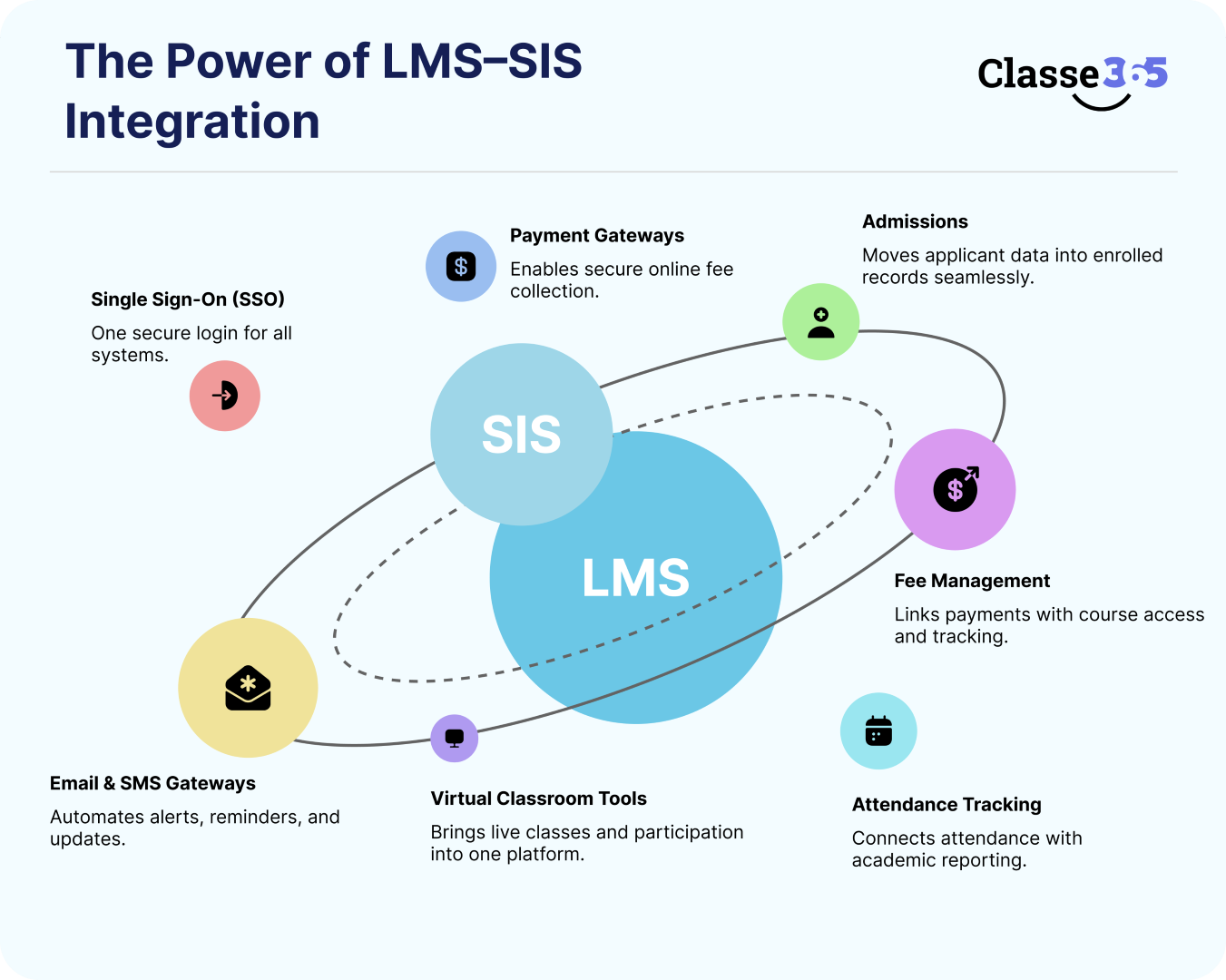
4. Does it work with your SIS and other systems you use?
A separate LMS makes data silos. Schools thus use three different systems to handle admissions, fees, and academics, which leads to mistakes and duplication.
An integrated LMS should connect with:
- Student Information System (SIS)
- Admissions
- Fee management
- Attendance tracking
- Virtual classroom tools
- Email and SMS gateways
- Single Sign-On (SSO)
- Payment gateways
Why LMS and SIS Integration Matters
- Student enrollment automatically updates.
- Grades show up right away on transcripts.
- Attendance is related to how well students do in school.
- No entering the same data into more than one system.
Classe365 brings together admissions, SIS, LMS, finance, and CRM into one solution. This stops operations from being split up and makes reports more accurate.
5. Is it really ready for mobile devices, not just responsive?
Schools are using mobile engagement more and more. Parents use smartphones to monitor grades and attendance. Students turn in their work from iPads. A mobile-friendly LMS needs to be more than just a responsive website.
What to Look For
- Apps that work on Android and iOS
- Push notifications for grades and attendance
- Alerts about fees in real time
- Access to content when not connected to the Internet
- Syncing between devices
Find out if the mobile app is a real native app or just a web wrapper.
Mobile-first platforms make it easier for parents to get involved, turn in assignments, and respond to messages.
Classe365 has native mobile apps that send you notifications in real time and sync your devices without any problems.
6. What kinds of reporting and analytics tools are there?
Schools should use data to help them act early, not merely provide end-of-term reports. If the only way to report is through downloadable spreadsheets, leaders can’t see what’s going on in real time.
Advanced Reporting Should Include
- Correlation between attendance and performance
The system should show if low attendance is directly linked to worse academic results. This enables schools to step in before board exams. - Finding students who are at risk
The LMS should mark students who always get low grades, miss assignments, or have patterns of attendance that aren’t normal. Early warnings lower the chance of dropping out or failing. - Outcome distribution by subject
Administrators should be able to view how grades are spread out by subject and section. This shows gaps in the curriculum or grading standards that aren’t always the same. - Comparisons of cohorts
Leadership can judge how well teachers are doing and how consistent students are in their studies by comparing sections, batches, or academic years. - Custom exportable reports
Reports that can be exported in any way. Schools typically need reports that are ready for the board or an audit. Being able to adapt and export structured data saves hours of formatting by hand.
Strategic Advantage
Analytics make it possible to:
- Faster help in school
- Data-backed PTA discussions
- Planning for school based on performance
Classe365 has consolidated dashboards that include attendance, grading, and SIS data, making it easier for schools to look at patterns without having to transfer systems. Schools should think about whether reporting is reactive (after results) or proactive (before results).
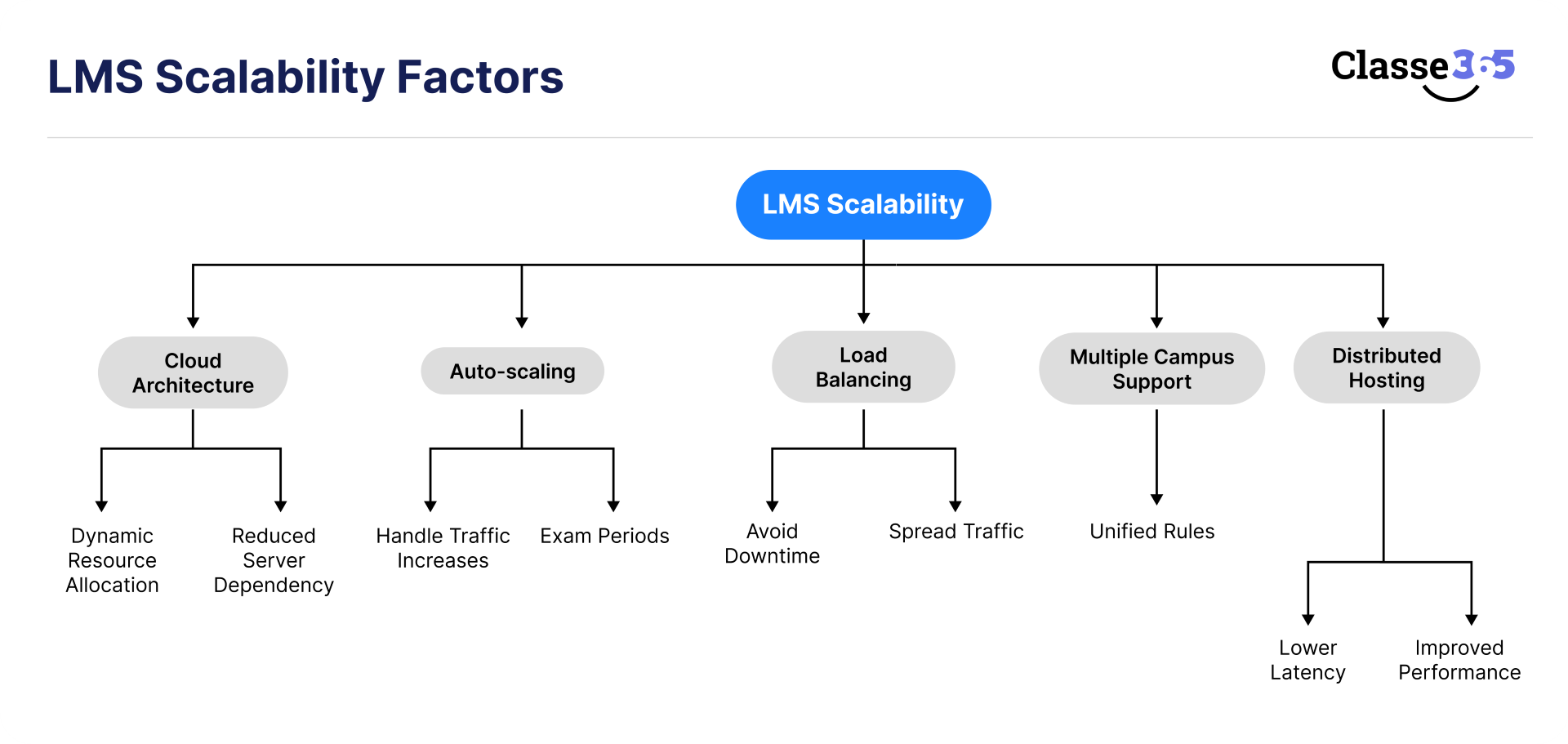
7. How easy is it to scale the LMS?
An LMS might work OK while there aren’t many users, but it might have problems when there are a lot of people using it, such as when results are released or tests are turned in.
Infrastructure Checklist
- Architecture based in the cloud
Cloud systems let you allocate resources dynamically and make you less dependent on local servers. - Auto-scaling
The platform should be able to handle increases in traffic on its own, notably when parents check in or when exams are going on. - Balancing the load
To avoid downtime, traffic should be spread out over multiple servers. - Support for multiple campuses
Institutions with more than one branch should run them all under the same set of rules. - Distributed hosting
Data centers in different areas lower latency and make things work better.
What to Ask For
- Uptime SLA commitments
- Historical uptime reports
- Disaster recovery processes
Scalability keeps long-term investments safe. Classe365 runs on a secure cloud architecture that can support schools of all sizes, from small schools to enterprises with several campuses. People in charge should check to see if infrastructure keeps up with enrollment.
8. What kinds of tests and content does it work with?
Modern teaching methods need to be flexible. An LMS that only lets you use PDFs and multiple-choice quizzes makes it hard to get involved.
Advanced Systems Support
- Video lectures
Teachers should add or submit videos to the blended learning platform. - Interactive modules
Doing digital tasks that are fun helps you remember concepts better. - Works with SCORM and xAPI
Schools that use third-party e-learning content need to make sure that all of their content works together. - Live sessions
Integrated virtual classrooms make it less necessary to use outside platforms. - Discussion forums
Encourage students to work together and talk to each other. - Group assignments
Helpful for learning by doing and improving skills. - Rubric-based grading
Supports education and skill assessment based on results.
Why This Is Important
Being involved helps you learn better. Teachers can use flipped classes and blended techniques better when their systems can handle different types of content.
Classe365 combines material delivery with grading and student records, such that academic reports can be made directly from instructional data. Schools should see if the LMS can do more than just basic tests and assist current teaching methods.
9. What kind of help and training do you get?
Even the best platforms won’t work if they aren’t set up correctly. Guided rollout is important for technology acceptance.
Ask Vendors
- Is the price of onboarding included?
- Is there a manager for each account?
- What is the set response time for the SLA?
- Do you offer live or role-based training sessions?
Successful Implementation Requires
- Alignment of the steering committee
- Training depending on roles (admin, instructor, parent)
- Instead of launching everything at once, do it in stages.
- Set clear goals for success
Without a defined onboarding process, people stop using the product after the first enthusiasm.
Classe365 has guided implementation and training routines, but schools should check to see if the assistance is proactive (with check-ins and optimization guidance) or reactive (just with tickets). The difference has an effect on long-term use.
10. What is the total cost of ownership for the LMS?
Long-term sustainability depends on clear pricing. The lowest Year 1 price could not include expenditures over the next three to five years.
Ask Clearly
- Is the price per student or a set fee?
- Are integrations charged separately?
- Are apps for mobile devices included?
- Are analytics modules extra?
- Are upgrades or new features charged separately?
Transparent Pricing Should Include
- Clear structure for LMS and SIS bundles
- Defined support inclusions
- Make the upgrade roadmap more visible
- No extra payments for infrastructure
Schools should look at the total cost of ownership (TCO) over three to five years, not simply the cost of the first year.
Classe365 calls itself an all-in-one ecosystem, which could save costs for working with several vendors. But schools should think about whether packaged systems fit with how complicated their operations are and their ambitions for expansion.
LMS Evaluation Checklist
To help you compare platforms objectively, use this checklist with scoring weights:
| Evaluation Criteria | Weight (%) | Notes |
| Academic Customization | 15 | Curriculum alignment |
| Security & Compliance | 15 | Encryption, role control |
| Usability | 10 | Teacher/student interfaces |
| Integration | 15 | SIS, virtual classroom sync |
| Mobile Support | 10 | Native apps, offline |
| Reporting & Analytics | 10 | Dashboards & export |
| Scalability | 5 | Cloud performance |
| Content Support | 10 | Rich media & assessments |
| Training & Support | 5 | Onboarding + SLA |
| Pricing Transparency | 5 | TCO clarity |
Tip: Score each vendor from 0 to 5 on every criterion and compare weighted totals.
Best Practices for Implementation & Adoption
Choosing an LMS is only half the battle; the other half is making sure it works and people use it.
Establish a Steering Committee
Get teachers, IT admins, principals, and parents together to talk about what they need.
Define Success KPIs
Examples:
- % of teachers who adopted it in the first semester
- Rates of assignment submission
- Metrics for parent involvement
- Early warning signs that action has to be taken
Try it out before you roll it out fully
Test with one grade or department and improve the procedures before using them in other schools.
Give training based on roles
Don’t treat all users the same. Teachers, kids, and parents all have distinct needs.
Watch and change
Use analytics to make your course design, communication, and engagement plans better.
Common LMS Mistakes Schools Make
Even the best LMS systems don’t work when judgments about which one to use are made too quickly or with too little thought. Most mistakes are strategic, not technical.
- Choosing based on price rather than value.
A low subscription charge can hide problems like limited integrations, inadequate analytics, or poor scalability. Schools should look at the overall cost of ownership, not just the initial price.
- Not paying attention to SIS integration.
Without real-time syncing between the LMS and Student Information System, schools have to enter the same data twice, miss reports, and have problems with how things work.
- Not paying attention to mobile-first access.
A lot of parents and students rely on their phones. People are less likely to use and interact with an LMS that isn’t fully responsive or has apps.
- Putting something into action without clear KPIs.
It will be hard to figure out ROI if you don’t set success indicators like adoption rates, submission percentages, or engagement levels early on.
- Not making plans to grow.
You need cloud infrastructure that can grow with your business if you have more students, new programs, or operations on more than one campus. Eventually, you’ll have to get rid of a system that can’t grow.
If you don’t make these mistakes, the LMS will be a long-term academic tool instead of just a short-term software purchase.
Choose the Best LMS for Schools in 2026
It won’t be enough to compare feature lists to choose the best LMS for schools by 2026. Instead, it will be about choosing the right long-term academic infrastructure. Schools need platforms that work with the ones they already have instead of forcing them to change the way they do things. They also need a strong security system to keep student data safe and experiences that are easy for teachers, students, and parents to use.
To eliminate data silos, it is essential to integrate with student information systems and operational tools. On the other hand, mobile-friendly accessibility makes sure that students are always interested, whether they are on campus or in a hybrid setting.
It is also important to be able to make data that can be used, change with the school, and offer systematic onboarding and support. It’s easier to plan for the long term when pricing models are clear and show the full cost of ownership. When schools use these strategic criteria to pick LMS solutions, they make it easier for students to learn, make it easier for staff to run the school, get more students involved, and build a digital ecosystem that is ready for the future and will help the school succeed in the long run.
FAQ
Q: What exact measures should schools take to go from an old LMS like Moodle to a new platform that works with SIS?
Migration means: 1) Exporting data using CSV/SCORM; 2) Mapping existing courses to new templates; 3) Running parallel pilots for 4 to 6 weeks; and 4) Training users in stages. It will take 2 to 3 months in total. Integrated platforms like Classe365 automate 70% of the data flow to keep things running smoothly.
Q: How can schools get teachers to accept LMS in hybrid settings?
To get over opposition, work with instructors to create processes through pilots, give them a 2-hour training that is appropriate to their function, and start with features that have a big impact, like mobile grading. According to 2025 edtech implementation studies, adoption goes up by 40% when teachers are in charge of beta testing.
Q: How do schools get better LMS prices during vendor demos in 2026?
Ask for a summary of the total cost of ownership (TCO) over three years, package discounts on SIS and training (10 to 20% off), provide free trials for 90 days, and compare prices with those of rivals. If you sign up for more than one year, you may sometimes get pricing of less than $5 per student per month for more than 1,000 students.
Q: How can schools avoid vendor lock-in when selecting an LMS for long-term use?
Pick systems that have open APIs, standard data outputs (CSV/LTI), and no proprietary formats. Test exit strategies in contracts to make sure that all data can be moved within 30 days. This is important because edtech changes quickly in 2026.