



You already know your institution needs an LMS. You are past that. What you actually need is a way to tell, before you sign anything, which learning management system features will still matter in three years and which ones just demo well.
This guide is for that. Each of the 10 features below is written the way you would actually evaluate it: the problem it solves, what happens when it is missing, and the exact question to ask on your demo call.
The best learning management software for universities cuts the manual work between departments. An LMS that hosts your course content but cannot push a final grade into the student record has solved half a problem and quietly handed you a new one.
And this is a crowded, expensive decision. The global LMS market is projected to grow from roughly 31 billion dollars in 2026 to over 100 billion by 2034, a compound annual growth rate near 16 percent, according to Fortune Business Insights.
In North American higher education specifically, Canvas held about 39 percent of the market in Fall 2024. So you are choosing inside a category that is both consolidating around a few big names and filling up with new options every year.
Why Evaluating an LMS for Higher Education is Different From K-12
Think about what a K-12 LMS has to handle. One campus, one calendar, a fixed set of grade levels. Now think about a university: multiple departments on different academic calendars, students enrolled across several programs at once, credit and degree tracking, and a registrar’s office that answers to accreditation bodies.
A nice-to-have feature in a school becomes a deal-breaker in a university. Multi-course enrollment. Degree audit data. Transcript-grade accuracy. None of those are optional in higher education.
It also explains something you have probably noticed already. Higher education buyers almost never evaluate an LMS on its own. They evaluate how it talks to the student information system, because in a university the LMS and the SIS are joined at the hip.
Several of the features below sit right on that seam, which is exactly where higher education platforms tend to succeed or fall apart. For the full picture, our guide on how a student information system improves data management in higher education covers it in depth.
The 10 Learning Management System Features That Matter Most
-
Native SIS Integration, so Grades Reach the Student Record Without Re-Keying
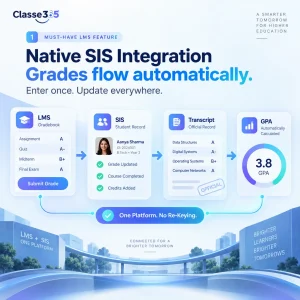
A grade entered in the LMS lands in the student’s SIS record and automatically flows into the transcript, report card, and GPA calculation. Because Classe365 builds the LMS and SIS as modules of one platform, not two stitched-together products, a grade recorded in the gradebook updates the student record automatically. Our digital gradebook vs spreadsheet grading breakdown shows exactly how much this matters at scale. Confirm this first in any demo. Everything else depends on it.
-
Blended and Flipped Classroom Support for Hybrid Programs
What you are looking for is flip-class functionality: instructors attach learning materials to specific lectures and sections, and can see how long students actually spend on each one.
Classe365’s LMS is built around this. An instructor creates sections, adds lectures underneath them, then loads content into each lecture- videos, quizzes, notes, Google Drive files- while activity tracking shows engagement per student. The real test on your demo call is simple. Ask whether one course structure can serve both online and on-campus students at once, or whether hybrid delivery means building everything twice.
-
Built-in Assessment and Quiz Tools With Flexible Grading Scales
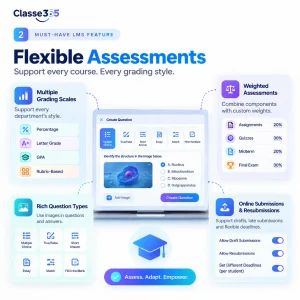
Ask about question types, whether images are supported in questions and answers, and how the grading scale gets configured. One department wants percentages, another letter grades, another rubric-based, and another weighted. Your LMS has to hold all of them at once. This is what to confirm:
| Assessment capability | Why it matters for higher ed | Question to ask the vendor |
| Multiple grading scales | Departments grade differently (percentage, letter, GPA, rubric) | Can each course use its own scale? |
| Weighted assessments | Final grades often combine weighted components | Can I set component weights, and highest-grade-wins rules? |
| Question variety and media | STEM and language courses need images, not just text | Do questions and answers support images? |
| Online submission and resubmission | Late and draft submissions are common in higher ed | Can students submit drafts, and can deadlines vary by student? |
Classe365’s LMS includes a dedicated quiz section with multiple question types and image support in both titles and answers, plus an assessments module for uploading and grading submitted work.
Finer control over resubmissions and per-student deadlines is a request that comes up, so if that is important to your faculty, put it on the table during the demo rather than assuming it. If AI-assisted grading is part of your plan, our roundup of the best AI grading tools for teachers and schools is worth a read alongside this.
-
AI Tools That Actually Reduce Grading and Admin Time
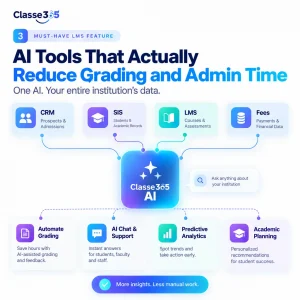
AI is the fastest-moving feature category right now, and it is one of Classe365’s clearest edges for higher education. But do not let a vendor answer “yes, we have AI” and move on. The real question is what the AI does across your daily work and what data it reads.
Classe365’s AI module connects across the CRM, SIS, LMS, and Fees modules instead of sitting in one corner of the product. That means natural-language querying of your institutional data, automated chat and support, predictive analytics, and AI-assisted academic planning, all pulling from the same connected record. It gets more useful the more you use it because it works from one dataset instead of several disconnected ones.
-
Degree Audit and Academic Progress Tracking
A degree audit tracks each student against their program requirements and flags the gaps early, while there is still time to fix them. Pair it with progress tracking, and your advisors get a live view of who is on track and who needs a nudge. Classe365’s Degree Audit module ties into the student’s SIS record, so the requirements check reads from the same data as enrollment and grades, not a separate spreadsheet someone updates monthly.
-
Multi-Course Enrollment and Flexible Academic Session Handling
Confirm the platform supports multi-course enrollment and multiple concurrent academic sessions. Classe365 added multi-course enrollment support specifically for this pattern. The demo test is easy to run: ask them to enroll one student in two overlapping courses, then show you how attendance, grades, and communications stay separate but still tied to the same student record.
-
Parent, Student, and Faculty Portals with Role-Based Access
Through student, parent, and faculty portals with role-based access controls, students see their own courses and grades while administrators see the institution-wide picture. One G2 reviewer singled out the platform as “especially great for parent communication,” which isn’t a phrase you hear about most higher-ed systems.
-
Communication and Social Learning Tools Inside the Platform
Look for built-in messaging, announcements, and discussion or social-learning features tied directly to courses. Classe365 includes discussion groups and a social-learning forum where students and teachers can clarify, discuss, and share within the course context, plus announcement tools that automatically email students. One reviewer described the before-and-after cleanly: they replaced manual mass emails, where every student address got typed in one at a time, with portal notices that reach the whole cohort in a single step.
-
Reporting, Analytics, and Behavioral Insight
Confirm the platform gives you customizable reports and analytics that combine academic and behavioral data in one place. Classe365’s analytics module surfaces behavioral trends alongside grades, and reviewers note that reports generate in a few clicks rather than being assembled by hand. The question to ask is whether reporting is genuinely self-serve, or whether every non-standard report turns into a support ticket. Reporting flexibility is one area some reviewers want extended, so bring your actual reporting requirements to the demo instead of trusting the defaults to cover them. Our guide to the student performance metrics schools should track is a useful checklist to bring.
-
Mobile Access and Reliable Performance at Scale
Ask directly about performance at your student volume, and about what the mobile app can and cannot do. Classe365 is cloud-based with mobile apps for students and staff, and reviewers regularly praise fast page loads and instant syncing on the web platform. Two honest limitations worth raising yourself, because they show up in reviews: some users report server lag once student numbers push past 1,000, and several note the mobile app does not yet match the depth of the desktop portal, though the vendor has said an app overhaul is in development. Ask them to speak to both, against your specific scale.
How to Test These Learning Management System Features in a Demo
A features list only helps if you can verify it with your own eyes. So turn the 10 features above into a short script for the demo call. Before you commit to any LMS for your university or college, make them show you these five things live:
- Grade flow: Have the rep grade an assignment in the LMS, then show that same grade appearing in the SIS record and on the transcript, with no manual export in between.
- Real scale: Ask what happens to performance at your actual student count, and request a reference from an institution roughly your size.
- Your grading model: Have them build a course using your exact grading scale and weighting rules, including any resubmission policy your faculty use.
- Integrations you rely on: Confirm the platform connects to the tools you already run. Classe365 lists integrations including Canvas, Moodle, Google Workspace, Microsoft 365, Stripe, PayPal, QuickBooks, and Xero.
- Total cost with your modules: Get pricing that reflects the modules you will actually switch on, and confirm there are no per-module surprises after you sign.
Get your module list and its cost in writing before you sign anything. You can compare Classe365 pricing against your current stack while you are at it.
Where Classe365 Fits
Classe365 is an all-in-one platform where the LMS, SIS, CRM, admissions, finance, and degree-audit tools are modules of a single product rather than separate systems you sync. For higher education, that architecture is the whole point. A grade entered once shows up in the transcript, the GPA, the degree audit, and the parent portal without anyone re-entering it. If you want the wider view of how those modules connect, our rundown of essential school management software features maps it out.
On the two things buyers ask about most, price and proof, Classe365 is more upfront than a lot of the field. Pricing is published and scales by student count, starting around 50 dollars a month for up to 100 students, instead of hiding behind a mandatory sales call.
If you want to see the grade-to-transcript flow run against your own grading model, book a demo and ask them to set up your exact scenario. You can also read what other institutions say before you get on a call.
FAQs
What is the difference between an LMS and an SIS in higher education?
An LMS manages teaching and learning: course content, assessments, and grading. An SIS manages the student record: enrollment, transcripts, GPA, and degree progress. In higher education the two have to share data constantly, which is why an integrated platform cuts down the manual work between them.
Do universities need a separate LMS if they already have an SIS?
Not always. Some platforms combine both, so a grade recorded for teaching flows straight into the official record. The real question is whether your SIS already includes learning-delivery tools, or whether you are running two products and syncing them by hand.
How much does a higher education LMS typically cost?
Pricing models vary a lot, from published per-student rates to custom enterprise quotes that require a sales call. Many leading vendors, including Canvas, do not disclose figures publicly. Always ask for pricing based on the specific modules you will use and your actual student count.
Can an LMS handle students enrolled in multiple programs at once?
It depends on the platform. Look specifically for multi-course enrollment support and concurrent academic session handling, because not every LMS is built for students taking courses across programs at the same time. Test this exact scenario in the demo.
Is a cloud-based LMS secure enough for student data?
Cloud LMS platforms can meet strict data-protection standards, but compliance is a shared responsibility between vendor and institution. Confirm the vendor’s certifications and data-handling practices, and check that they meet your accreditation and regional requirements before uploading identifiable student data.
How long does it take to migrate to a new LMS?
Migration time depends on data volume, the number of modules you use, and how much historical data you carry over. Ask vendors for a realistic timeline and, more importantly, for references from institutions that migrated recently. Reviewers consistently rate migration support as a make-or-break factor.
Can an LMS integrate with tools we already use, like Google Workspace or Microsoft 365?
Many can, but integration depth varies. Confirm native support for the specific tools your faculty and students use daily, rather than trusting a generic “integrations available” line to cover your stack.
What should we prioritize if our budget only covers some features?
Start with the integration between learning delivery and the student record, because that is where manual work and errors pile up. Assessment flexibility and degree audit usually come next in higher education, since they directly affect grading accuracy and graduation.