




You are comparing two categories of tools that sound similar and do very different things.
Online assessment software is built to create, deliver, and grade tests. ClassMarker is the clearest example: you build an exam, send a link, students take it, and results come back.
LMS assessment tools are built into a broader learning management system. TalentLMS is one example. Classe365 is another. The difference is that grades from an LMS assessment flow into other parts of the platform, course completion records, learner progress dashboards, and in Classe365’s case, the student information system, transcript, GPA, and degree audit.
The online assessment software market reached an estimated 5.31 billion dollars in 2026, growing at a compound annual growth rate of 16.7 percent according to The Business Research Company.
TL;DR
- ClassMarker is built for testing. It handles quizzes, proctoring, and certificates well, but your grades live in a silo. You export results manually and paste them into whatever student system you use.
- TalentLMS embeds assessments inside its LMS. Grades stay connected to courses, but the platform is built for corporate training, not academic institutions. Rubrics, degree audit, and multi-scale grading are missing.
- Classe365 connects assessments directly to the student record. A grade entered in the gradebook updates the transcript, GPA, report card, and degree audit without anyone having to re-enter it.
Meanwhile, a 2025 Learnosity survey found that teachers spend an average of 9.9 hours per week on grading, and a third have considered leaving education because of the workload. The tool you choose either adds to that burden or reduces it, depending on how much manual work sits between the assessment and the student’s record.
Which assessment tool do you need?
- Choose standalone assessment software if you primarily need exams, quizzes, certification, and proctoring.
- Choose LMS assessment tools if you want assessments connected to courses and learner progress.
- Choose an integrated LMS & SIS if you need grades to flow into transcripts, GPA, report cards, and degree audits.
This guide compares ClassMarker, TalentLMS, and Classe365 across 10 parameters so you can see exactly where each one is strong, where it falls short, and which type of tool fits your institution.
Quick Comparison Table: Online Assessment Software vs LMS Assessment Tools
| Parameter | ClassMarker | TalentLMS | Classe365 |
| Best for | Standalone testing and certification | Corporate training with built-in quizzes | Academic institutions needing assessment connected to SIS |
| Question types | Multiple choice, true/false, matching, fill-in-the-blank, essay, file upload | Multiple choice, fill-the-gap, ordering, drag-and-drop, free text, randomised | Multiple choice, checkbox, true/false, matching, essay, document upload, image-supported questions |
| Grading | Automated for objective types, manual for essays | Automated with question weights, manual review for assignments | Automated with five grading scales (grades, rubrics, percentage, actual points, manual entry) plus AI evaluation |
| AI features | None documented | AI question generation for multiple-choice | AI assessment evaluation analyzing all scores, quizzes, homework, and comments per student |
| Proctoring | AI-powered: tab detection, camera monitoring, face detection, ID card verification | Not available | Releasing: AI-based proctoring and document plagiarism detection |
| Gradebook sync | No native gradebook; export results manually | Grades stay within TalentLMS course records | Grades sync natively to the SIS, transcript, GPA calculation, report card, and degree audit |
| Reporting | Per-test analytics, exportable results | Course-level analytics, learner progress dashboards | Per-student, per-subject, and institution-wide analytics with bell curve and candlestick views |
| Certificates | Custom branded certificates with pass-mark rules | Certificates tied to course completion | Custom certificate templates assignable per degree or milestone |
| Integrations | API and webhooks for embedding into external LMS/CRM | 200+ integrations, including Zapier, BambooHR, and Salesforce | Native SIS/LMS/CRM integration within one platform, plus Canvas, Moodle, Google Classroom, and Google Workspace |
| Pricing | Published: subscription plans and pay-as-you-go credit packs | Published: free plan for up to 5 users, paid from $89/month | Published: starts at $50/month for up to 100 students, scales by student count |
What is online assessment software?
Online assessment software is a standalone tool for creating, administering, and scoring tests online. ClassMarker is one of the most established examples, operating for 20 years and used by organizations including Google, Amazon, and Netflix.
What are LMS assessment tools?
LMS assessment tools are assessment features built into a learning management system. Instead of existing as a standalone product, they sit inside a platform that also handles course delivery, content management, learner tracking, and (in some cases) student records.
TalentLMS and Classe365 both fall into this category, but they serve different audiences.
Why should an institution actually change from its current setup?
Signs your current assessment setup is becoming a problem
- Teachers manually transfer grades.
- Assessment data lives separately from student records.
- Report cards require additional data entry.
- GPA calculations require another system.
- Different departments use different grading scales.
- Teachers spend significant time writing end-of-term evaluations.
- Assessment analytics aren’t connected to learning objectives.
If several of these apply, the issue may not be your assessment tool itself. It may be the lack of connection between assessment and the rest of your academic system. The comparison below breaks down how different platforms handle these areas, so you can see where each tool fits and which approach best addresses the gaps in your current setup.
-
Question type variety
ClassMarker and TalentLMS both cover the essentials: multiple choice, true/false, fill-in-the-blank, matching, and free-text or essay questions. ClassMarker adds file upload for document submissions. TalentLMS adds drag-and-drop matching and an ordering question type. Both support question randomization from pools.
Classe365’s quiz module includes multiple choice, checkbox, true/false, matching, essay, and document upload. One key difference: both question titles and answer options support images, which matters for STEM and language assessments where text-only questions are insufficient. The platform is also releasing a proctoring function that checks uploaded documents for AI-generated content and peer plagiarism.
-
Grading scales and flexibility
ClassMarker grades objective questions automatically and provides a percentage score. It does not support multiple grading scales, rubric-based assessment, or GPA calculation. TalentLMS supports question weights (so one question can count more than another) and percentage-based grading, but it does not offer rubrics, GPA points, or multiple grading scale types.
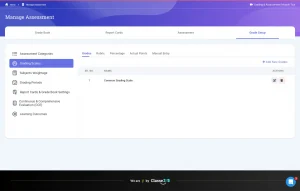
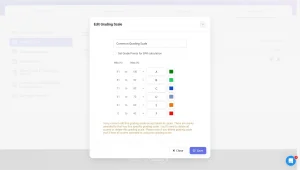
Classe365 provides five grading scale types: letter grades with configurable GPA points, rubrics with criteria mapped to learning objectives, percentage, actual points, and manual entry. Each subject can use a different scale, and subject weightages (30% participation, 10% quizzes, 40% exam, for example) can be standardized centrally or customized per department. If weightages change after grades are entered, the system automatically recalculates all affected scores.
-
AI features
ClassMarker does not currently document any AI capabilities beyond its AI-powered proctoring monitor. TalentLMS added AI question generation, which creates multiple-choice questions from a topic prompt. You specify the topic and number of questions, and the system generates them for review. This saves time on question creation but does not extend to grading or evaluation.
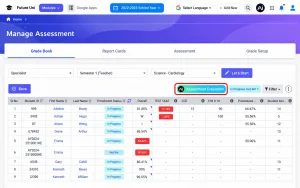
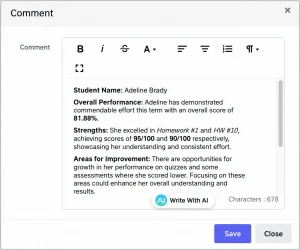
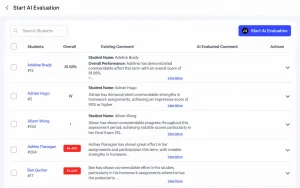
Classe365’s AI works on the output side, not the input side. After assessments, quizzes, homework, and exams are graded, the AI assessment evaluation analyzes every score, every assessment category, and every teacher comment against the subject’s learning objectives, then generates a comprehensive written evaluation for each student. Teachers can add their own comments on top and use AI assistance to refine the writing. For the 9.9 hours per week teachers spend grading, end-of-term evaluation writing is where the time actually disappears.
-
Proctoring and exam security
ClassMarker Monitor includes tab switching detection, mouse boundary restrictions, camera monitoring, face detection, and ID card verification, all browser-based with no downloads required. This is a mature, production-ready feature.
TalentLMS does not offer proctoring. Classe365 is releasing a proctoring feature that checks for AI-generated content in submitted documents and peer plagiarism. If your concern is submission integrity rather than live-session monitoring, Classe365’s approach addresses a different (and increasingly relevant) problem.
-
Gradebook and SIS integration
ClassMarker has no gradebook. Results stay inside ClassMarker until you export them. You then import or re-enter those results into whatever student information system, spreadsheet, or LMS you use separately. Every assessment cycle, someone does this manually.
TalentLMS keeps grades inside its own course records and learner profiles. This is better than a manual export, but the data stays within TalentLMS. TalentLMS has no native connection to a student information system, transcript, or GPA calculation because it is built for corporate training, not academic records.
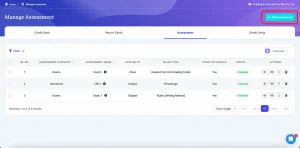
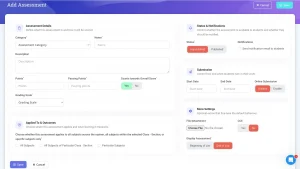
Classe365 connects assessment directly to the student information system. A grade entered in the gradebook updates the student’s SIS profile, transcript, GPA calculation, report card, and degree audit, without anyone re-entering data. In a standalone tool, you grade and then transfer; in Classe365, you grade, and it is already there.
Want to see how assessment grades automatically flow into student records?
Book a Classe365 demo and see the workflow using your grading model, or compare pricing against your current stack.
-
Report cards and transcripts
ClassMarker does not generate report cards or transcripts; it generates per-test result reports. TalentLMS generates course completion certificates and learner progress reports, but not academic report cards or transcripts, since those are not part of its corporate training use case.
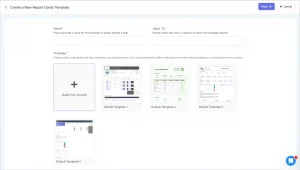
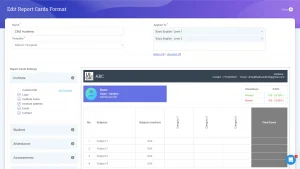
Classe365 includes a fully customisable report card builder with predefined templates and HTML-level customisation. You configure which data variables appear (attendance percentages, assessment scores by category, overall scores, and teacher comments), assign templates to specific cohorts, and publish them to students and parents. Consolidated report cards combine multiple grading periods (semesters or terms) into a single transcript view. Transcripts tie into the degree audit module for higher education institutions.
-
Reporting and analytics
ClassMarker provides per-test analytics: pass/fail rates, score distributions, question-level performance, and exportable CSV results. The reporting is solid for test-level analysis but does not extend beyond the individual assessment.
TalentLMS offers course-level analytics, learner progress dashboards, and completion tracking. You can see how learners progress through learning paths and where they drop off. The analytics focus on course effectiveness, not individual student academic performance.
Classe365’s analytics sit at three levels: per-assessment, per-subject, and institution-wide. The per-subject view includes top- and bottom-performing students, score distributions in pie charts and bell curves, and a candlestick-style view per assessment that shows whether a specific homework or exam tied to a learning objective caught all students in the lower percentile. That last view tells a teacher whether to reteach a concept, not just whether students passed. For a broader view, our guide to student performance metrics schools should track covers the full picture.
-
Certificates and credentials
ClassMarker offers custom branded certificates with configurable pass-mark thresholds. When a test-taker finishes and meets the required score, the certificate is generated automatically. This works well for compliance, professional development, and one-off certification exams.
TalentLMS ties certificates to course completion within learning paths. You can customize certificates and issue them when a learner completes all required course activities.
Classe365 handles certificates at the institutional level: create templates (or use defaults), assign them per degree or milestone, and issue them from the student profile or in bulk. Certificates tie into the graduation and alumni workflow, so issuing a certificate is a part of the learner journey from enrollment to alumni.
-
Integration and data flow
ClassMarker offers an API and webhooks for embedding tests into external platforms (LMS, CRM, WordPress, Google Sites). This is flexible but means ClassMarker is always a separate system.
TalentLMS provides over 200 integrations through Zapier, plus native connections to tools like BambooHR, Salesforce, and Shopify. These integrations serve corporate workflows (HR, CRM, e-commerce) rather than academic data systems.
Classe365’s LMS assessment module is natively integrated with its own SIS, CRM, admissions, fees, and degree audit modules. It also integrates with Canvas, Moodle, Google Classroom, Google Workspace, Microsoft 365, Zoom, Microsoft Teams, and Google Meet. The key difference is that “integration” in Classe365 means modules of one platform talking to each other, not two separate products synced through a third-party connector.
-
Pricing transparency
ClassMarker publishes pricing: subscription plans for ongoing use and pay-as-you-go credit packs for occasional testing. Discounts are available for educators and nonprofits. G2 rates ClassMarker 4.4 out of 5.
TalentLMS publishes pricing: a free plan for up to 5 users, with paid plans starting at $89 per month. Pricing scales by active users and features. G2 rates TalentLMS 4.6 out of 5 based on 700+ reviews.
Classe365 publishes pricing starting at approximately $ 50 per month for up to 100 students, scaling by student count. Every module (LMS, SIS, CRM, fees, degree audit) is included in the subscription, not priced separately. Classe365 holds 4.8 out of 5 across 165 reviews on Capterra and 4.3 out of 5 across 23 reviews on G2.
48 percent of assessment platforms now offer AI-powered features as add-ons that inflate the base price, and Classe365 includes its AI evaluation as part of the standard subscription.
When to choose Classe365 for LMS Assessment
Choose Classe365 if you are a school, college, university, or training provider that needs assessment grades to reach the student record without manual re-entry. You want AI that evaluates student performance across every assessment, not just AI that generates questions. You want grading, transcripts, report cards, attendance, fees, and admissions running on one platform, so a grade entered once shows up everywhere it needs to without anyone copying it over.
FAQ
Is online examination software different from LMS assessment tools?
Online examination software runs independently for one-off exams. LMS assessment tools are a part of a teaching platform, so grades stay connected to courses and student records automatically.
Do LMS assessment features work on mobile devices?
Yes. Classe365’s assessment tools work through its mobile app, letting students take quizzes and teachers grade submissions from a phone or tablet.
Can I reuse the same question bank across different online testing software platforms?
Rarely. Question banks are typically locked to their platform. Exporting and rebuilding questions manually in a new system is standard practice when switching providers.
Do LMS assessment tools support multiple languages?
Classe365 offers multilingual platform settings so users can pick their preferred language. ClassMarker and TalentLMS support interface language options too, though question content translation stays manual.
Is customer support included with online examination software subscriptions?
Support varies by vendor and plan. Classe365 includes 24/7 follow-the-sun support on every subscription; ClassMarker and TalentLMS support levels depend on the tier purchased.
Can parents view results directly through LMS assessment tools?
In Classe365, yes, parents access grades and report cards through a dedicated portal. ClassMarker and TalentLMS have no parent-facing access built in.
Does switching from online examination software to an LMS mean losing historical exam data?
Not necessarily. Most platforms allow result exports as CSV or PDF. Classe365 also supports bulk import, so you can move historical records with you.