



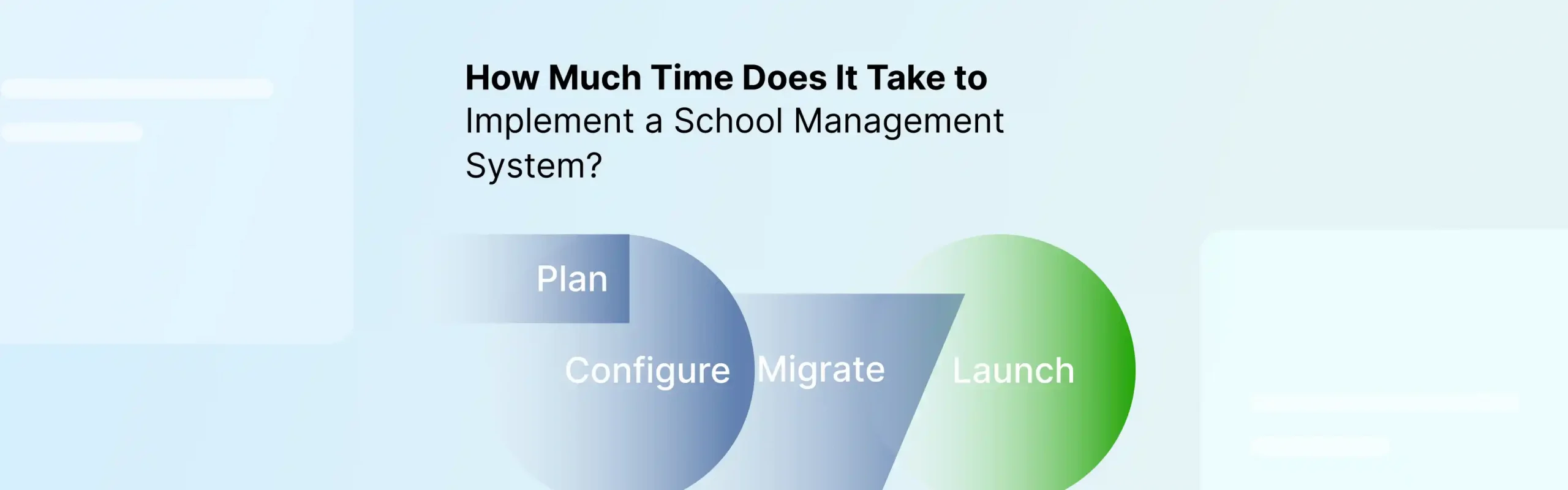
Implementing a School Management System typically takes 4–12 weeks, depending on the school’s data, number of modules, integrations, customization, and staff readiness. For schools replacing existing software, the work usually involves migration and consolidation rather than a first-time setup. UNESCO reports that 53% of countries worldwide still rely on paper-based information systems for education planning and management, highlighting the data challenges that can shape a digital-system rollout.
The hard part of a school management system implementation is rarely the software. It is preparing the data, configuring workflows, connecting systems, and getting users ready. This guide explains how to implement a school management system, the factors that affect it, and what schools need to complete before go-live.
What Phases Affect the School Management System Implementation Timeline?
A typical school management software implementation can be divided into six stages:
| Phase | Typical timeline | Key activities |
| Planning | 1 week | Requirements, ownership, and scope |
| Data preparation | 1-2 weeks | Cleaning, mapping, and validating records |
| Configuration | 1-2 weeks | Academic structure, roles, and workflows |
| Migration & integration | 1-3 weeks | Importing data and connecting systems |
| Testing & training | 1-2 weeks | User testing and staff enablement |
| Go-live | 1 week+ | Launch, monitoring, and issue resolution |
These phases can overlap. For example, configuration can begin while the school prepares its data, reducing the overall timeline.
The biggest variables are school size, number of modules, data quality, integrations, customization, and decision-making speed. A school that has clean records and one person responsible for implementation can move considerably faster than an institution where every decision requires approval from several departments.
Where this goes wrong: schools agree on a launch date before defining what needs to be operational on that date. “The system is live” is not the same as “teachers, administrators, and parents can use it successfully.”
What Does the School Management System Implementation Process Involve?
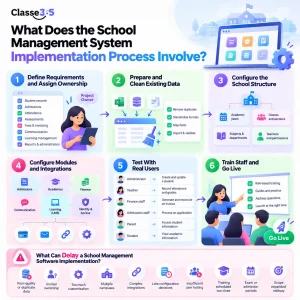
A successful SIS implementation is easier to manage when the work is divided into clear phases.
Phase 1: Define Requirements and Assign Ownership
Before you implement a school management system, decide what the school needs to accomplish with it. List the workflows that must work at launch, such as:
- Student records
- Admissions and enrollment
- Attendance
- Assessments and grading
- Fees and invoicing
- Parent communication
- Learning management
- Reports and administration
Then assign one internal project owner. This person coordinates decisions, collects information from departments, and works with the implementation team.
This becomes especially important when schools school deploy ERP system modules across multiple departments. Without a clear owner, configuration decisions can sit with different teams and delay the project.
Where this goes wrong: trying to implement every available feature at once; define the minimum set of workflows required for launch and phase additional functionality later.
Phase 2: Prepare and Clean Existing Data
Data migration is often one of the most underestimated parts of School management software implementation. Before importing anything, identify where existing information lives. It may be spread across an old SIS, spreadsheets, accounting software, or separate databases.
The basic process is:
- Inventory existing records.
- Remove duplicates and outdated information.
- Standardize names, dates, and identifiers.
- Map existing fields to the new system.
- Import a sample.
- Validate the results.
- Correct errors.
- Complete the final migration.
Matching the number of records in the old and new systems is not enough. Relationships, identifiers, class assignments, and other values also need validation. A school that plans to school deploy ERP system functionality without preparing its data first can lose weeks correcting records after migration.
Data management also varies widely across education systems. UNESCO reports that only 54% of countries worldwide use student IDs to inform management, planning, and education-sector performance monitoring.
Phase 3: Configure the School Structure
Once the data requirements are clear, configure the system around the school’s actual structure. This may include:
- Academic years
- Classes and sections
- Subjects
- Departments
- Teachers
- Student roles
- Parent access
- Administrative permissions
- Assessment structures
- Fee categories
Configuration should reflect how staff actually work rather than simply reproducing the structure of the old system.
If you are comparing platforms before starting implementation, our Classe365 Student Information System page explains how student records, academic information, and administration can be managed within one system, which can simplify the implementation process.
Phase 4: Configure Modules and Integrations
The timeline expands when the project includes several connected systems. LMS adoption is already widespread in higher education. EDUCAUSE research found that 99% of US higher education institutions and 88% of faculty use an LMS, with adoption rates the organization compares to everyday technologies such as cars and cellphones. A broader school management software implementation may involve:
| Area | Example requirement |
| Admissions | Application and enrollment workflows |
| Academics | Classes, subjects, and assessments |
| Finance | Fees, invoices, and payments |
| Communication | Student and parent notifications |
| Learning | Courses and online learning |
| Identity | User access and authentication |
Integrations should be tested as complete workflows, not simply confirmed as “connected.” For example, if a payment gateway is integrated, test the entire journey from payment initiation to transaction recording and reconciliation. The same principle applies when schools deploy ERP system functionality across several departments. Every connected workflow needs an owner and a defined test case.
Phase 5: Test With Real Users
Testing should happen before the entire school receives access. Create practical scenarios based on everyday tasks:
| User | Test |
| Administrator | Create and update a student |
| Teacher | Record attendance and grades |
| Finance staff | Generate and reconcile an invoice |
| Admissions staff | Process an application |
| Parent | Access relevant student information |
| Student | View assigned academic information |
Role-based testing can expose permission problems, missing fields, and confusing workflows before they affect the entire school.
Where this goes wrong: testing only with the IT team. The people who perform the work every day should be involved in acceptance testing.
Phase 6: Train Staff and Go Live
Training should happen close enough to launch that staff remembers what they learned but early enough to allow questions and practice. Separate training by role:
- Administrators need configuration and reporting guidance.
- Teachers need attendance, grading, and classroom workflows.
- Finance teams need fee and payment workflows.
- Admissions enrollment teams need application and enrollment processes.
When a school deploy ERP system modules without adequate training, employees often continue using spreadsheets or older processes alongside the new platform. After training, launch at a low-risk point in the academic calendar and monitor the first few weeks closely. What Can Delay a School Management Software Implementation?
Several factors can turn a planned six-week rollout into a much longer school management software implementation. The most common include:
- Poor-quality or duplicate data
- Unclear implementation ownership
- Too much customization
- Multiple campuses
- Complex integrations
- Late configuration decisions
- Insufficient user testing
- Training scheduled too close to launch
- Exam or admission periods
- Expanding the scope midway through the project
The academic calendar deserves particular attention. A technically ready system can still create operational problems if staff are asked to change processes during examinations, admissions, or other high-pressure periods.
If a school plans to deploy ERP system functionality during the academic year, it should define which workflows can change safely and which should wait for a natural transition point.
How Can You Speed Up the Implementation Timeline?
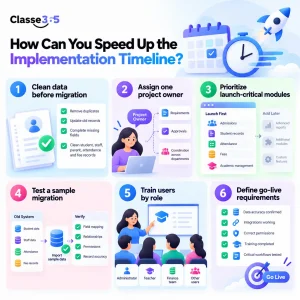
Good preparation can shorten a school management software implementation by reducing rework, approval delays, and migration issues. Focus on these areas before the system goes live:
- Clean data before migration: Remove duplicate, outdated, and incomplete student, staff, parent, attendance, and fee records before importing them.
- Assign one project owner: Give one person responsibility for requirements, approvals, and coordination across departments to keep the school deploy erp system process moving.
- Prioritize launch-critical modules: Start with essential workflows such as admissions, student records, attendance, fees, and academic management. Add lower-priority modules after launch.
- Test a sample migration: Import a small dataset first to verify field mapping, relationships, permissions, and record accuracy before migrating the full database. This is especially important during SIS implementation.
- Train users by role: Train administrators, teachers, finance teams, and other users on the workflows they will handle daily.
- Define go-live requirements: Confirm data accuracy, working integrations, correct permissions, completed training, and successful testing of critical workflows before launch.
For implementation planning, Classe365’s enterprise onboarding support outlines setup, data migration, integrations, and training activities.
School Management System Implementation Checklist
Before you implement a school management system, confirm that:
- Project owner and responsibilities are defined
- Launch scope is approved
- Academic structure is configured
- Student and staff data is cleaned
- Trial migration is validated
- Required modules are configured
- Integrations are tested
- User permissions are verified
- Staff training is complete
- Key workflows pass acceptance testing
- Go-live date is confirmed
- Post-launch support is available
Should You Implement a School Management System All at Once?
Not always. The right approach depends on the school’s size, data readiness, and number of workflows.
| Approach | Best suited for | Consideration |
| Full rollout | Small scope and clean data | Faster transition |
| Phased rollout | Multiple departments | Easier change management |
| Pilot first | Complex workflows | More testing before scale |
| Module-by-module | Broad ERP scope | Lower initial disruption |
For a School management software implementation, choose the rollout model based on the number of users, campuses, integrations, data volume, and workflows involved. A smaller school may manage a full rollout, while a larger institution may benefit from a phased approach.
Ready to Plan Your School Management System Implementation?
If you are planning a new deployment, replacement, or migration, book a Classe365 implementation walkthrough to discuss your school’s workflows, integrations, data migration, and rollout requirements.
You can also review Classe365 pricing to assess the platform based on your school size and requirements.
FAQ’s
How long does a school management system implementation take?
A focused single-school rollout can take around 4–8 weeks, while broader implementations may require 8–12 weeks or more. Data quality, integrations, customization, and the number of modules have a major effect on the timeline.
What is the longest part of SIS implementation?
Data preparation and migration can take significant time because records need to be cleaned, mapped, imported, and validated. Complex integrations and multiple rounds of testing can also extend the schedule.
What data should a school prepare before implementation?
Schools should typically prepare student, parent, staff, academic, enrollment, and relevant financial records. The exact migration scope should be agreed before the project begins.
Can a school implement ERP software during the academic year?
Yes, but avoid high-risk periods such as examinations and major admissions cycles where possible. A phased rollout can reduce disruption when implementation cannot wait for the next academic session.
Does school management software implementation require staff training?
Yes. Teachers, administrators, finance teams, and other users need training on the workflows relevant to their roles. Training should include practical tasks rather than only a product demonstration.
Can schools deploy ERP system modules in phases?
Yes. Schools can launch critical workflows first and introduce additional modules later. This approach can make testing, training, and change management easier for larger implementations.
What causes school management software implementation delays?
Common causes include poor data quality, unclear ownership, late decisions, excessive customization, complex integrations, and insufficient testing or training. Multiple campuses can also add configuration and migration work.
How can a school choose the right implementation timeline?
Start with the desired go-live date, then work backward through data preparation, configuration, migration, testing, and training. Add contingency time for migration corrections and user acceptance rather than assuming every stage will finish on the first attempt.