




With automation in schools communication, the right message reaches the right person at the right time, without anyone having to remember to send it. A student is marked absent, and the parent knows within seconds. A fee comes due, and the reminder goes out on its own. Updates reach parents as things happen, not hours later when someone finally gets around to it. Your staff spends less time chasing and more time on work that actually needs them.
Why Communication Still Breaks Down in Most Schools
Talk to any school administrator, and they will tell you the same thing. The workload is not really about teaching. It is about everything else. Chasing parents about unpaid fees. Manually notifying students about schedule changes. Sending exam reminders one by one.
According to the OECD TALIS 2024 report, an additional hour spent on administrative tasks or communicating with parents is associated with a steeper decline in teacher well-being than almost any other non-teaching activity. In 18 education systems, the share of teachers reporting administrative work as a source of stress increased between 2018 and 2024.
Most of that stress comes from one simple problem: communication is still largely manual. And manual means slow, inconsistent, and dependent on someone remembering to do it.
Educational automation fixes this by handling repetitive, time-sensitive tasks automatically, so your team can focus on the conversations that actually need them.
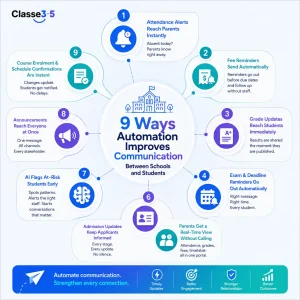
Here are nine ways it does that:
-
Attendance Alerts Reach Parents Instantly
In most schools, a teacher marks a student absent. That information sits in a register. At some point, someone notices. A phone call gets made, maybe an hour later, maybe not at all.
That gap is where things go wrong. Parents stay in the dark. And by the time someone follows up, the opportunity for early action has passed.
With education automation, none of that lag exists. The moment a teacher marks a student absent, an SMS or email is automatically sent to the parent. No call needed. No one has to remember. According to Modern Campus research, SMS achieves a 98% open rate compared to email’s 20%, making it the most reliable channel for time-sensitive alerts.
How Classe365 Handles This
In Classe365’s automated attendance tracking, attendance data flows directly into the notification engine. When a student is flagged as absent, alerts are sent to parents and administrators in real time. If the same student shows a pattern of absences, the student information system escalates automatically to the relevant staff. No one has to run a report to notice a problem.
-
Fee Reminders Send Without Anyone Pressing Send
Chasing fee payments is one of the most time-consuming things school administrators deal with. Someone checks who has not paid, compiles the list, drafts a reminder, and sends it. Then follows up a week later. Then again.
Automation in schools replaces this entire loop. An invoice is generated at enrolment. A reminder goes three days before the due date. Another goes on the day. A final notice follows if payment is still outstanding. All without staff involvement.
According to Verified Market Research, the global school management software market is projected to reach USD 41.46 billion by 2032, with fee automation among the fastest-growing use cases. Parents hear from the school on time. Finance teams stop chasing. Payment comes in faster.
-
Grade and Assessment Updates Reach Students Immediately
Automated grade notifications are sent the moment a teacher submits results. Students get an alert through the learning management system or email. Parents see the update through their portal. It also cuts down on the steady stream of “when do we get our marks back?” messages landing in teachers’ inboxes after every assessment.
-
Exam and Deadline Reminders Go Out Automatically
Education workflow automation triggers reminders from the academic calendar. An exam reminder sends three days before. An assignment notification goes out the morning it is due. A re-sit reminder is sent to anyone who missed the first sitting. No staff member sets up each message manually. Every student gets the same communication. Nobody is reminded or forgotten, depending on which teacher sent the message that week.
-
Parents Get a Real-Time View Without Calling the Office
One of the biggest sources of inbound calls to any school is parents asking for information they cannot easily access themselves. What is my child’s attendance record? Has the fee gone through? When is the next exam?
These are not difficult questions. They just require someone to look something up and pass it on. Which, multiplied across hundreds of parents, becomes a significant drain on staff time.
A parent portal changes this entirely. Parents log in and see attendance records, grades, fee statements, timetables, and announcements in one place, updated in real time. They do not need to call. The information is just there.
How Classe365 Handles This
Classe365’s parent portal connects directly to the student information system and the fees and invoicing module. When a fee is paid, the record updates instantly. When attendance is marked, parents see it. When a grade is submitted, it appears in the portal automatically. Parents can message teachers directly through the portal, and teachers reply within the same system. Everything stays in one place.
-
Admission Updates Keep Applicants Informed at Every Stage
Silence during admissions costs you students. Someone fills out a form, hears nothing for two weeks, and by the time your offer lands in their inbox, they have already said yes to someone else.
The fix is not hiring more people to send more emails. It ensures communication happens automatically at every stage. A confirmation goes out the moment a form is submitted. When the application moves to review, the applicant gets an update. When an offer is made, the letter goes out without anyone having to draft it. And when the student enrolls, a welcome message is already waiting.
Your team writes nothing individually. Yet every applicant feels like they are being kept in the loop. That responsiveness matters more than most institutions realize. According to Ruffalo Noel Levitz, almost 80% of graduate students enroll at the institution that responds to them first. At scale, automation is the only way to be that institution consistently.
-
AI Flags At-Risk Students Before Problems Escalate
When attendance, grade, and engagement data all sit on the same platform, the system can connect the dots earlier. A student missing three consecutive sessions while grades are slipping is not just an attendance problem. It is a signal that someone needs to reach out, and the right person to do that is a counselor or advisor, not an automated message.
AI workforce platforms for student engagement use this data to surface early warnings to the right people. A counselor gets an alert. A personal tutor is notified. An advisor can reach out before the student disengages completely.
How Classe365 Handles This
Classe365’s AI module does not look at attendance, grades, and engagement in isolation. It reads them together and surfaces a combined picture. When a student is slipping across multiple signals at once, the relevant staff member gets an alert that includes the attendance record, recent grade trend, and engagement history, so they can have an informed conversation rather than a cold check-in. According to a Classe365 case study, a secondary school in Southeast Asia reduced admin workload by 40% and improved reporting accuracy by 60% within six months of switching to a unified platform.
-
Announcements Reach Every Stakeholder Without Multiple Send-Outs
Top data entry automation solutions for educational institutions consolidate this into one broadcast that reaches students, parents, and staff through their preferred channel simultaneously. One message. One send. SMS to parents. Email to students. In-app notification to staff. Everyone gets the same information at the same time.
-
Course Enrolment and Schedule Confirmations Are Instant
When a student selects courses for the next term, they should receive confirmation immediately. When a schedule is assigned, they should know. When a class is moved, an update should reach them before they show up to an empty room.
Without automation, this depends on someone in administration to process the change and then separately send the communication. With automation, the confirmation goes out the moment the record updates. The learning management system reflects the change. The student gets a notification. The administrative action and the communication happen together, automatically.
How Classe365 Brings Automated Communication Together
Most schools use separate tools for each of these functions. One for SMS alerts. Another for the parent portal. A different one for fee reminders. None of them talk to each other, and every update requires manual input in at least one of them.
Classe365 is built differently. Every communication function, attendance alerts, grade notifications, fee reminders, admission updates, and AI-driven early warnings, runs from a single platform on one shared database. When something changes in one module, every other module knows instantly. According to UNESCO’s 2024 guidance on AI in education, institutions that integrate AI tools into unified platforms see the strongest gains in operational efficiency and student engagement.
Trusted by 6,000+ institutions across 130 countries, including the Asian Institute of Management, the U.S. Air Force, and PricewaterhouseCoopers. Pricing starts at $100 per month. Individual modules, including the CRM, finance and accounting, and alumni tools, are available at $75 per month each. No setup fee. Start your 15-day free trial and see how your institution’s communication changes when everything runs from one place.
FAQs
What is automation in education?
It is the use of software to handle repetitive communication and administrative tasks automatically, like sending attendance alerts, fee reminders, grade notifications, and exam deadlines, without requiring manual input from staff each time.
How does automation in schools improve parent communication?
It removes the lag between an event happening and a parent being informed. When a student is marked absent, the parent gets an SMS instantly. When a fee is due, a reminder goes out automatically. Parents stay informed without anyone having to remember to call them.
What is education workflow automation?
It is a connected sequence of automated actions triggered by events in your school management system. A student enrolls, triggering an invoice. A grade is submitted, triggering a notification. An absence is recorded, triggering a parent alert and a staff escalation.
How does AI in higher education student engagement communication channels work?
AI analyzes attendance, grade, and engagement data together. When it spots a pattern suggesting a student is at risk, it sends a targeted alert to the appropriate staff member with sufficient context to act. It is not just a notification. It is an early warning with meaning.
What are the top data entry automation solutions for educational institutions?
These are platforms that eliminate manual data entry by connecting forms, records, and communications into one system. When a student submits an application, their data flows directly into the SIS. When a payment is made, the fee record updates automatically. No duplicate entry.
Can small schools benefit from education automation?
Yes. The time savings are proportionally just as significant for small teams as for large ones. A school with two administrators handling 200 students benefits from automated fee reminders and attendance alerts just as much as a university with a dedicated operations team.
How does automation affect the role of teachers and administrators?
It removes repetitive tasks so they can focus on work that actually requires their attention. Teachers stop chasing attendance registers. Administrators stop manually compiling fee lists. Time saved on these tasks goes back into student support.
What should I look for in an automated school communication platform?
Native integration between communication tools and student records. SMS, email, and in-app alerts in one system. A parent portal that updates in real time. AI-driven early warning for at-risk students. And pricing that scales with your institution rather than charging per message or per user.