




Most schools, colleges, and training centers use spreadsheets like Microsoft Excel or Google Sheets to keep track of their daily tasks. They’re easy to use, adaptable, and work well when there aren’t many students and the processes are simple.
But as organizations get bigger, it becomes harder to keep track of spreadsheets. One file has admissions data, another has attendance data, and another has grades. All of a sudden, teams are spending more time updating sheets than managing students.
At this point, spreadsheets don’t break; they just can’t keep up with how complicated institutions are getting.
Version conflicts, mistakes made by hand, data silos, and delays in reporting happen all the time, which makes it harder for faculty and administrators to stay on the same page.
If your school is still using spreadsheets to handle important academic or administrative tasks, there’s a good chance you’ve already outgrown them.
Here are seven clear signs that your school needs to stop using spreadsheets and start using a Student Information System (SIS) or Learning Management System (LMS).
Table of Contents
Why Spreadsheets Don’t Work in Modern School Management
At first glance, programs like Microsoft Excel and Google Sheets may seem like they can be used to keep track of student records and academic data. In reality, they are just tools for storing data, not platforms that are meant to support modern institutional operations. Schools and universities today need tools that can automate the process of admitting students, keep track of their progress in real time, make reports right away, and make it easy for departments to work together. Spreadsheets were never meant to handle this much operational complexity. They don’t have important features like automated workflows, real-time synchronization between teams, structured data relationships, and access control based on roles.
As schools get bigger, using spreadsheets to keep track of students and academic tasks often leads to data silos, mistakes made by hand, delays in reporting, and higher administrative costs. These are all signs that it’s time to switch to a dedicated Student Information System (SIS) or Learning Management System (LMS).
The Hidden Price of “Still Managing It Somehow”
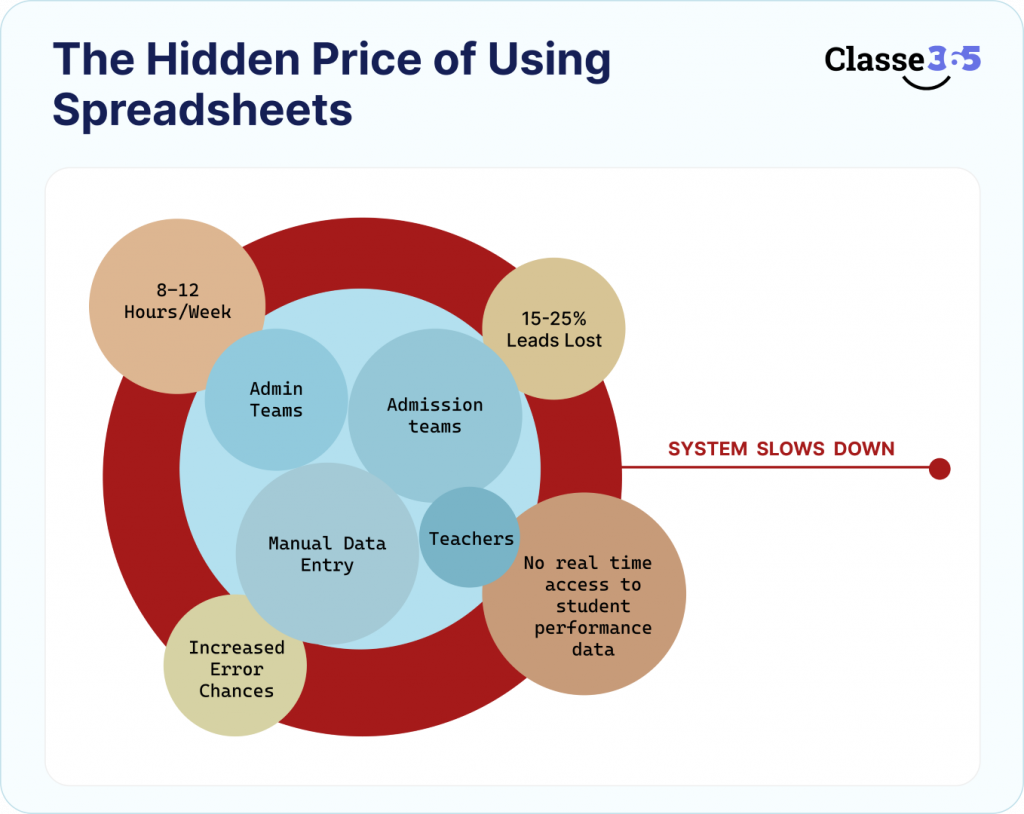
In a school with between 1,000 and 3,000 students:
- Admin teams put together reports for 8 to 12 hours a week.
- 15–25% of leads are lost by admission teams because they don’t follow up.
- Teachers don’t have real-time access to information about how students are doing.
- Every time you enter data by hand, the chances of making a mistake go up.
Each of these seems manageable on its own. They work together to make a system that slows down growth.
Quick Self-Check: Are Spreadsheets Making You Slow Down?
Before moving on, take a look at how your school handles student data and academic workflows.
Microsoft Excel and Google Sheets are good for simple tracking. But as your school gets bigger, with more students, programs, and teams, it gets harder to run. There is more duplicate data, reports take longer to make, and teams spend more time updating files than making choices.
If you say “yes” to even two of the following, spreadsheets are already making you less productive:
- Different teams keep their own copies of student data.
- You have to put together reports by hand from different sheets.
- Spreadsheets are used to keep track of admissions.
- Real-time data on student performance is not available.
- More and more data errors and inconsistencies are happening.
Right now, the problem isn’t how to better manage spreadsheets. Your organization has grown too big for workflows that use spreadsheets. You don’t need another tool; you need a structured system that can handle admissions, academics, reporting, and working together all in one place. Explore the 7 must-have features of a Student Information System to understand what to look for.
Your organization has grown too big for workflows that use spreadsheets.
You don’t need another tool; you need a structured system that can handle admissions, academics, reporting, and working together all in one place.
7 Signs That You Should Move Up from Spreadsheets to a SIS or LMS
1. Your data is spread out over several sheets
What it looks like:
There is a separate spreadsheet for admissions, attendance, grades, and fees.
Real scenario:
Before a meeting with parents, an administrator needs a full profile of each student. They spend 20 minutes getting data from four different sheets, only to find out that one file hasn’t been updated.
What breaks:
- There is no one source of truth.
- Conflicts between versions
- Making decisions too late
What solves it:
A Student Information System (SIS) puts all of a student’s information, including admissions, academics, attendance, and finances, into one database.
2. Manual workflows are making admissions and operations take longer
What it looks like:
Spreadsheets keep track of leads. Reminders by hand are what follow-ups depend on. People send documents back and forth by email..
Real scenario:
A potential student fills out a form to ask a question. You have to type the data into a sheet by hand. There is no automatic follow-up. The lead goes cold.
Impact:
- Lost chances to get in
- Less successful conversions
- More reliance on manual labor
What solves it:
An SIS with CRM features automates lead capture, follow-ups, and application tracking.
Many schools that use automated admissions workflows see a 20–30% increase in conversion rates.
3. You can’t see how well your students are doing in real time
What it looks like:
Every so often, grades are changed. You can’t see how engaged, how often students attend, or how much they are learning.
Real scenario:
A student is not doing well, but the problem is only found out after the final tests, when it’s too late to do anything about it.
Impact:
- Late academic help
- Bad results for students
- Not enough information from faculty
What solves it:
A Learning Management System (LMS) gives you the following:
- Keeping track of progress in real time
- Analytics for Assessment
- Metrics for Engagement
This lets you intervene before something goes wrong instead of after it goes wrong.
4. Reporting Takes Hours Instead of Minutes
What it looks like:
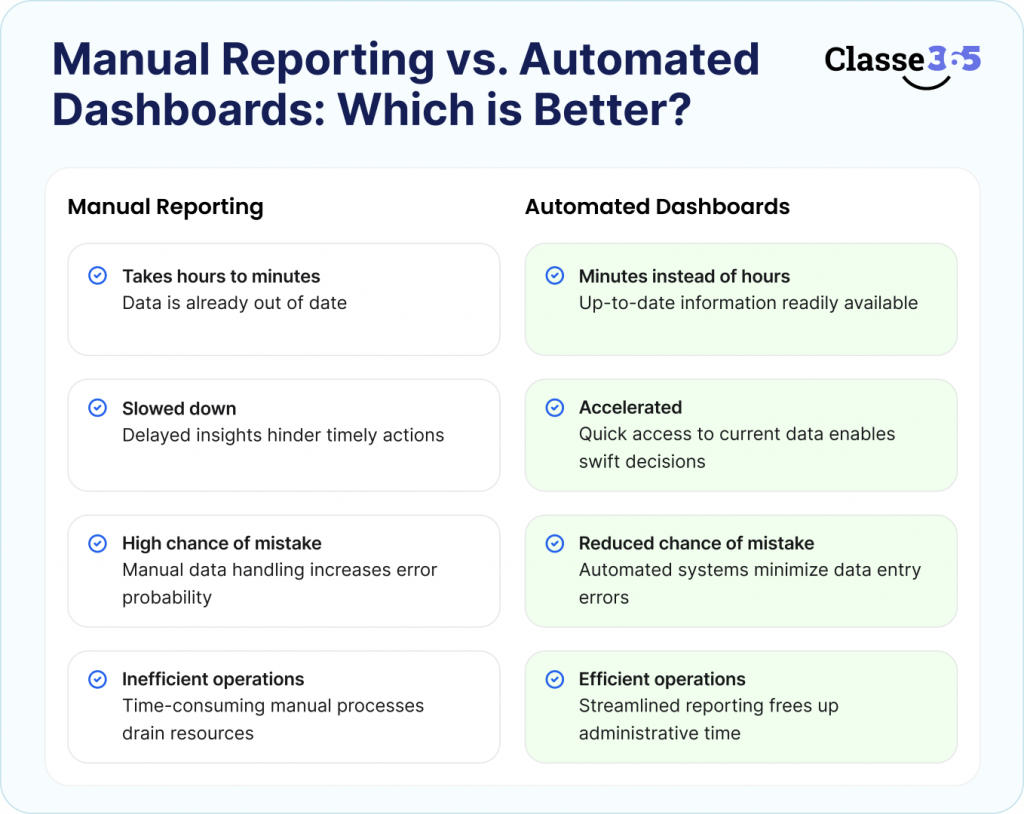
To make monthly or quarterly reports, you have to get data from many sheets, clean it up, and put together summaries by hand.
Real scenario:
A performance report is requested by leadership. The admin team spends a whole day getting it ready, but the data is already out of date.
Impact:
- Taking a long time to make decisions
- A high chance of making a mistake
- Inefficiency in operations
What solves it:
SIS and LMS platforms have real-time dashboards that cut down on reporting time from hours to minutes.
5. Departments work in their own areas
What it looks like:
There isn’t much coordination between the admissions, academics, and finance teams’ spreadsheets.
Real scenario:
Teachers can’t see if a student has paid their fees. There are no limits on who can take classes, which causes confusion and miscommunication.
Impact:
- Workflows that aren’t working well
- No one is responsible
- Bad experience for students
What solves it:
A unified platform makes sure that all departments use the same system, have the same visibility, and follow the same structured workflows.
6. The number of data errors and security risks is going up
What it looks like:
Anyone who has access can change data. There is no record of the audit. People don’t see mistakes.
Real scenario:
Someone accidentally overwrites a free entry. You can’t find out who changed it or get the original data back.
Impact:
- Differences in money
- Risks of not following the rules
- Problems with the integrity of data
What solves it:
The following are what modern SIS platforms offer:
- Access Control Based on Role
- Logs of Audits
- Safe Cloud Storage
7. Your school is getting bigger, but your systems aren’t getting bigger
What it looks like:
More students, more classes, more difficult, but the same spreadsheets.
Real scenario:
A school opens more than one campus. Each campus has its own sheets. It becomes almost impossible to report on everything at once.
Impact:
- Operational mess
- Hurdles to growth
- More work for the administration
What solves it:
Scalable SIS/LMS platforms can:
- Managing Multiple Campuses
- Access for Multiple Users
- Reporting from one place
What do you really need: a SIS or an LMS?
This is where a lot of schools get confused, and most articles don’t give clear advice. Schools hear a lot about Learning Management Systems (LMS) and Student Information Systems (SIS), but they don’t know which one will help them with their problems. Read our full SIS vs LMS comparison for a detailed breakdown.
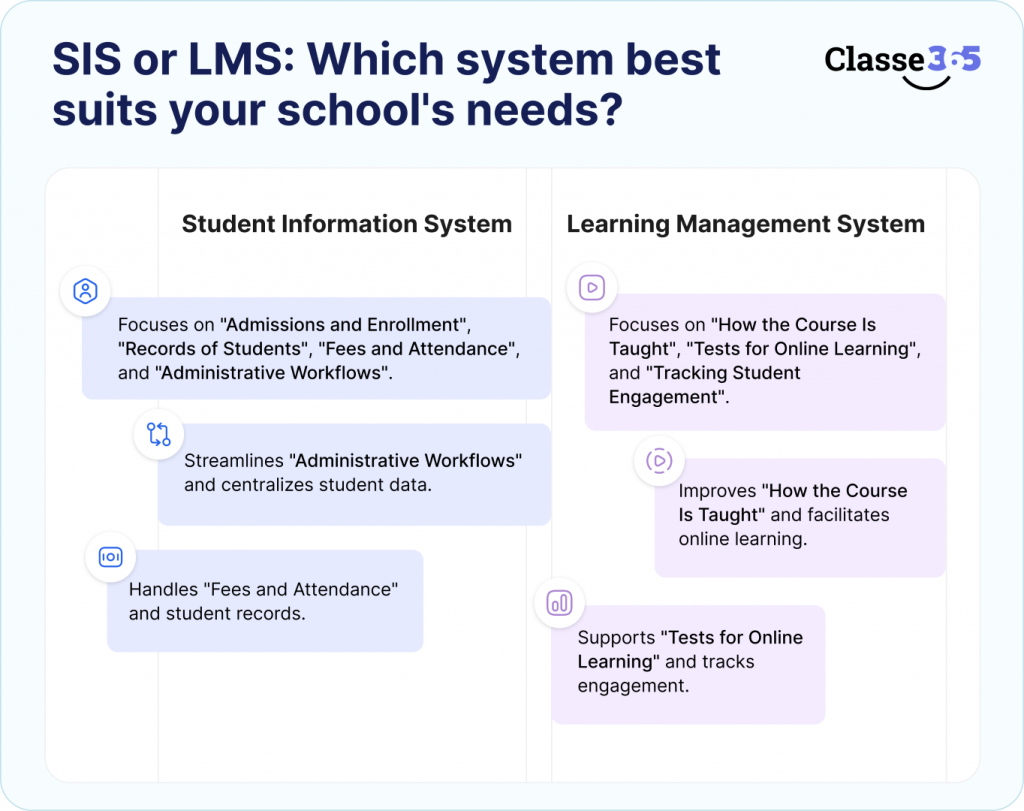
SIS stands for Student Information System
Best for:
- Admissions and Enrollment
- Records of Students
- Fees and Attendance
- Administrative Workflows
Learning Management System (LMS)
Best for:
- How the Course Is Taught
- Tests for Online Learning
- Tracking Student Engagement
When You Need Both
If your school is in charge of both running the school and teaching, then a SIS and LMS need to work together. Administrative data, student records, course enrollment, and learning progress all need to move smoothly between systems. That’s why many modern education platforms now combine SIS and LMS features into a single, integrated ecosystem. This lets schools manage both learning and operations from one place.
What Will Happen If You Keep Using Spreadsheets?
At first, spreadsheets like Microsoft Excel or Google Sheets may seem like enough to keep track of student data, admissions, and reports. It looks like nothing is broken, and things are going on as usual.
But as your school gets bigger, the problems start to show themselves. Tracking by hand slows down the admissions process, and data that is not all in one place makes it harder to see how well students are doing. Administrative teams also have to spend more and more time putting together reports and fixing mistakes. What used to work well starts to cause problems in the workplace.
Inefficiencies in admissions begin to slow down enrollment and hurt potential revenue. It’s harder to keep track of how students are doing and what they’ve learned when you can’t see all the data.
Manual processes make the workload for administrators and the costs of running the business higher. Every new student, program, or department makes it harder to scale operations.
The real problem is that spreadsheets don’t often fail all at once. Instead, small inefficiencies build up over time until growth becomes hard to handle. At that point, schools and colleges often realize that spreadsheets were never meant to handle large-scale academic operations. That’s why a structured system like a SIS or LMS is so important.
What to Look for When Getting Rid of Spreadsheets
When looking at a Student Information System (SIS) or Learning Management System (LMS), make sure to look for features that make the system more efficient, make data easier to find, and let the school grow.
Look for these important features:
- Admissions and workflow automation to get rid of the administrative work that has to be done by hand
- A central database for students to manage their data in a consistent and organized way
- Real-time reporting and analytics to help you make decisions about academics and operations faster
- Integration across departments so that admissions, academics, and administration can all stay in touch
- Role-based access control keeps sensitive student data safe.
- Scalability to support the growth of institutions and the expansion of programs
It’s not just about getting new software when you choose the right platform. It’s about putting in place a digital infrastructure that can help institutions grow over time.
Choosing the right platform is not just about adopting new software. It’s about building a digital infrastructure that can support long-term institutional growth.
How modern platforms completely take the place of spreadsheets
Modern education platforms do away with separate spreadsheet workflows and instead offer integrated systems that handle the whole academic lifecycle in one place. Instead of using Microsoft Excel and Google Sheets separately or having to switch between different files, schools are switching to unified platforms that bring together both learning and operational processes.
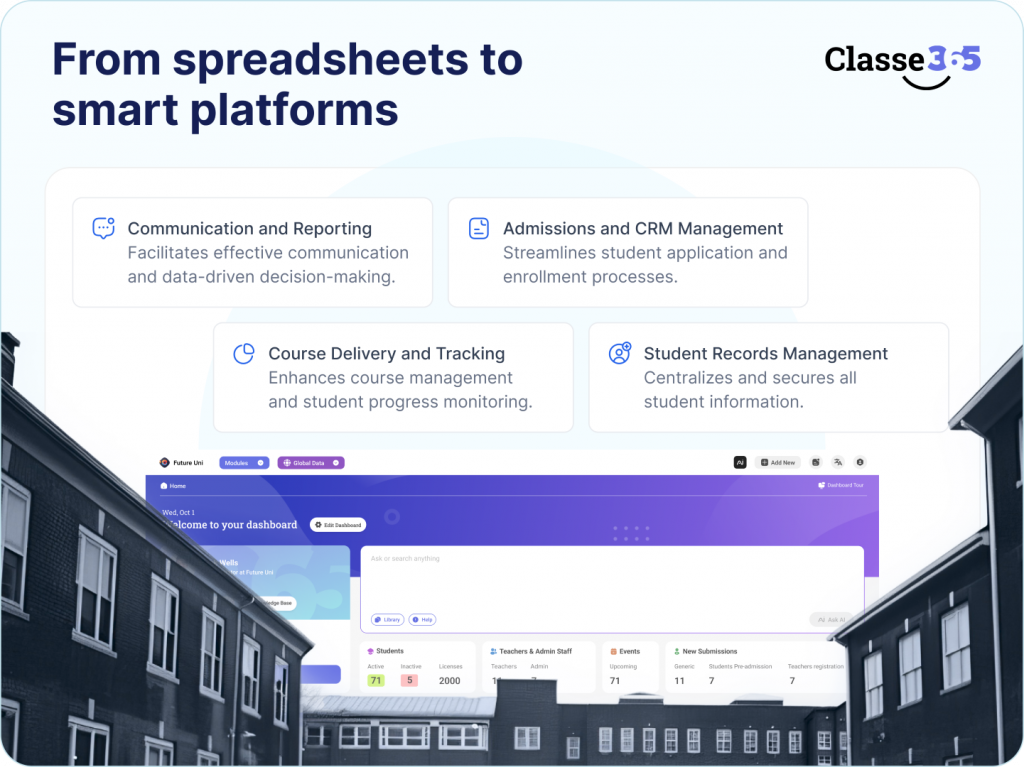
These systems usually link together:
- Admissions and CRM management: Schools can handle the whole process of getting students to apply and then enroll in one system. This helps keep track of leads, automates communication, and cuts down on the need for manual follow-ups during the admissions process.
- Managing student records and information: A single database holds all of the students’ information, such as their enrollment information, attendance records, academic history, and fee records. This makes sure that all departments can access the same data and cuts down on mistakes and duplicate entries.
- Course delivery and tracking student learning progress: Schools can handle course materials, assignments, and tests, and they can also see how well students are doing in real time. This makes it easier for teachers to keep an eye on how well students are doing and how involved they are.
- Communication and reporting across the whole institution: Modern platforms make it easy for administrators, faculty, students, and parents to talk to each other and get real-time reports and analytics to help the institution make better decisions.
Platforms like Classe365 bring all of these features together into one system, which lets schools:
- Get rid of manual tasks and entering the same data twice.
- Lower the cost of running the business
- Make the student experience better overall
- Make decisions based on data and make them faster across all departments
Spreadsheets are a way to get started, not a whole system
You can use spreadsheets like Microsoft Excel and Google Sheets to keep track of small amounts of data and basic student records. Because they are easy and well-known, many organizations start with them.
But as schools get bigger, it gets harder to use spreadsheets to keep track of admissions, student data, reports, and academic workflows. Data gets spread out across files, reports have to be made by hand, and departments have a harder time working together.
This is why schools and other organizations eventually switch to systems like a Learning Management System (LMS) or a Student Information System (SIS). The goal isn’t just to be efficient; it’s also to build a system that can handle growth, organize data, and make better decisions.
FAQ
What are the problems with using spreadsheets in school?
Spreadsheets are not good for managing complicated institutional workflows because they don’t have automation, real-time updates, data security, or scalability.
When is it time for a school to switch to a SIS?
When data is spread out, it takes longer to report, and manual processes start to hurt efficiency and growth.
What is the difference between SIS and LMS?
An SIS takes care of administrative data and tasks, while an LMS takes care of teaching, learning, and keeping students interested.
Can an LMS replace spreadsheets completely?
An LMS replaces spreadsheets for learning-related activities, but administrative functions still require an SIS.
Is an SIS necessary for small institutions?
Not immediately, but once operations grow beyond basic tracking, an SIS becomes essential for scalability.