



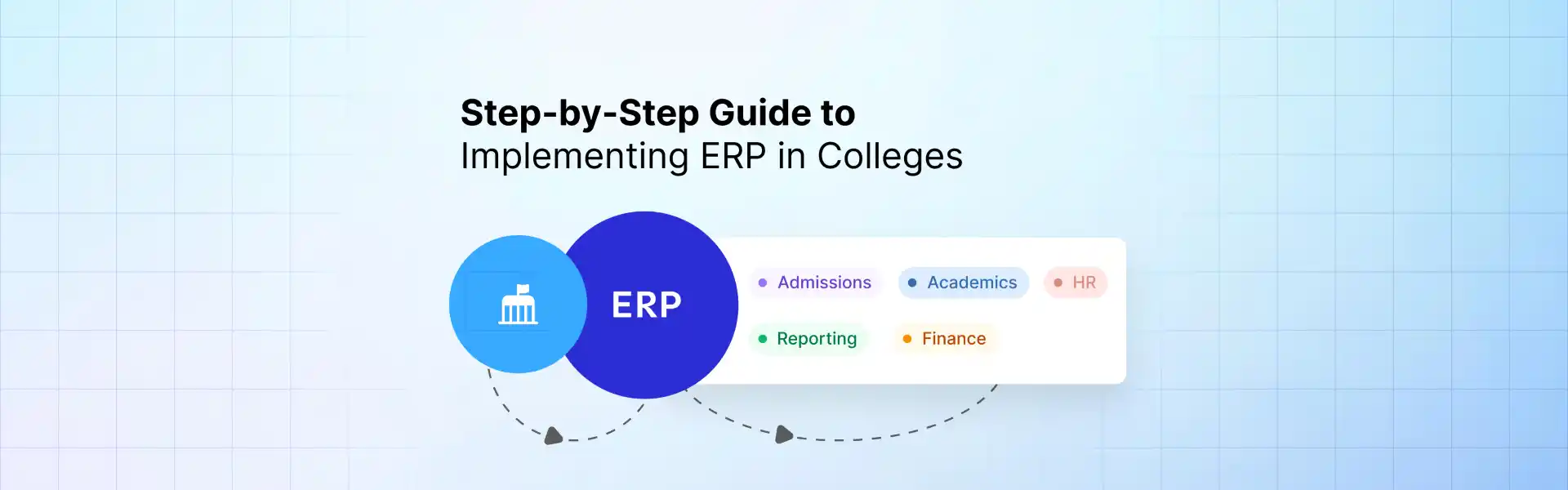
A university ERP implementation centralizes admissions, academics, finance, HR, and reporting into a unified system. The ERP implementation steps in education typically include readiness assessment, defining requirements, planning ERP migration for universities, configuring integrations, testing workflows, and executing ERP deployment in education environments. Following a structured project plan for higher education ERP helps institutions reduce operational complexity, improve data visibility, and scale campus operations efficiently.
This article explains how to implement ERP in college environments by outlining planning, governance, migration, integration, and deployment strategies. It also highlights risk mitigation, implementation timelines, and expected outcomes so institutions can execute ERP rollouts with minimal disruption.
Step 1: Evaluate the Readiness of the Organization
The first step to determining if an institution is ready to implement new software is to evaluate the complexity of its operations, data dependencies, and existing systems (both technical and business processes) to assess its readiness to implement new software. The two main items to complete are:
Audit Existing Systems and Existing Data Sources
Most universities are using School Information Systems, spreadsheets, and stand-alone finance systems. When understanding the scope of migration or integration of new systems to existing systems, it is important to perform a mapping of these systems.
Identify Cross-Departmental Interdependencies
Admissions, academics, and finance all have access to student data and can benefit from cross-functional processes. Documenting these interdependencies will enable universities to effectively integrate their ERP systems.
Assess the Readiness for Organizational Change
The adoption of new technology relies on people. Each team that will use new systems will require support and preparation in terms of changes to workflows and training as well as a centralized governance structure for data.
Step 2: Setting the ERP Scope and Goals
By setting a defined scope early, the organization can speed up the delivery process. For most schools, it is best to first implement the core functional areas of the organization.
Starting with the Core Areas
The core areas typically implemented in the first phase of an ERP project are the:
- Admissions
- Student Records
- Fee Collection
Defining Implementation Outcomes
The following are examples of measurable implementation outcomes for an ERP implementation:
- Reduction in the amount of time to process an application
- Improved accuracy of fee collection
- Vendor will provide real-time reporting
The outcomes will provide the foundation for the ERP implementation project plan in higher education.
Step 3: Build ERP Implementation Governance
Implementing an ERP system is dependent on the ownership of the decision-making authority. The governance process provides for accountability on the part of the institution.
Assigning Project Ownership and Decision Authority. An institution typically has a project sponsor, project manager, and IT lead.
Stating the Responsibilities of the Vendor and the Institution
Defining the ownership of responsibilities will assist in minimizing the time lost in the implementation of ERP in the educational environment.
Step 4: Select ERP Software for Universities
Choosing an ERP software for universities will have long-lasting effects on scalability, integration, and operational efficiencies; therefore, selecting the right ERP is critical.
Evaluate Higher Education Specific Features & Functionality
Make sure to only consider ERP platforms created specifically for the higher education space, instead of generic ERP solutions. Some key features to look for when evaluating ERP options include:
Complete end-to-end management of the student lifecycle (admissions to alumni)
The ability to support academic structures, such as credits, electives, and grade types.
The ability to produce inbuilt compliance and accreditation reports
Typically, systems that do not come with the above features will require additional costs for modifications later in time.
Evaluate Integration & Scalability
ERP systems should provide seamless integration into the following systems for universities:
The system must also provide real-time or close to real-time synchronization of data, as well as a reliable audit trail to ensure data integrity.
Additionally, verify that the ERP system you are evaluating behaves well during peak processing times throughout the academic year, such as during peak admissions and examination periods.
Evaluate the Levels of Configuration vs. Customization
When evaluating various ERP options, give priority to the platforms that have the capability to configure workflows within the application without the need for extensive coding, as this university ERP system reduces campus costs and provides for better overall flexibility.
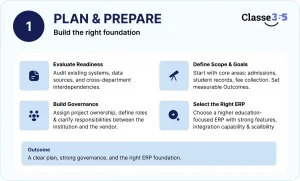
Stage 5: Planning For Migration Of Data For Schools
Data migration will impact the accuracy of reports and the reliability of systems after they have been implemented.
Map All Student Lifecycle Data
Make sure all key data points are identified:
- Applications and admissions information
- Academic history and transcripts
- Financial transactions and fee structure information
If data is not mapped correctly, there will be issues with reporting later on.
Clean Up and Standardize Data
Before starting the migration process:
- Remove duplicate records
- Ensure that all Date Formats, grading systems, and Course Names are Standardized
- Rectify any entries with Incomplete or inconsistent data
Having clean data will provide for accurate analytics and comply with the required report formats
Verify and test before going live
When doing parallel testing with a legacy system, it is important to do the following:
- Validate that the Data is Accurate
- Confirm that Reporting is Consistent
- Identify and rectify any migration problems early.
Quick Answer
When selecting an ERP for graduation or moving to a new ERP system, making sure that the new system is in alignment with the school’s academic workflow and that the data is separated, clean, and clearly structured will have a major impact on how easy or complicated integrating and mapping your new system will be.
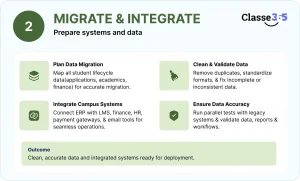
Step 6: ERP Integration with Campus Systems
| System | Integration Purpose | Outcome |
| LMS | Sync enrollment | Unified academic tracking |
| Payment gateway | Fee automation | Faster reconciliation |
| HR system | Staff data sync | Centralized workforce data |
| Email tools | Communication automation | Improved engagement |
Effective ERP integration for universities reduces manual data entry and improves collaboration.
Step 7: Pilot Rollout and Testing Strategy
Pilot rollout gives the opportunity to discover workflow problems and system failures before the program is deployed fully.
Department-Level Pilot Selection
Start with departments that have structured, high-volume processes—typically admissions or finance. These functions:
- Use critical workflows (applications, payments, approvals)
- Expose integration dependencies early
- Provide measurable outputs for validation
Selecting the right pilot group reduces risk during full implementation.
Parallel Run and Validation Criteria
Run the ERP alongside legacy systems to compare:
- Data accuracy (student records, financial entries)
- Process outputs (admissions status, fee calculations)
- Report consistency
Define clear validation criteria such as:
- Zero critical data mismatches
- Consistent reporting outputs
- Stable system performance under real usage
Parallel testing ensures the system is reliable before organization-wide rollout
Quick Answer
To have a successful ERP pilot rollout, you must select high impact departments for the pilot and validate the accuracy of the system through proper parallel testing with legacy business processes.
Step 8: Training and Change Management
The success of a company utilizing an ERP system relies heavily on end-users comprehending and adjusting to it properly. A Role-Based Training approach consists of training for individuals based on their specific responsibilities:
Administrative Staff: admissions, finance & operations
Faculty: grading, attendance & academic workflows
Students: portals/modes of communication and payment processing
The increased usability of an ERP system is achieved by providing specific user roles with appropriate training.
Phased training, as opposed to one-time training sessions, allows for better user adoption rates for an ERP system. Phased training can occur in three phases:
- Pre-Launch – system navigation information
- Pilot – hands-on workflow training using the system
- Post-Launch – advanced features and reporting
Utilizing this training method provides continuous learning opportunities for end-users and increases the probability of high adoption rates.
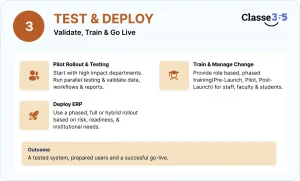
Step 9: ERP Deployment Strategy
The delivery model affects three things: The Risk of use; the Ripeness of the System; the Rate of Adoption for your end-users.
Phased vs Full Rollout Decision Criteria
- Phased rollout
- Deploy modules or departments gradually
- Lower risk and easier issue resolution
- Full (big-bang) rollout
- Entire system goes live at once
- Faster implementation but higher risk
- Hybrid approach
- Combines phased and full rollout elements
- Balances speed with control
Most universities prefer phased ERP deployment to minimize operational disruption.
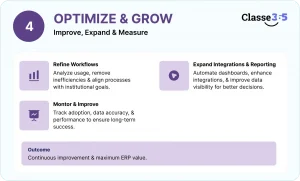
Step 10: Post-Implementation Optimization
ERP implementation does not end at go-live. Continuous optimization is required to realize full value.
Workflow and Process Refinement
Analyze system usage to:
- Remove inefficiencies in workflows
- Improve process automation
- Align system usage with institutional goals
Reporting and Integration Expansion
Post-implementation focus areas include:
- Automating dashboards and reports
- Enhancing integrations with LMS, finance, and analytics tools
- Improving data visibility for decision-making
ERP Implementation Approaches for Universities
| Approach | Best For | Considerations |
| Phased rollout | Multi-campus universities | Lower risk |
| Big-bang deployment | Small colleges | Faster rollout |
| Hybrid approach | Growing institutions | Balanced strategy |
Expected Outcomes After University ERP Implementation
Institutions typically experience measurable improvements within the first year:
| Area | Before ERP | After ERP |
| Admissions processing | Manual tracking | Automated workflows |
| Fee management | Delayed reconciliation | Real-time tracking |
| Reporting | Spreadsheet-based | Live dashboards |
| Administrative workload | High | Reduced |
| Data visibility | Siloed | Centralized |
These improvements highlight the operational value of structured ERP implementation steps in education.
University ERP Implementation Risks to Address Early
Multiple stakeholders, legacy systems and complicated data structures are all involved in the implementation of ERP in universities. Early identification of risks can help avoid delays, unanticipated costs and/or adoption difficulties.
- If data migration planning fails, this can result in inaccurate reporting and disruption of normal operations.
- Resistance from stakeholders can delay the process of adoption and lessen the effectiveness of the ERP system.
- If integration is done improperly, this can create data siloes, which will affect system performance if left unaddressed.
- If there is scope creep due to uncontrolled changes to requirements, then this will cause delays and increased costs.
If these issues are fixed early enough, then they will improve the success rate.
University ERP Implementation Timeline
| Phase | Duration | Activities |
| Planning | Month 1–2 | Requirements, governance |
| Migration & Configuration | Month 3–4 | Data preparation |
| Testing | Month 5–6 | Pilot rollout |
| Deployment | Month 6–8 | ERP go-live |
| Optimization | Month 9+ | Workflow refinement |
When Should Colleges Start ERP Implementation
Institutions typically consider ERP when operational complexity increases. Common triggers include:
- Managing multiple campuses or departments
- Student population exceeding 800–1,000
- Spreadsheet-based operations
- Rising administrative workload
- Limited reporting visibility
These signals indicate the need for university ERP implementation to improve scalability.
Post-Go-Live Governance and Performance Monitoring
After deployment, universities should monitor adoption, data accuracy, and workflow efficiency. Regular reviews ensure long-term ROI.
University ERP Implementation Checklist
| Task | Status |
| Implementation goals defined | Mark status |
| Governance team assigned | Mark status |
| Workflows documented | Mark status |
| Data cleaned | Mark status |
| Integrations mapped | Mark status |
| Testing completed | Mark status |
| Training delivered | Mark status |
| Deployment approved | Mark status |
A structured university ERP implementation helps institutions centralize operations, automate workflows, and improve decision-making. By following clear ERP implementation steps in education, universities can execute data migration, integrate campus systems, and complete ERP deployment in education environments with minimal disruption. Over time, centralized data and automated workflows reduce administrative overhead, improve reporting accuracy, and support scalable institutional growth, making ERP a strategic investment for higher education institutions.
FAQ’s
Why do mult-campus universities experience so many problems with ERP implementation?
Many institutions don’t realize that multi-campus environments are much more complicated than they generally anticipate. Each campus usually has its own procedures, Fees structure and format, therefore when ERP implementation is carried out without making those differences first, the end result is that the ERP will be an inconsistent representation of how the business really operates. General success comes from standardizing the key processes first and then controlling for campus level differences after.
What are typical problems with ERP data migration in universities?
The largest problem is not that of migration, but of poor quality data that is being migrated. Many universities still utilize legacy data from many years ago and therefore migrate that data to the new system without properly cleaning it first resulting in duplicate student records / inconsistent record formats / inconsistent reporting after the “go-live” phase and many others. Once this happens, the teams will lose faith in the system very quickly. Clean and structured data will tell you whether an ERP system will be a reliable/efficient source of data or merely another layer of confusion.
How do universities manage different fee structures across campuses in one ERP?
Modern ERP’s have the capability of using configuration-based rules, rather than having different systems for each campus. Institutions define the central fee structure and apply variations based on campus, program, or student type. The big issue is not with technology, but rather with getting all of the campuses aligned about how fees should be structured prior to implementation. Without that agreement, it is difficult to standardize financial reporting.
Why does reporting often break after ERP implementation?
Reporting issues are generally caused by data-mapping inconsistencies and undefined processes in ERP implementation. Even if the system is functionally correct, inconsistent data structure between departments can create reports that do not match. When executive management sees conflicting information in reports, their confidence in the ERP diminishes. The logic behind the reports must be confirmed during testing and not after go-live.
How do universities test ERP accuracy before going live?
Typically, institutions will run a parallel system for a set period between the new ERP and the existing systems. This parallel run provides the opportunity for the functional area to compare output, student records, financial reports, and operational data across both systems in a real-world manner. Usually, a go-live decision will not be made until the outputs are consistent and all critical discrepancies have been resolved. If this process is skipped, then there are not any guarantees concerning the accuracy and usability of the new ERP.
What causes resistance from faculty and administrative teams during ERP rollout?
The technology itself is rarely resistant. It’s usually a consequence of changing workflows. Adoption will slow down if teams see ERP as a complexity and not an effort-reducer. Institutions that involve departments early, train users for their actual roles, and demonstrate clear time savings tend to have much smoother adoption across campus.
Should universities customize ERP systems or adapt to standard workflows?
Usually adapting to the system is better than heavy customization. Over-customization often leads to re-creation of existing inefficiencies and makes the system difficult to maintain over time. Modern ERP platforms for higher education already have structured workflows, so configuration is usually all that’s needed. The goal is process improvement, not the preservation of obsolete processes.
What is the most common point of failure after ERP go-live?
Reporting is often the first visible failure point. When reports are delayed, inconsistent, or difficult to generate, users will quickly fall back to spreadsheets or legacy tools. This is often a result of improper data migration or process alignment during implementation. Once users lose confidence, it’s much harder to bring them back.
What is the phased rollout vs full deployment decision that universities make?
It’s a question of operational complexity.” Institutions with multiple campuses often choose to roll out in phases, allowing teams to test the workflows in a controlled environment and work out the kinks early on. Smaller institutions with less complicated operations may want to do full deployment, but even then, there is more risk if systems are not thoroughly validated up front.
How do ERP systems manage student transfer between campuses?
In a well-designed ERP, student data is stored in a centrally available database, not in isolated campus systems. This allows students to move between campuses without re-entering information or losing academic history. It also guarantees uniformity of financial and academic records throughout the institution.
Where do universities see ROI first post ERP implementation?
The first impact is generally felt in admissions and finances. These are high volume transaction and manual effort areas so automation provides immediate time savings and better accuracy. The value grows into reporting, compliance and general operational control over the long run, but the initial benefits are most often derived from these core functions.