




The best AI grading tool for most K-12 teachers in 2026 is one that scores student work against a clear rubric, generates draft feedback a teacher can edit in seconds, and sends the final grade back into the school’s gradebook without re-keying.
No single tool does all three perfectly, which is why the right choice depends on what your actual grading bottleneck is: essay feedback, STEM problem sets, or the sheer volume of assignments across multiple sections.
This guide covers five AI grading tools worth evaluating, what each one does best, where each falls short, and how the grades these tools produce should flow back into a centralized student information system and learning management system so they actually become part of a student’s permanent record.
How AI Grading Tools for Teachers Work
According to a Gallup and Walton Family Foundation survey of more than 2,200 U.S. teachers, those who use AI tools weekly save an average of 5.9 hours per week. That adds up to roughly six full weeks reclaimed over a school year. Grading is one of the most common tasks teachers apply AI to, and the tools available in 2026 have matured significantly from the experimental chatbot prompts of two years ago.
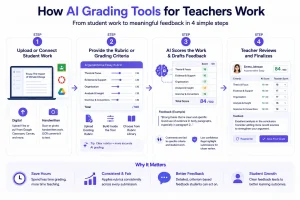
AI grading tools use large language models to read student work, compare it against a rubric or answer key, and produce a suggested score plus written feedback. The process generally follows four steps:
Step 1: Upload or connect the student work
For digital assignments, teachers paste text, upload a Word or Google Doc, or pull submissions directly from Google Classroom or Canvas through an integration. For handwritten work, teachers scan or photograph the pages, and the tool runs optical character recognition to convert handwriting into text the AI can read. Gradescope and Gradeasy.ai both handle this OCR step; tools like Brisk and CoGrader assume digital submissions only.
Step 2: Provide the rubric or grading criteria
The teacher uploads an existing rubric, builds one inside the tool using sliders or dropdowns per criterion, or picks from a pre built template library by subject and grade level. Some tools, like MagicSchool, let a teacher describe criteria in a sentence and generate a structured rubric automatically. Vague rubrics are where AI grading accuracy drops the most.
Step 3: AI scores the work and drafts feedback
The model checks each submission against every rubric criterion separately, not one holistic score. A five criterion essay rubric produces five sub scores plus a total. The tool drafts comments tied to specific criteria, often quoting the exact sentence or answer that earned or lost points, so feedback traces back to the student’s actual work.
Step 4: The teacher reviews and finalizes
The teacher sees the score broken down by criterion alongside draft comments in an editable view, can override any individual score, or rewrite feedback entirely. Most tools flag low confidence scores, cases where the model’s certainty is lower than usual, so teachers know which submissions need a closer look.
The 5 Best AI Grading Tools for K-12 Teachers in 2026
-
Gradescope: Best AI Grading Tool for Structured Assignments at Scale
Gradescope, a Turnitin product originally developed at UC Berkeley, is the most established AI grading platform for structured work: problem sets, exams, short answer responses, and bubble sheets. Its core strength is “intelligent answer grouping,” which clusters similar student responses so a teacher can grade one example and apply that rubric decision across every matching answer.
What it does well
Gradescope handles both paper and digital submissions. Teachers scan handwritten exams, upload them, and the platform groups answers by similarity. For a math or science teacher grading 150 or more papers per assessment, this cuts grading time dramatically.
Where it falls short
Pricing is institutional and quote-based through Turnitin, putting it out of reach for individual teachers or small schools buying independently. It is also strongest for structured, rubric-scorable work, not open-ended essays or creative writing.
FERPA note: Gradescope operates under Turnitin’s compliance framework, which includes FERPA, COPPA, and SOC 2 certifications.
-
MagicSchool AI Grader: Best AI Tools for Education in One Place
MagicSchool is the most widely adopted AI toolbox for U.S. K-12 teachers in 2026, with over 80 teacher-facing tools under one platform. The AI Grader is one tool within that library. Teachers supply a rubric and student work, and MagicSchool produces a criterion-referenced grade plus draft feedback.
What it does well
The strength is ecosystem. A teacher already using MagicSchool to generate lesson plans and build assessments can grade in the same platform. The free tier is genuinely usable, and the paid tier at roughly $8.33 per month annually is affordable.
Where it falls short
The grading module is one of 80-plus tools, so it is not as deep as a purpose-built platform like Gradescope. Curriculum alignment is primarily U.S. focused.
FERPA note.: MagicSchool holds SOC 2, FERPA, COPPA, GDPR, and CCPA certifications.
-
Brisk Teaching: Best AI Grading Tool for Essay Feedback Inside Google Docs
Brisk Teaching runs as a Chrome extension inside Google Docs, Google Slides, and Google Forms. Open a student’s essay, open the Brisk panel, and generate rubric-aligned feedback without leaving the document.
What it does well
For teachers whose workflow lives in Google Workspace, Brisk meets them where they are. It also includes a writing process replay that flags AI-generated student work, a genuine differentiator for academic integrity. Our COPPA compliance checklist for K-12 schools is worth reviewing alongside any tool that processes student writing.
Where it falls short
Premium pricing is quote-based with no public per-teacher figure. The tool is tightly coupled to Google Workspace, so Microsoft 365 schools benefit less.
-
Gradeasy.ai: Best Free AI Grading Tool for Schools Getting Started
Gradeasy.ai offers free AI grading with handwriting recognition, used by more than 15,000 educators across over 100 U.S. districts according to the company. Teachers upload scanned or digital student work, supply a rubric, and receive AI-scored results.
What it does well
The free tier is the most generous in this category. Handwriting recognition is included in the base product. For a school piloting AI grading tools for teachers without a procurement process, Gradeasy.ai is a practical starting point.
Where it falls short
Integrations with major LMS platforms are more limited than Gradescope or MagicSchool. Schools running Canvas or Schoology should confirm compatibility first.
-
CoGrader: Best for Teacher in the Loop Rubric Grading
CoGrader positions itself as an AI grading assistant rather than an AI grading authority. Upload a rubric and student work, and the AI drafts a grade and feedback per criterion. The teacher reviews and adjusts every mark before anything is recorded.
What it does well
The friction to override an AI decision is intentionally low, which is a smart design choice given documented bias risks. For teachers who want AI to handle the first pass while keeping full control over the final mark, CoGrader is well designed.
Where it falls short
The platform is narrowly scoped, so teachers need a separate tool for planning and content creation. The free tier caps grading runs.
Quick Comparison: Best AI Grading Tools for Teachers
| Tool | Best For | Free Tier | Paid Pricing | Handwriting | FERPA |
| Gradescope | STEM at scale | Limited trial | Institutional, quote-based | Yes | Yes (Turnitin) |
| MagicSchool | All-in-one AI toolbox | Yes, capped | ~$8.33/mo annual | No | Yes (SOC 2) |
| Brisk Teaching | Essay grading in Google Docs | Yes, free forever | Quote based | No | Review per district |
| Gradeasy.ai | Free entry point with OCR | Yes, generous | Paid tiers available | Yes | Stated on site |
| CoGrader | Teacher in the loop rubric grading | Yes, capped | Paid tiers available | No | Review per district |
Why AI Grading Tools Need to Connect to Your School’s Gradebook
An AI grading tool produces a score. But that score only matters once it reaches the student’s permanent record inside the school’s gradebook and assessment module. If a teacher grades 30 essays in Brisk Teaching and then has to manually re-enter those 30 scores into a separate gradebook system, the time saved on grading is partially lost on data entry.
This is where AI education software and school management software need to work together. The ideal workflow looks like this:
Step 1: Teacher sets a rubric and grades in the AI tool: The AI handles first-pass scoring and feedback.
Step 2: Teacher reviews and approves the grades: Every mark gets a human check before it counts.
Step 3: Approved grades sync to the school’s centralized gradebook: The score, the feedback, and the rubric criteria all flow into the student’s record automatically.
Step 4: The gradebook updates report cards and GPA calculations: Parents see the grade in the portal. Transcripts update. No re-keying needed.
Classe365’s Assessment and Grading Module supports flexible grading scales, including percentage, letter grade, rubric, and manual entry, so grades from any AI tool can be recorded in the format the school already uses. The module ties directly into each student’s SIS record, so a grade entered in the gradebook updates the student’s transcript, report card, and GPA calculation without staff having to touch multiple systems. See how this works operationally in our GPA calculation software guide.
How to Choose the Best AI Grading Tool for Your School
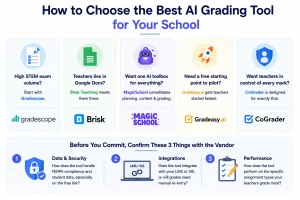
- If your bottleneck is STEM exam volume, start with Gradescope.
- If your teachers already live in Google Docs, Brisk Teaching meets them there.
- If you want one AI toolbox for planning, content creation, and grading, MagicSchool consolidates the workflow.
- If you need a free starting point to pilot AI grading without a procurement cycle, Gradeasy.ai gets teachers started fastest.
- If your priority is keeping teachers firmly in control of every mark, CoGrader is designed for exactly that.
Before committing to any tool, confirm three things with the vendor.
- First, how does the tool handle FERPA compliance and student data, especially on the free tier?
- Second, does the tool integrate with your school’s LMS or SIS, or will grades need manual re-entry?
- Third, how does the tool perform on the specific assignment types your teachers grade most?
Our student performance metrics guide covers the data points schools should be tracking alongside grading to get the full picture of student progress.
Schools already using Classe365 can review grades from any of these tools inside the platform’s gradebook, where they connect to attendance, billing, and parent communication automatically.
Our LMS evaluation criteria checklist also covers what to look for when choosing learning tools that need to integrate with an existing school management stack.
If you want to see how a centralized gradebook connects with the rest of your school’s operations, book a demo with Classe365 or compare pricing against your current setup.
You can also read what other schools say on the Classe365 testimonials page.
FAQ
Can AI grading tools fully replace a teacher’s grading work?
No. AI handles the first pass of rubric scoring and draft feedback, but nuanced judgment on creative work and individual student context still requires a teacher. The strongest workflows use AI for the draft and a teacher for the final mark.
Are free AI grading tools reliable enough for classroom use?
Free tiers from Gradeasy.ai and MagicSchool are genuinely usable for piloting on a small scale. The main limits are caps on volume and fewer integrations. For school wide rollouts, paid tiers offer better compliance documentation.
How do AI grading tools handle handwritten student work?
Gradescope and Gradeasy.ai both support handwriting recognition through optical character recognition. Teachers scan handwritten work, upload it, and the AI scores it against the rubric. Accuracy is highest on clearly written responses.
Is it safe to upload student work to AI grading platforms under FERPA?
FERPA compliance is a school and district responsibility, not just a vendor feature. Most enterprise tiers offer Data Processing Agreements and SOC 2 certifications. Free tiers should be reviewed against your district’s data policy before uploading identifiable work.
Do AI grading tools work with Google Classroom and other LMS platforms?
Brisk Teaching and MagicSchool integrate with Google Classroom. Gradescope supports Canvas, Blackboard, and other platforms at the institutional level. Smaller tools have more limited integrations, so confirm compatibility before committing.
What types of assignments work best with AI grading?
AI grading is most accurate on structured, rubric-scorable work: multiple choice, short answer, and criterion referenced essays. It is least reliable on open-ended creative writing and assignments where originality is a core grading criterion.
Can schools use multiple AI grading tools at the same time?
Yes. A math department might use Gradescope while English teachers use Brisk Teaching. The key is ensuring all grades flow into one centralized gradebook so the student’s record stays complete and consistent.
How much time do AI grading tools actually save per week?
According to the Gallup and Walton Family Foundation survey, teachers using AI weekly save an average of 5.9 hours per week. Actual savings on grading specifically vary by assignment type, class size, and how much manual re-entry is needed afterward.