Classe365
 Hiree365
 4.8/5 on Capterra · 169 reviews
 4.3/5 on G2 · 26 reviews



It's Sunday evening, and a parent fills in your website form for the North campus. On Monday morning, she calls the East campus too, because she isn't sure which one is closer to home. By Wednesday, both campuses have replied, or neither has, because each team assumed the other one had it.
Every branch ends up with its own inbox, its own spreadsheet and its own way of counting enquiries. The same family gets counted twice. The head office can't say which campus is losing families, and nobody can say why.
The fix is one shared system. Every enquiry gets a campus tag, goes to a named owner and moves through the same stages. Campus teams see their own families, the central office sees everything, and you get one family, one record and one set of numbers.
This guide shows you how to set that up: capturing and routing enquiries across branches, building stages and permissions, handling duplicates and campus transfers, comparing campuses fairly and staying on the right side of FERPA and COPPA.
You'll also get a checklist and six demo tasks to help you choose the software. For the product side, see Classe365's admissions CRM and its pre-admissions and enrolment tools. For single campus basics, read our guide to enquiry management for schools.
What is an admissions CRM for schools, and why do multi-campus schools need a different setup?
An admissions CRM for schools tracks every family from the first enquiry to enrolment. Add a second campus and the job changes, because one family can now contact several branches and the network still needs a single set of numbers.
The market is big. The United States had 30,553 private elementary and secondary schools with 5,096,365 students in the 2023 to 2024 school year, according to NCES. Each extra site adds an inbox, a tour calendar and a waiting list, and that's where the trouble starts.
Area | One campus | Several campuses |
Enquiry inbox | One team reads it | Each branch has its own, so enquiries get missed or answered twice |
Duplicates | Rare | Common, because one parent contacts several branches |
Reports | One list | Branch totals that don't match |
Access | Everyone sees everything | Campus staff should see only their own families |
Stage rules | One set | Each campus invents its own |
A CRM for schools handles families before they enrol. A student information system takes over once they do. Our comparison of an admissions CRM and a student information system shows where one ends and the other begins.
How should a school network capture and route enquiries across campuses?
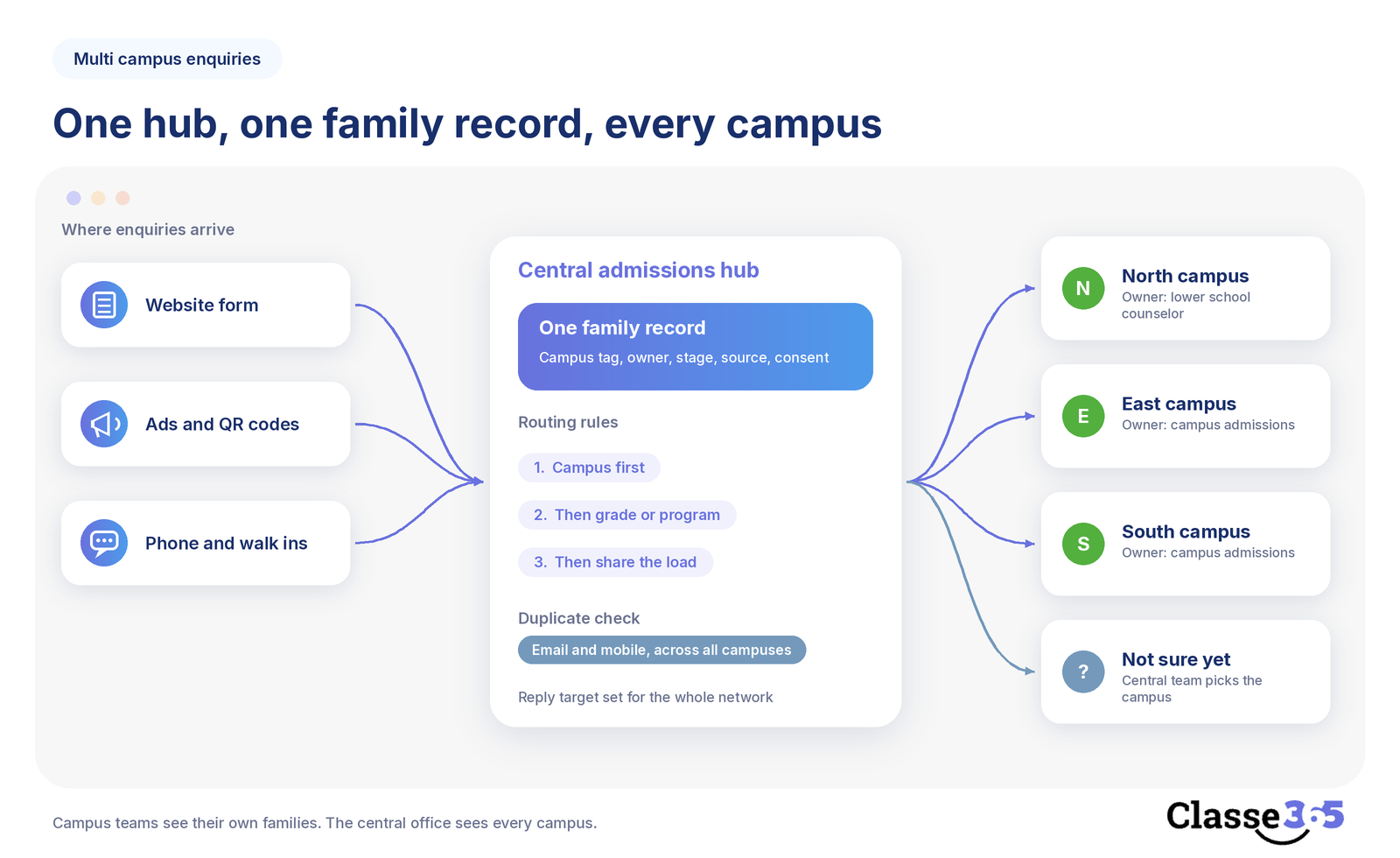
Capture every enquiry in one system, tag it with a campus at the start and let routing rules send it to a named owner. The family gets one reply from one person, no matter which branch they contacted.
A campus tag is a field on the enquiry record that says which campus the family wants. Routing, permissions and reports all run off it.
One intake form, one campus choice. Add a required "Which campus?" dropdown, plus a "Not sure yet" option that sends those families to a central team.
One link per campus. Tag every campus page, ad and QR code so the campus gets captured even when the family doesn't pick one. Google recommends utm_source, utm_medium and utm_campaign on every link, as explained in its campaign URL guidance.
Routing rules. Route by campus first, then by grade or program, then share the load between staff at that campus.
A home for "not sure." The central team asks a few questions and moves the record to a campus within a set time.
A reply target. Send an automatic reply at once, then a personal one within a window your network picks, such as one business day.
Phone and walk-in enquiries. Staff log them the same day with a campus and source, so they land on the same list as everything else.
Here's what the rules can look like.
If the enquiry | Then it goes to |
Picks the North campus, Grade 3 | North campus, lower school counselor |
Picks "Not sure yet" | Central admissions team |
Comes from a campus tagged ad | The campus in the tag |
Arrives outside office hours | Automatic reply, then the campus owner in the morning |
How do you set up stages, roles and permissions across branches?
Use one stage list for the whole network and let each campus add its own owners and limits. The numbers stay comparable, and every campus still runs its own follow-up.
A simple list works: New enquiry, Contacted, Tour booked, Applied, Offered, Enrolled and Lost. Write one exit rule for each stage so every campus moves families the same way. Our guide to using a CRM for student admissions teams goes deeper on stage setup.
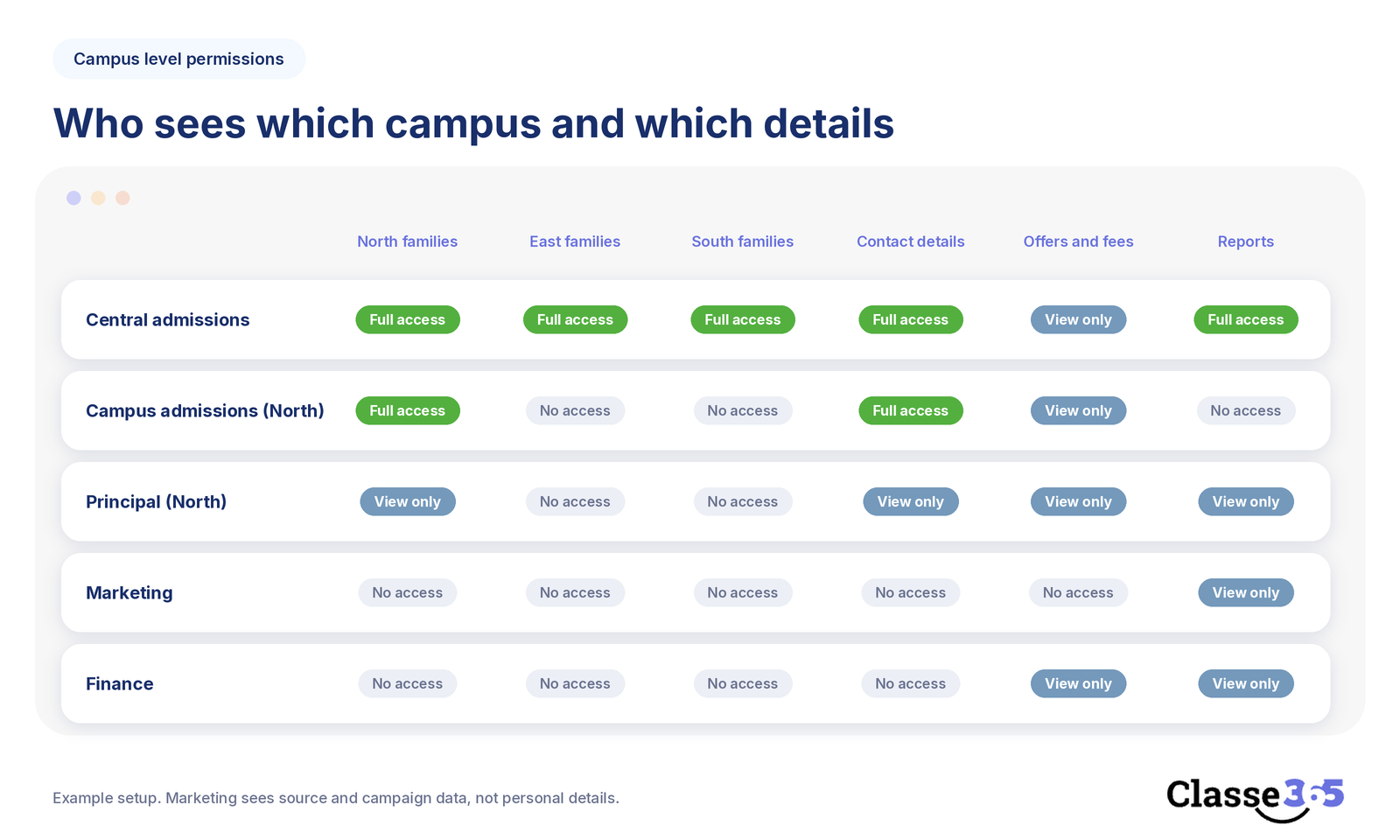
Permissions take the most care. A counselor at one campus shouldn't browse another campus's families, while a regional director needs to see all of them.
Role | What they see | What they can do |
Central admissions | All campuses | Route, reassign, run network reports |
Campus admissions | Own campus only | Reply, update stages, book tours |
Principal or head | Own campus, read-only | View pipeline and reports |
Marketing | Source and campaign data | View reports, no personal details |
Finance | Offers and deposits | View fees and payments |
What happens when a family enquires at two campuses or moves between them?
The system should match every new enquiry against existing families across the whole network, not only inside one campus. Two branches stop working the same family, and the history survives if the family changes campus.
Match on email and mobile number before saving a new record, across all campuses.
Keep one family record with one entry per child. A parent with children at two campuses has one parent profile and two student entries.
Let the family's choice decide the owner. The campus the family picks for the child owns the record. If the family hasn't picked, the first campus to reply owns it.
Move the record when a family switches campus. Change the campus tag and owner, and keep the notes, source and messages.
Notify the new owner so the family doesn't have to tell their story twice.
Which reports should a multi-campus school compare?
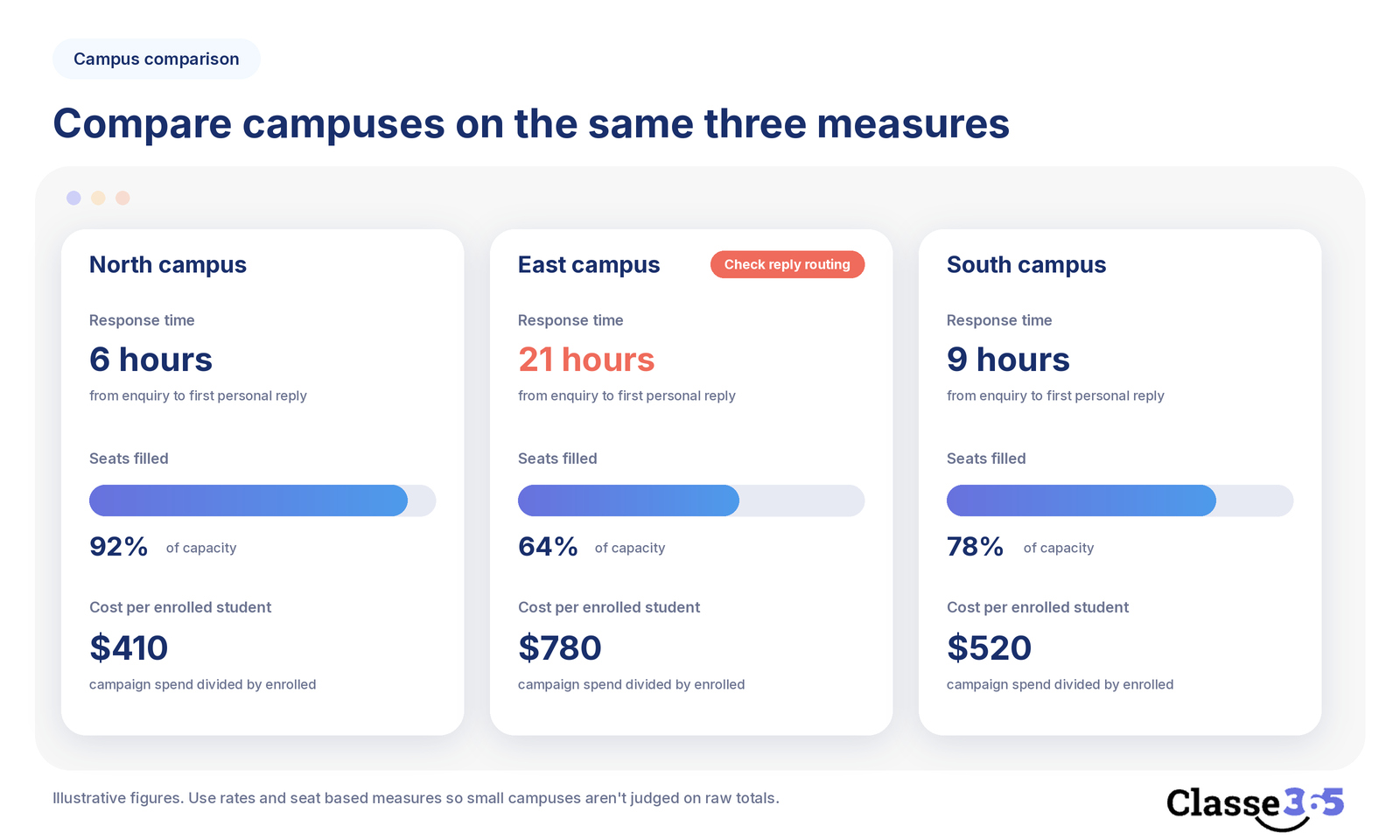
Compare campuses on the same measures, and use rates or seat-based figures so a small campus isn't judged against a large one on raw totals.
Measure | How to calculate it | What it tells you |
Response time | Hours from enquiry to first personal reply | Which campus replies late |
Enquiry to tour | Tours booked divided by enquiries | Whether families get interested |
Tour to application | Applications divided by tours | Whether tours convince families |
Offer to enrolment | Enrolled divided by offers | How well offers convert |
Seats filled | Enrolled divided by seat capacity | Which campus has room |
Cost per enrolled student | Campaign spend divided by enrolled students | Which source deserves budget |
Judge sources by cost per enrolled student, not cost per enquiry. A source that brings in hundreds of enquiries and no enrolments is the most expensive one you have. Seat capacity matters too, since a campus with a full waiting list can send extra families to a campus with space, if your policy allows it.
How do FERPA, COPPA and consent apply across campuses?
FERPA covers enrolled students' education records, COPPA covers personal information collected online from children under 13, and your own consent rules cover marketing messages.
The US Department of Education explains that FERPA covers schools that receive federal funds, that parents generally keep full rights unless a court order or similar document removes them, and that rights pass to the student at 18 or when they attend a postsecondary institution.
For a network, that means checking custody paperwork before you share records with the other parent, and giving campus staff access to enrolled student records only when they need to see them.
The FTC's COPPA FAQ says the rule applies to personal information collected online from children, and not to information collected from parents. A form a parent fills in is a different case from a form a 12-year-old fills in, so build your enquiry form for parents. If children use your forms, see our COPPA compliance checklist.
For texting, save the date, channel and exact wording of each parent's consent on the record, and apply opt-outs across all campuses. Our FERPA compliance page explains how Classe365 handles access. This section is general information, not legal advice.
How do you choose admission management software for several campuses?
Choose software that manages all campuses in one account, then test it with your own data. Plenty of tools work for one campus and fall apart at three, so the demo tells you more than the feature list.
Use this checklist for any school admission management system or admission CRM software.
One login, one database: every campus works in the same account.
Campus field on every record: routing and reports both depend on it.
Routing rules: by campus, grade and program.
Duplicate matching: across campuses, not just within one.
Campus-level permissions: each team sees its own families.
Network reports: by campus and for the whole group.
Consent on the record: with date, channel and wording.
Link to the student information system: so enrolled families don't get retyped.
Published pricing: so you can predict what each new campus costs.
Then run a quick test. Ask each vendor to do these six tasks live.
Add a new campus and its staff without a support ticket.
Create a rule that sends a Grade 3 enquiry for the North campus to the right counselor.
Submit the same family twice through two campuses and show how the duplicate is handled.
Log in as a campus counselor and show that other campuses' families are hidden.
Move a family from one campus to another and keep the history.
Show a network report that compares campuses.
How do you roll out an admissions CRM across several campuses?
Start with one or two campuses, fix the process there and then add the rest. Switching every branch on in the same week makes problems hard to trace.
Agree the rules. Write the stage list, exit rules, routing rules and reply target on one page.
Clean the spreadsheets. Merge every branch file, remove duplicates by email and mobile number, and add a campus and stage to every row.
Pilot with one or two campuses. Import their data, train the team and run for one intake period.
Review the pilot. Check response times, the duplicate rate and whether staff use the system daily.
Add the remaining campuses in groups, using the same rules.
Hold a weekly review. The central team checks stalled enquiries and campus reports.
Where does Classe365 fit?
Classe365 is an all-in-one school management platform where the admissions CRM and the student information system work together, so an enquiry becomes a student record after enrolment without anyone retyping it.
Here's what users say:
Review | Platform | Rating |
"I find the dashboard of Classe365 very informative." John H., President/CEO, May 2026 | 5.0 out of 5 | |
"The integration with Microsoft products makes the work seamless." Halalisani D., Academic Administrator, May 2026 | 5.0 out of 5 | |
"Affordable product for the various features present." Mikkel Y., CTO, June 2025 | 5.0 out of 5 | |
"I like how the customer care staff respond to queries: fast, effective and to the point." Ildus R., Director of Academic Affairs, February 2025 | 5.0 out of 5 |
Want to see it with your own campuses? Request a demo and bring your six tasks.
Frequently Asked Questions
Talk to our teamCan each campus have its own application form and fees?
Yes, if the system lets you build forms and fee rules per campus. Check this in the demo, because some tools allow only one network-wide form.
What if campuses have different intake dates?
Add an intake term field to every record and set stage limits per intake. Reports can then compare campuses for the same term only.
What happens to records if a campus closes or merges with another?
Reassign active families to the receiving campus, change the campus tag and keep the history. Archive the closed campus's staff accounts but keep its past reports.
How do we compare campuses of very different sizes?
Use rates and seat-based measures instead of raw totals, such as tours per 100 enquiries and enrolled divided by capacity. Large campuses will always have bigger numbers.
Can parents book a tour at the right campus without calling?
Yes, if you give each campus its own booking link or calendar. Tours should write back to the family record, so staff don't enter them by hand.
What do we do with families outside every campus area?
Send them to a central queue with a clear tag, and reply within your normal target. If a new campus opens later, you already have a list of interested families.
How long should we keep records of families who never enrolled?
Set a retention schedule with your legal counsel, since the right period depends on state law and your policy. Keep a short record, such as the source and outcome, if you want to study past years.
Do we need to migrate every branch's old spreadsheets?
Not all of it. Import families from the last one or two intake periods and archive the rest, after you merge files and remove duplicates.