Classe365
 Hiree365
 4.8/5 on Capterra · 169 reviews
 4.3/5 on G2 · 26 reviews



Without a school admission management system, schools running several campaigns at once end up with enquiries scattered across a website inbox, a front desk notebook, and individual spreadsheets, making it impossible to say which campaign brought in the families who enrolled.
The damage shows up in three places:
Replies depend on whoever checks the inbox first
The same family gets counted twice when it contacts the school through two channels
Budget flows to the campaigns with the most enquiries instead of the most enrolled students.
An enquiry management system solves this by giving every family one record that stores the campaign it came from, the staff member who owns it, and its current stage, so the school can follow the full path from first contact to enrolment and compare campaigns by cost per enrolled student instead of cost per enquiry.
This guide explains how to track pre-admission leads across campaigns, which stages and numbers to use, how fast to respond and when a spreadsheet stops being enough, with a checklist for choosing admission management software at the end.
For the product side, see the admissions CRM page and the admission CRM vs SIS comparison from Classe365, an all-in-one school management platform.
What is an enquiry management system, and how is it different from a school admission management system?
An enquiry management system captures first contacts from families and tracks follow-up until they apply, while a school admission management system covers the full path: enquiry, tour, application, offer, and enrolment.
Term | What it covers | Where it usually stops |
Enquiry management system | Capture, source tagging, follow-up reminders | Before the formal application |
Admissions CRM for schools | Enquiry plus message history, stages and reports | Often at the offer, with no student record |
School admission management system (also sold as admission management software) | Enquiry to application, offer and enrolment, with forms and documents | Depends on whether it hands over to your student information system |
The handoff to a student information system matters more than any single enquiry feature, because family contact data moves between tools easily while student records do not.
The market is large: the United States had 30,553 private elementary and secondary schools with 5,096,365 students in the 2023 to 2024 school year, according to NCES.
Our roundup of the best admission management software in 2026 compares tools.
How do you track pre-admission leads across multiple campaigns?
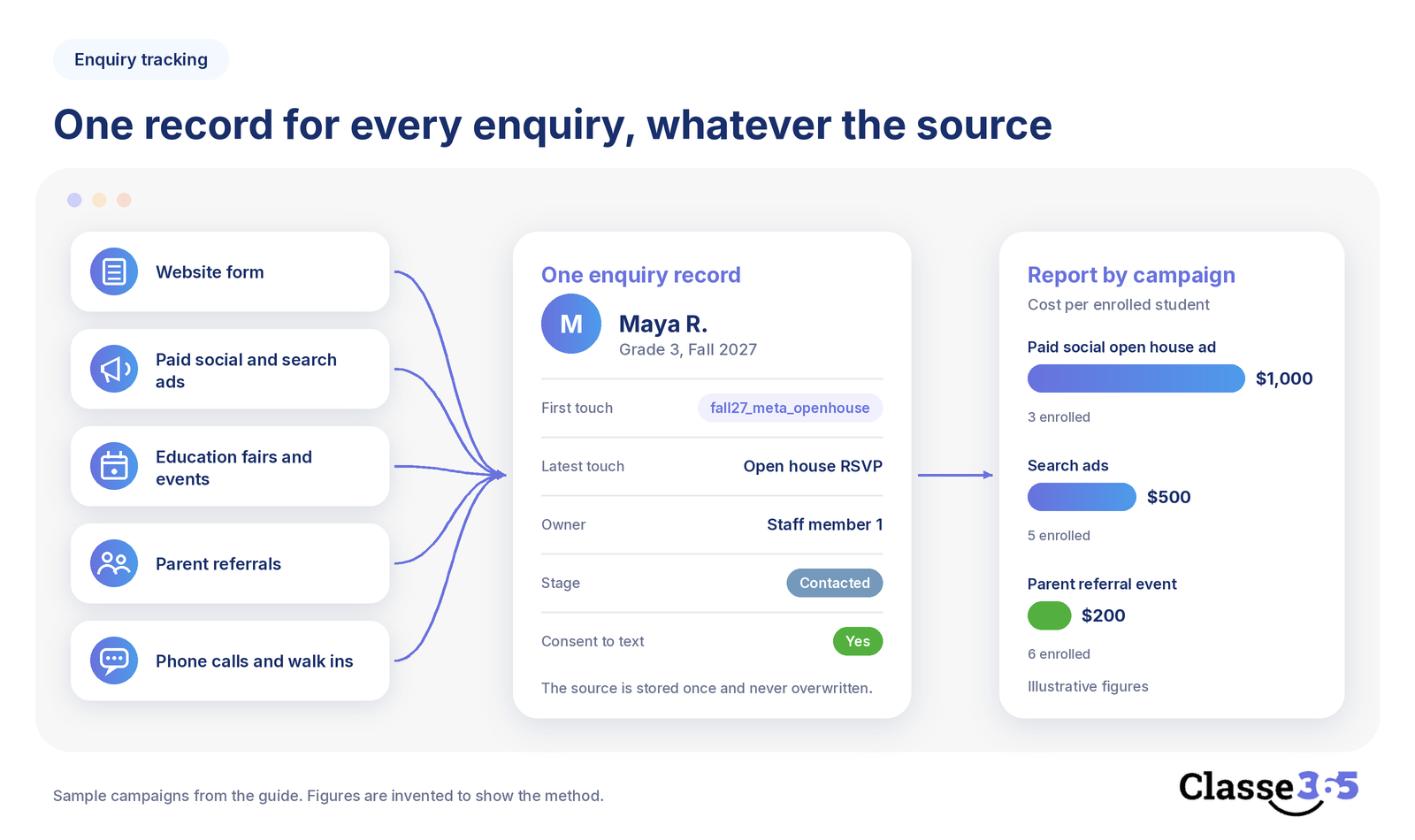
Give every campaign a fixed name, attach it to the family's first record, and never overwrite it, using the six steps below.
Write a naming rule. Use lowercase, one school year, one channel, and one campaign name, for example fall27_meta_openhouse, because Google Analytics treats values as case-sensitive and counts "Meta" and "meta" as two sources, according to Google's campaign URL guidance.
Tag every digital link. Add utm_source, utm_medium and utm_campaign to every ad, email and social link, since Google recommends always using these three and shows missing values as "(not set)" in reports.
Capture the tags on the form. Save them in hidden form fields so they stay attached to the enquiry without parents seeing them.
Code your offline sources. Give each education fair, mailer, and community event its own QR code or short link, and add a required "How did you hear about us?" dropdown for phone and walk-in enquiries so staff select a source instead of typing one.
Store first touch and latest touch. First touch is the campaign that created the enquiry, and latest touch is the one that moved it forward; keep both because a family may click an ad and later attend an open house.
Match duplicates before saving. Check email and mobile number before creating a record, and merge matches while keeping the source history so one family is not counted as two leads.
Every enquiry record should hold at least these fields.
Field | Example | Why it matters |
Child name and entry grade | Maya, Grade 3 | Routes the enquiry to the right owner |
Parent email and mobile | Used for matching | Finds duplicates and enables contact |
Intake year | Fall 2027 | Keeps cohorts apart |
First touch campaign | fall27_meta_openhouse | Judges the campaign |
Campus | North | Multi-campus reporting |
Stage and stage date | Tour booked, Oct 12 | Shows time in stage |
Owner | One named staff member | Removes "I thought you replied" |
Lost reason | Chose another school | Feeds next year's plan |
Consent to text and email | Yes, with date | Protects the school |
Which stages should an enquiry pass through before it becomes an application?
Use six to eight stages with a clear exit rule for each, so every family has one status and one next step, and adjust the starting time limits below after your first intake.
Stage | Moves on when | Suggested limit |
New enquiry | A family has made contact | Reply the same business day |
Contacted | A two-way conversation has started | 2 days |
Tour or event booked | A date is confirmed | 7 days |
Tour attended | The family has visited | Follow up within 24 hours |
Application started | The form is opened | Reminder after 5 days of inactivity |
Application submitted | Required documents are in | Your deadline |
Offer and enrolled | Offer accepted, deposit paid | Your policy |
Lost | Family declined or stopped replying | Always add a reason |
Define registration and enrolment as separate steps, as explained in this guide to the difference, and record a lost reason for every closed enquiry, such as fees, distance, no seat, chose another school, no response, or timing, because after one intake this list tells you more than a survey.
For a full workflow, read our pre-admissions and enrolment page and the guide on using a CRM for student admissions teams.
How fast should a school respond to a new enquiry?
Aim to send a first reply on the same business day, and within an hour during office hours where possible.
A Harvard Business Review study of online sales leads by Oldroyd, McElheran and Elkington concluded that most companies do not respond nearly fast enough (study record), although it examined commercial leads rather than school enquiries, so use it as direction and not as a school benchmark.
The plan below moves from an immediate acknowledgement to personal contact and then to regular notes:
Send an automatic acknowledgement at once that says who will reply and by when.
Call or email personally within one business day.
Follow up on day 3, day 7 and day 14 with something useful, such as tour dates, a fee sheet or deadlines.
Move the family to a monthly note until the application deadline.
Close the enquiry as lost, with a reason, after your final attempt.
Give each enquiry one named owner, because when two staff members each assume the other replied, no one does.
Which numbers show whether a campaign is working?
Compare campaigns by cost per enrolled student instead of cost per enquiry, because enquiry counts show who clicked while enrolments show who joined. For each campaign, track enquiries, contact rate, tour rate, application rate, enrolment rate, cost per enquiry and cost per enrolled student.
The hypothetical example below, for a 400-student independent school, uses invented figures to show the method.
Campaign | Spend | Enquiries | Cost per enquiry | Enrolled | Cost per enrolled student |
Paid social open house ad | $3,000 | 150 | $20 | 3 | $1,000 |
Search ads | $2,500 | 60 | $42 | 5 | $500 |
Parent referral event | $1,200 | 30 | $40 | 6 | $200 |
The social ad has the lowest cost per enquiry and the highest cost per enrolled student, reversing the ranking most reports show.
Because enrolment happens months after the enquiry, judge campaigns by intake year and keep each campaign open in your report until that intake closes. To weigh software cost against your current process, see what school management software costs in 2026.
Where do enquiries leak? A 15-minute audit
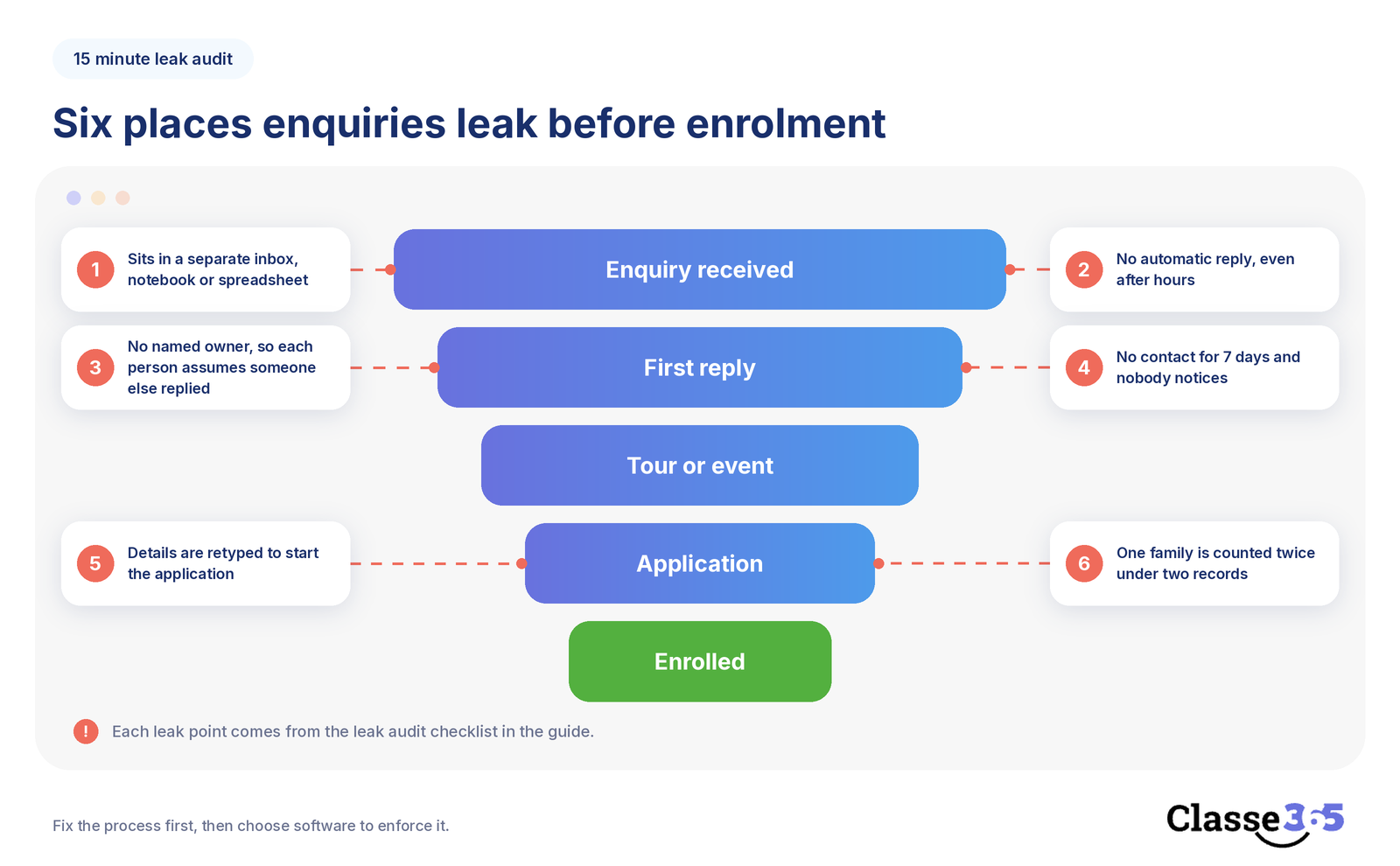
Answer yes or no to each statement below, and if fewer than five are yes, fix the process before buying software, because a tool will not enforce a rule that nobody follows.
Every enquiry has a named owner.
Every source, including calls and walk-ins, ends up in one list.
One family is never counted twice.
Nobody retypes enquiry details to start an application.
Families get an automatic reply, even after hours.
You can list enquiries older than 7 days with no contact in under a minute.
You can name the campaign behind every student enrolled last year.
Is a spreadsheet enough, or do you need a school admission management system?
A spreadsheet is enough for one intake with one or two sources and one person replying, and errors multiply beyond that.
Setup | Works for | Starts to break when |
Form plus spreadsheet | One campus, 1 to 2 sources, around 100 enquiries per intake | Two people edit, or sources multiply |
Form plus email automation | Same size, when you need reminders | Campaign reports need manual merging |
Admissions CRM | Several campaigns, 2 or more staff | Records must be retyped into a student system |
Full admission management system | Multiple campuses or campaigns, with application and enrolment on one record | Your volume is small, and the cost is not justified |
These thresholds are rules of thumb from common school setups, not research data. Consider switching when you cannot name last year's winning campaign within five minutes or when enquiries arrive from more than two sources, and if you already use a general sales CRM for school admissions, check it for school-specific stages, campus fields, and a lost-reason list.
What should you check before choosing admission management software?
Test any admission management software with your own campaigns instead of sample data, using the checklist below.
Captures source and campaign from the form without code
Keeps first touch when a family returns
Flags duplicates before saving
Lets you rename stages and add lost reasons
Sends acknowledgements and reminders by stage
Imports a CSV of old and offline enquiries
Reports enrolled students by campaign, not only enquiries
Passes the enrolled family to your student information system without retyping
Records consent and honours opt-outs
Exports your data if you leave
Then ask the vendor to run these five tasks live:
Submit a test enquiry from a tagged link and ask where the campaign name appears.
Submit it again with the same email and ask what happens.
Move the enquiry to tour booked and ask which reminder fires.
Request enrolled students by campaign for the last intake.
Enrol the test family and open the student record.
For a wider buyer checklist, see 10 questions to ask before buying school management software. Ask for pricing in writing, including onboarding, submission limits, and per-student fees, as Classe365 does on its pricing page.
What consent and privacy rules apply to enquiry data?
An enquiry record holds a parent's contact details and a child's name and grade, so collect only what you need, tell families how you will use it and address forms to parents. If a form collects details directly from children, review the COPPA checklist for K12 schools.
Marketing texts and autodialed calls to mobile phones fall under the Telephone Consumer Protection Act, which the FCC enforces and which centers on consent, as described in the FCC's guide to unwanted robocalls and texts. Marketing emails need an easy opt out, so record the consent date and wording on the enquiry itself.
Once a child enrols, the admissions record joins the student record, where FERPA applies, as described in how Classe365 approaches FERPA compliance.
Where does Classe365 fit?
To see these steps in a product, review the Classe365 admissions CRM and pre-admissions pages linked above, then request a demo, bring your campaign list, and ask for the five-task test.
What do users say?
Review | Platform | Rating |
"Easy registration forms and link to our website." Michael O., School Administrator | Capterra, October 2025 | 5.0 out of 5 |
Iyesha S., Head of Academic Administration, said the "forms feature is particularly impressive, especially the ability to add signatures for registration purposes." | Capterra, April 2025 | 4.0 out of 5 |
"What I like best is how incredibly proactive they are." Bandith K., School Administrator and System Manager | G2, April 2026 | 5.0 out of 5 |
Frequently Asked Questions
Talk to our teamWhat if one family enquires for two children?
Create one household contact with a separate child record for each child and keep a single first touch for the household, tracking each child's stage on its own and reporting enrolled students instead of households.
How do we handle enquiries for several campuses?
Make campus a required field, route each enquiry to the admissions owner for that campus and report by campus and campaign together, transferring the existing record when a family chose the wrong campus so the source history stays intact.
What should we do with lost enquiries after the intake closes?
Tag each one with the year it was lost and keep it for the next intake if the family agreed to hear from you, then archive or delete it when your retention period ends.
Can we import enquiries from spreadsheets or past years?
Most systems accept CSV imports, so clean the file first with one row per child, standard source names and an intake year column, and mark old records as imported so they do not distort this year's reports.
Who should own enquiries, the front office or admissions?
Admissions should own the follow up, while the front office logs walk ins and calls the same day using the source dropdown and hands them over, and each record needs one named owner.
When should we stop following up with a family that stops replying?
A common approach is 3 to 5 attempts across email, phone and text over four to six weeks, after which the enquiry is marked lost with "no response", with one last phone call if a deadline is close.
Does this work for higher education too?
The tracking steps and the cost per enrolled student calculation are the same, although colleges add stages such as programme choice, transcripts and financial aid, as described on our higher education solutions page.
What is a good enquiry to enrolment rate?
There is no reliable public benchmark for schools because grades, fees and demand differ, so track your own rate by campaign for two intakes and compare entry grades separately.