




Curriculum management software is a system for planning, organizing, and maintaining an institution’s courses, credits, prerequisites, and learning outcomes in one place, rather than across scattered documents and spreadsheets. It maps how courses fit into programs, keeps the curriculum aligned to standards and accreditation requirements, tracks changes over time, and connects the curriculum to the systems that use it: enrollment, the gradebook, and the degree audit. For schools and universities, the main value is consistency. When the curriculum, the courses students take, and the requirements they must meet all draw from one source, nothing falls out of sync.
This guide covers what curriculum management software is, why managing the curriculum by hand breaks down, what good software should do, and how to choose it.
What Is Curriculum Management Software, and What Does It Do?
Curriculum Management Software is a tool that holds an institution’s entire academic structure, programs, courses, credits, prerequisites, and outcomes, in one connected system. Rather than storing the curriculum in a catalog PDF, a spreadsheet, and an advisor’s reference sheet that each drift apart, it keeps a single authoritative version.
Its core job is to make the curriculum usable by the rest of the institution. Good curriculum software does not just document what should be taught; it feeds that structure into enrollment validation, the timetable, grading, and graduation checks. When a course definition changes in one place, everything downstream reflects it. This is the difference between a curriculum that is a static document and one that is a working part of the system.
Why Do Educational Institutions Struggle With Managing the Curriculum?
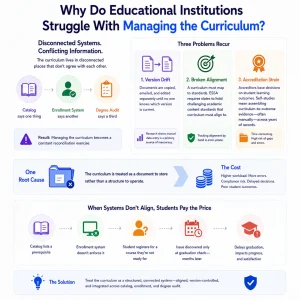
Most institutions struggle because the curriculum lives in disconnected places that do not agree with each other. The catalog says one thing, the enrollment system another, and the degree audit a third, so managing the curriculum becomes a constant reconciliation exercise.
Three problems recur:
- Version drift. Curriculum documents are copied, emailed, and edited separately until no one knows which version is current. Research on educational records finds that manual data entry is a primary source of inaccuracy, and scattered documents multiply that risk.
- Broken alignment. A curriculum has to map to standards. In K-12, the Every Student Succeeds Act requires states to hold challenging academic content standards that curriculum must align to, and tracking that by hand is error-prone.
- Accreditation strain. In higher education, accreditors base decisions on student learning outcomes, so a self-study means assembling curriculum-to-outcome evidence, often manually, across years of records.
Each problem traces back to the same root: the curriculum is treated as a document to store rather than a structure to operate. The cost is not abstract. When a catalog lists a prerequisite the enrollment system does not enforce, students register for courses they are not ready for, and the mistake often surfaces only at a graduation check months later.
What Should Curriculum Management Software Do?
Strong curriculum software for schools and universities does more than store a course list. The capabilities below are what separate a real system from a shared folder.
| Capability | What it does | Why it matters |
| Curriculum mapping | Lays out programs, courses, and how they relate | One clear structure instead of scattered documents |
| Course, credit, and prerequisite management | Defines courses, credit values, and prerequisite chains | Enrollment and graduation rules enforce automatically |
| Standards and outcomes alignment | Maps courses to standards and learning outcomes | Supports accreditation and standards compliance |
| Assessment mapping | Links assessments to the outcomes they measure | Shows whether the curriculum tests what it teaches |
| Versioning | Tracks curriculum changes over time | Students stay on the version they enrolled under |
| Reporting | Generates curriculum and accreditation reports | Turns a self-study from weeks of work into a query |
The reporting row is where the value concentrates. When the curriculum is structured data rather than prose, an accreditation report becomes a query instead of a manual assembly job.
One capability worth singling out is the approval workflow. Curriculum changes usually need review before they take effect, so a proposed new course or a credit change should move through the right approvers and be recorded, rather than edited into a document with no trail. This governance is what keeps a shared curriculum trustworthy as it evolves, and it is hard to replicate in a spreadsheet.
How Does Curriculum Management Connect to the Rest of a School System?
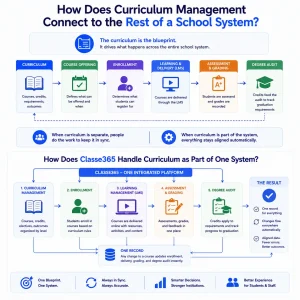
The curriculum is not a standalone artifact; it is the blueprint the rest of the system runs on. Course definitions drive what students can enroll in, credit values drive the degree audit, and outcomes drive assessment. When curriculum software sits apart from those systems, someone has to keep them in sync by hand. When it sits inside them, they stay aligned automatically. This is why curriculum management works best as part of a platform rather than a separate tool.
How Does Classe365 Handle Curriculum as Part of One System?
In Classe365, the curriculum is built directly into the platform that delivers and records it. Courses, credits, and electives are grouped and organized by level in the student information system, so the structure a school defines is the same structure students enroll against. Those courses are delivered through the learning management system, assessed and graded in the same place, and their credits feed the degree audit that tracks graduation requirements. A change to a course flows through all of it, because there is only one record. That is the practical meaning of an all-in-one platform applied to the curriculum.
How Do You Choose Curriculum Software for Your School?
The right choice depends on your institution’s complexity, and being honest about that keeps you from overbuying.
- A small, single-program school. You may not need dedicated curriculum software yet. A well-organized SIS with course and credit management often covers it.
- A multi-program school or college. This is where curriculum software for schools earns its place, keeping programs, prerequisites, and requirements consistent across departments that would otherwise drift apart.
- A multi-campus or accredited institution. Here it becomes essential. Accreditation reporting, standards alignment, and curriculum versioning across campuses are impractical to manage by hand.
Match the tool to the complexity you actually have, and favor a system that connects to your records rather than one more standalone database to reconcile.
How Does Classe365 Support Curriculum and School Management?
Classe365 treats curriculum and school management as one problem rather than two. Because the curriculum, courses, assessments, and student records share a platform, defining a program once makes it usable everywhere: enrollment, timetabling, grading, and graduation all read from it. That removes the reconciliation work that consumes staff time when curriculum lives apart from the systems that use it.
The flexibility to build that structure matters. Owais Baran, CEO of Al-Ihsan Institute, tested several platforms over two years and found Classe365 hands down the best for running courses. For schools and universities, that single structure is what lets administrators manage the curriculum as a live part of operations rather than a document they maintain on the side. It reflects the same connected logic behind a modern student information system.
Try Curriculum Management Without the Guesswork
The fastest way to judge fit is to build a piece of your own curriculum in the system. Start a free Classe365 trial to map your courses and credits yourself, or book a demo to see it walked through for your institution.
Frequently Asked Questions
What is the difference between curriculum management software and an LMS?
An LMS delivers course content and manages online learning. Curriculum management software defines the academic structure behind those courses: programs, credits, prerequisites, and outcomes. The LMS is where learning happens; curriculum management is the blueprint it follows.
Does a small school really need curriculum management software?
Not always. A single-program school with a well-organized student information system may cover its needs there. The value of dedicated curriculum tools grows with the number of programs, campuses, and accreditation demands.
How does curriculum software support accreditation?
It stores courses, outcomes, and assessments as linked data, so evidence for a self-study can be generated rather than assembled by hand. Because accreditors focus on learning outcomes, mapping courses to outcomes in advance turns reporting into a routine task.
What happens to students when the curriculum changes?
Curriculum versioning keeps each student on the version they enrolled under, while new students follow the updated one. This prevents a mid-program change from unfairly altering a current student’s requirements.
Can curriculum management handle prerequisites and corequisites automatically?
Yes, when it connects to enrollment. Defined prerequisite and corequisite rules are enforced at registration, so a student cannot enroll in a course before meeting its requirements without a staff member checking manually.
Who owns and edits the curriculum in the system?
Typically registrars, academic administrators, and department heads, with role-based permissions. Good systems include an approval workflow so curriculum changes are reviewed before they take effect across the institution.
Is curriculum management different for K-12 and higher education?
The principles are the same, but the emphasis differs. K-12 centers on alignment to state academic standards, while higher education centers on programs, credits, and accreditation. A capable system supports both structures.
How hard is it to migrate an existing curriculum into new software?
It depends on how the current curriculum is stored. Structured data imports faster than scattered documents. Most institutions map their programs and courses during onboarding, and a phased move avoids disrupting a live term.