



Personalized online learning tailors the pace, content, and path of online education to each student rather than teaching everyone the same way at once. The six best practices for schools are: (1) use student data to guide personalization, (2) set individual learning paths and pace, (3) differentiate content into multiple formats, (4) give students choice and ownership, (5) use continuous feedback and progress tracking, and (6) personalize carefully for primary-age students with limited screen time. Each works only when grounded in accurate student data, not manual tracking. When done well, personalized learning helps struggling students catch up, and advanced students keep moving.
The evidence is encouraging but conditional. RAND found that students in schools using personalized learning made significant gains in math and reading, with the lowest performers catching up toward national averages. The same research makes it clear that results vary widely depending on how well they are implemented, which is exactly what these practices address.
What Is Personalized Learning, and Why Does It Matter in Schools?
The U.S. Department of Education defines personalized learning as instruction in which the pace and approach are optimized for each learner, a definition echoed across state education agencies. In plain terms, what is personalized learning comes down to this: the lesson bends to the student rather than the student bending to the lesson.
It matters because a single fixed pace leaves some students lost and others bored. Personalized adaptive learning lets each student work at the right level, which is hard to do for thirty students at once without good information and the right tools. That dependency is the thread running through every practice below: personalized learning strategies only scale when they are grounded in data, not when a teacher manually tracks everyone. This is the gap a platform like Classe365 is built to close by putting that data in one place from the start.
How Do You Use Student Data to Personalize Learning?
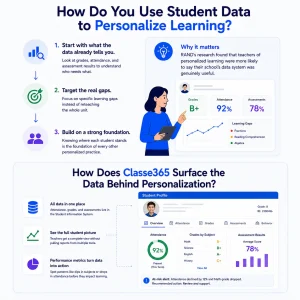
Start with what the data already tells you. Effective personalization begins by examining each student’s grades, attendance, and assessment results to determine who needs what, rather than guessing. A teacher who knows a student struggled with fractions last term can target that gap directly instead of reteaching the whole unit.
This is the foundation, because every other practice depends on knowing where each student stands. RAND’s research found that teachers of personalized learning were more likely to say their school’s data system was genuinely useful, which is not a coincidence.
How Does Classe365 Surface the Data Behind Personalization?
In Classe365, the data a teacher needs lives in one place. Attendance, grades, and assessment results are stored in the student information system, so a teacher can see a student’s full picture without pulling reports from separate tools. The performance metrics that schools track turn that raw data into patterns a teacher can act on, such as a dip in a specific subject or a drop in attendance that precedes falling grades.
How Do You Set Individual Learning Paths and Pace?
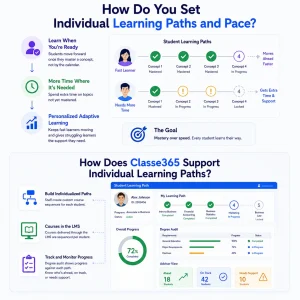
Let students progress when they are ready, not when the calendar says so. Individual learning paths mean that a student advances to the next concept once they have mastered the current one and gets more time on concepts they have not yet mastered. This is the core of personalized adaptive learning, and it is what stops fast learners from stalling and slow learners from falling behind.
How Does Classe365 Support Individual Learning Paths?
Classe365 lets staff build individualized course paths and track each student along them. Courses delivered through the learning management system can be sequenced per student, and the degree audit shows progress against each path, so an advisor can see at a glance who is ahead, who is on track, and who needs support.
How Do You Differentiate Content for Different Learners?
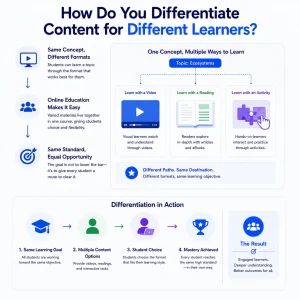
Offer the same concept in more than one form. Differentiation means a student can learn a topic through a video, a reading, or an interactive task, whichever suits how they learn, while the learning objective stays the same. Online education makes this easier, because varied materials can sit side by side in one course for students to choose from. The goal is not to lower the bar for anyone, but to give every student a route to clear it.
How Do You Give Students Choice and Ownership in the Classroom?
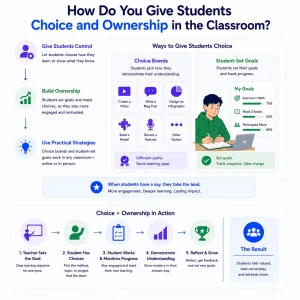
Hand students some control over how they learn. Personalized learning in the classroom works best when students help shape it by choosing how to demonstrate their understanding or setting their own learning goals. Ownership raises engagement, because a student following a path they had a say in is more invested than one simply assigned work. Practical personalized learning strategies here include choice boards and student-set goals tracked over time, both of which work as well online as in person.
How Do You Use Continuous Feedback and Progress Tracking?
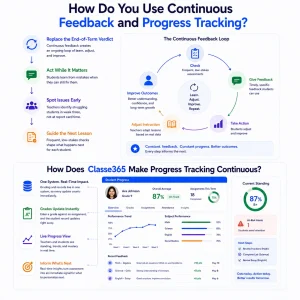
Replace the end-of-term verdict with an ongoing loop. Continuous feedback means students learn what they got wrong while they can still act on it, and teachers spot a struggling student in week three rather than at the report card. Frequent, low-stakes checks guide the next lesson for each student.
How Does Classe365 Make Progress Tracking Continuous?
Because grading and records share one system in Classe365, a grade entered against an assignment updates the student’s record immediately and feeds their progress view. Teachers and students see standing in real time rather than waiting for a term to close, which turns assessment into a live signal for what to personalize next.
How Do You Personalize Online Learning for Primary School Students?
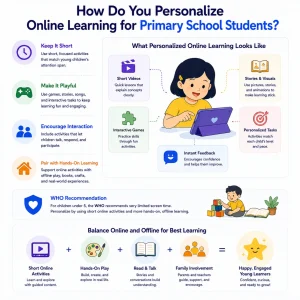
Personalize for younger learners with extra care around screen time. Personalized learning in primary schools should lean on short, varied, playful tasks and keep online time limited, because young children learn through interaction, not long screen sessions. The WHO recommends very limited screen time for children under five, a reminder that for the youngest students, personalization means tailoring short online activities and pairing them with hands-on, offline work rather than maximizing time on a device.
What Do Examples of Personalized Learning Look Like in Practice?
The practices above become concrete in a few recurring formats. These examples of personalized learning show what it looks like in the classroom, day-to-day, online, or in person.
| Approach | What it looks like in class |
| Adaptive pacing | A student moves to the next unit once they master the current one |
| Choice boards | Students pick how to show learning: essay, video, or project |
| Data-driven grouping | The teacher groups students by current skill level for targeted help |
| Learning playlists | Each student follows a task sequence matched to their level |
| Goal setting | Students set and track their own learning goals with the teacher |
How Does Classe365 Make Personalized Online Learning Work at Scale?
Every practice above shares one requirement: knowing each student well enough to tailor their learning, for hundreds of students at once. That is a data problem before it is a teaching problem, and it is where a connected platform earns its place. When the records, the online learning environment, and the progress tracking are one system, a teacher can personalize from a single, accurate view rather than stitching together spreadsheets and separate apps.
Michael Wang, Academic Research Director at GoEast Mandarin, moved the institution’s courses fully online with Classe365. That kind of shift only works when delivery and student data are integrated, because personalization at scale depends on the system handling tracking so the teacher can focus on teaching. It is the same single-source logic behind an all-in-one school platform, applied to learning, and it mirrors how schools reduce manual work through automation so teachers spend their time on students rather than admin.
See Personalized Online Learning in Your School
Want to see how personalized online learning could work for your students? Talk to the Classe365 team about your school’s setup and goals.
FAQ
What is the difference between personalized, differentiated, and individualized learning?
Differentiated learning varies how the same goal is taught to groups. Individualized learning varies the pace for each student toward the same goal. Personalized learning is the broadest: it varies pace, path, and goals around each learner’s needs and interests.
Does personalized online learning increase teacher workload?
It can, if personalization is tracked by hand. The workload drops when a system automatically surfaces each student’s data, so the teacher spends time acting on insights rather than compiling them. Without that, personalization at scale is hard to sustain.
Is personalized learning just more screen time?
It should not be. Good personalization mixes online and offline work, and, especially for younger students, it limits screen time. Technology serves the personalization; it is not the point of it.
Does personalized learning work for primary school children?
Yes, with adjustments. Personalized learning in primary schools works best with short, playful, varied tasks and strict screen-time limits. The personalization shows up in matching the activity to the child’s level, not in long device sessions.
How do you measure whether personalized learning is working?
Through progress over time, not a single test. Track each student’s growth relative to their own starting point, alongside engagement and mastery of objectives, rather than comparing them only to a class average.
What role does AI play in personalized learning?
AI can suggest next steps, flag struggling students, and adapt content, but it works from the student data the school already holds. It speeds up personalization; it does not replace the teacher’s judgment about what each student needs.
Can personalized learning widen the gap for students with less access?
It can if access to devices and connectivity is uneven, which is a real equity risk. Schools address it by ensuring access first and by blending online personalization with offline work so no student is left out.
Where should a school start with personalized online learning?
Start with the data you already have on each student, then pick one or two practices, such as adaptive pacing or continuous feedback, before expanding. Trying every practice at once tends to overwhelm both teachers and students.