




For a single teacher with one class, a grade spreadsheet can work fine. For a department or an institution, a digital gradebook wins on integration, visibility, and data security. The honest answer to which is better is “it depends on scale,” and this guide shows exactly where that line falls.
The stakes are not trivial, because grading is already a heavy load. Across OECD education systems, about half of teachers report excessive administrative work as a source of work-related stress, according to the 2025 TALIS study. The tool a teacher uses to record grades either adds to that load or removes some of it.
What Spreadsheet Grading Actually Is
If you have ever looked up the spreadsheet meaning, it is simply a grid of rows and columns for organizing data, and grading is one of its oldest uses. Spreadsheet grading means recording marks in a grid built in spreadsheet software such as Excel or Google Sheets. The spreadsheet meaning here is plain: rows for students, columns for assignments, and formulas to average the results. A grade spreadsheet is something a teacher builds and owns, and it sits on their own device or drive.
This is why it is so common. Spreadsheet software is already installed, already familiar, and costs nothing extra. For a teacher who wants total control over their own column layout, a grade spreadsheet is the path of least resistance.
Where Spreadsheets Genuinely Work
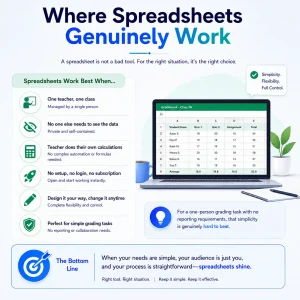
A spreadsheet is not a bad tool, and pretending otherwise is dishonest. For the right situation it is the right choice.
It works well when a single teacher manages a single class, needs no one else to see the data, and does their own calculations. There is no setup, no login, and no subscription. A teacher can design exactly the gradebook they want, change it on a whim, and keep it entirely under their own control. For a one-person grading task with no reporting requirements, that simplicity is genuinely hard to beat.
Where Spreadsheets Break Down at Scale
The problems start the moment a spreadsheet has to do more than serve one teacher. Each issue below is a direct consequence of a grade living in an isolated file.
- Manual reconciliation. Grades have to be copied by hand into the student record or report cards, which is slow and error-prone.
- Version chaos. Multiple copies, shared by email, drift out of sync until no one knows which file is current.
- No integration. The spreadsheet does not connect to the student information system, so the official record and the working grades live apart.
- No visibility. Students and parents cannot see progress without the teacher exporting and sending it.
- Security and privacy risk. A grade file holds protected student data, and a local or casually shared spreadsheet is hard to secure under privacy rules like FERPA.
These are not hypothetical. The time lost to manual record-keeping is real, and reducing it returns hours to teaching: Gallup found that teachers who use digital tools weekly to cut administrative work save close to six hours a week. A wider review of how teachers spend their time reaches the same conclusion, finding that they consistently prefer less time on administrative and grading tasks and more on instruction (TNTP research).
What a Digital Gradebook Does Differently
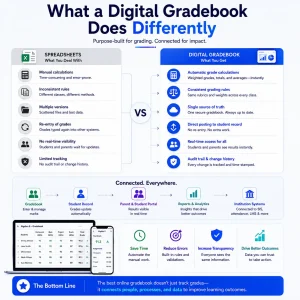
A digital gradebook is purpose-built for grading, which means it solves the problems a spreadsheet creates rather than leaving them to the teacher. Good gradebook software calculates weighted grades automatically, applies the same rules across every class, and keeps one authoritative version instead of scattered files.
The difference that matters most is connection. A digital gradebook posts grades straight to the student record, so there is no re-entry. Students and parents see results in real time through a portal. A gradebook app on a phone or tablet lets teachers enter marks anywhere, and every change is logged in an audit trail. For institutions comparing options, the best online gradebook is the one that does all of this while staying connected to the systems that already hold student data. These capabilities also feed the performance metrics schools track, turning raw marks into insight.
How Classe365 Supports Digital Grading
Classe365’s gradebook lives inside the platform rather than alongside it. Grades entered against an assignment calculate automatically, post to the student’s record, and become visible to students and parents without a separate export. Because it sits in the same system teachers use for attendance and coursework and connects to the learning management system, the grade a teacher enters is the grade everyone else sees.
The calculation itself runs through the Assessment & Grading Module, which applies weighting and grading scales automatically rather than leaving a teacher to build formulas by hand. The broader Assessment & Grading documentation covers the full set of available grading and report-card options. That report card is the same one every stakeholder ends up relying on, from the teacher’s initial entry through to the record a parent or employer eventually sees, which is exactly why keeping it accurate at the source matters more than fixing it later.
Digital Gradebook vs Spreadsheet: Side by Side
The trade-offs become clear when the two are set against each other on the factors that decide grading at scale.
| Factor | Grade spreadsheet | Digital gradebook |
| Cost | Free or already included | Subscription or part of a platform |
| Best scale | One teacher, one class | Department to whole institution |
| Calculation | Manual formulas, error-prone | Automatic and rule-based |
| Link to records | None, manual export | Posts to the student record |
| Student/parent access | None without sharing | Real-time via portal |
| Reconciliation | Manual matching | Automatic |
| Data security | Local file, weak control | Access-controlled and FERPA-aware |
| Audit trail | None | Every change tracked |
Which Is Better for You?
The right choice follows directly from your situation rather than from a blanket rule.
- A solo teacher with one class and no reporting duties. A grade spreadsheet is perfectly adequate. The overhead of a system is not worth it.
- A department or multi-teacher courses. A gradebook app brings consistency, shared standards, and one version of the truth across teachers who would otherwise keep separate files.
- A whole school or university. A digital gradebook built into the records system is the only option that scales because it removes the manual bridge between grades and the official record. At this size, the best online gradebook is the one that connects to the systems already holding student data, not the one with the most features in isolation. This is the same logic behind an all-in-one platform, where grading is one connected piece rather than a standalone tool. If you are weighing K-12 options specifically, a comparison against Gradelink shows how an integrated gradebook differs from a point solution.
How a Connected Gradebook Changes the Work
The deeper value of a digital gradebook is not the gradebook itself. It is what happens after a grade is entered. In a connected system, one grade does several jobs at once.
When a teacher records a mark in Classe365, it updates the student’s record, flows into progress tracking, and contributes to graduation requirements without anyone re-keying it. There is no end-of-term scramble to compile grades from spreadsheets, because the record was building itself all along. That is the same shift institutions see when they move other manual tasks onto a platform, as covered in how automation improves school operations.
The payoff is time and accuracy. Khaled Bitat, Administrative Director at Ecole les Aures, reports that with Classe365, student administrative and academic management is streamlined, saving staff time.
For institutions weighing the return, the ROI calculator puts numbers to the hours a connected system saves over manual grading and reconciliation.
See a Connected Gradebook in Action
If your teachers still grade in spreadsheets and reconcile by hand, book a Classe365 walkthrough to see grading, records, and reporting working as one system.
FAQ
Can I import my existing grade spreadsheet into a digital gradebook?
Usually yes. Most gradebook software supports importing from Excel or CSV, so teachers can move existing data in rather than re-entering it. The import maps spreadsheet columns to the gradebook’s fields during setup.
Does a digital gradebook work offline?
It depends on the tool. Many gradebook apps cache entries made offline and sync them once a connection returns, but a pure spreadsheet stored locally is always available without internet. For schools in low-connectivity settings, offline capability is worth confirming before choosing.
How does a digital gradebook handle weighted or standards-based grading?
A capable gradebook applies weighting rules and standards-based scales automatically, so a teacher sets the rule once rather than rebuilding a formula per class. This is harder to maintain consistently in a spreadsheet, where each file needs its own formulas.
Who can see grades in a digital gradebook?
Access is role-based. Teachers see their classes, students and parents see their own results, and administrators see what their role permits. This is a key difference from a spreadsheet, where access control depends on how carefully the file is shared.
Is student grade data safer in a gradebook than a spreadsheet?
Generally, yes. A digital gradebook stores data behind access controls and encryption, while a spreadsheet emailed or saved locally is easy to lose or expose. Grade data is protected information, so controlled access matters.
Can multiple teachers grade the same course in a gradebook?
Yes. A gradebook lets co-teachers and teaching assistants work in the same course with appropriate permissions, all updating one record. Coordinating that across separate spreadsheets is where version conflicts usually begin.
Will switching from spreadsheets disrupt the current term?
It does not have to. Many institutions import mid-term data and run a short parallel period before fully switching. Planning the move around a term boundary keeps disruption minimal.
Does a gradebook replace a teacher’s judgment?
No. It automates calculation and record-keeping, not assessment. The teacher still decides marks and feedback; the gradebook removes the manual math and the copying that follow.