




Student management software is a digital platform that centralizes a school’s student records, attendance, grades, admissions, billing, and communication in one connected system. Instead of a registrar updating one file, a teacher updating another, and a finance officer maintaining a third, everyone works from the same live data.
That single shift, from scattered records to one connected system, is why adoption has accelerated across every type of institution in the last few years. Schools are not buying student management software because it is trendy. They are buying it because manual processes stop scaling once enrollment, staff, or compliance requirements grow past a certain point.
This guide walks through what student management software actually does, how it differs from a student information system or an LMS, what it costs, and how to figure out which platform fits your school, whether you run a 150-student academy or a multi-campus network.
What Is Student Management Software, and What Problem Does It Solve?
Student management software is built to solve one core problem: information about a student living in too many places at once. A student’s grade might sit in one gradebook, their fee balance in an accounting spreadsheet, and their attendance in a paper register or a separate app.
When a parent calls the front office with a question, staff often have to check three or four sources to give an accurate answer. A student management platform fixes this by tying every piece of a student’s record- academic, financial, and behavioral- to one profile.
Update a student’s grade level once, and their fee structure, class assignments, and report card template update automatically. This is the operational core of platforms like Classe365, which unifies SIS, LMS, CRM, and finance into a single Student Admin OS rather than a set of loosely connected tools.
Student Management Software vs Student Information System vs LMS vs School ERP
These four terms get used almost interchangeably in vendor marketing, which makes evaluating options harder than it needs to be. Here is the practical distinction.
| Term | What It Actually Covers | Who Uses It Most |
| Student management software | The full operational layer: enrollment, attendance, billing, communication, records | Administrators, registrars, finance staff |
| Student information system software | Student records specifically: demographics, grades, transcripts, enrollment history | Registrars, compliance teams |
| Learning management system (LMS) | Course content, assignments, quizzes, online learning delivery | Teachers and students |
| School ERP | Everything above plus HR, payroll, and facilities in one enterprise platform | District and multi-campus administrators |
A student information system handles the records layer, while a learning management system handles instruction, and a full student management platform typically includes both plus finance and communication.
If a vendor calls their product an SIS but it cannot handle billing or enrollment workflows on its own, you are looking at a narrower tool than a full student management system. Our complete SIS guide breaks this distinction down further for multi-level institutions.
How Does a Student Management Platform Actually Connect School Data?
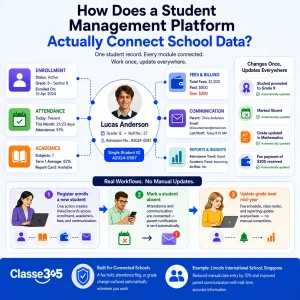
Behind the interface, a student management platform runs on a relational structure: a student profile connects to enrollment records, attendance logs, grades, and fee balances through shared identifiers.
- When a registrar enrolls a new student, that single action creates linked records across every module rather than requiring separate data entry in the gradebook, the billing system, and the communication tool.
- Mark a student absent, and a parent notification triggers automatically because attendance and communication share the same underlying student record.
- Adjust a student’s grade level mid-year, and their fee schedule and class roster update without a staff member manually correcting three separate systems.
Classe365 was built around this principle from the start, so a fee hold, an attendance flag, or a grade change surfaces automatically wherever a staff member happens to be working in the platform.
The practical takeaway for buyers: ask any vendor to demonstrate this connection live. A platform that looks unified on the surface but requires manual syncing between modules behind the scenes will create the same data fragmentation problem you are trying to solve.
Core Student Management Software Features to Expect in 2026
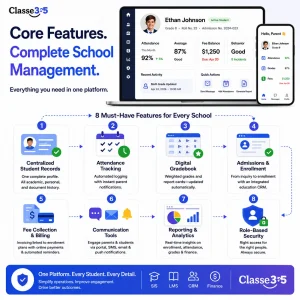
A genuinely useful student management platform covers these areas at minimum. For a full breakdown of each, our guide to essential school management software features goes deeper into how each one works in practice.
- Centralized student records. One profile per student, covering demographics, academic history, and documentation, accessible by role.
- Attendance tracking. Automated logging with parent notifications triggered the moment a student is marked absent.
- Digital gradebook. Weighted grading, GPA calculation, and report card generation that updates without manual re-entry.
- Admissions and enrollment workflows. Online applications, document collection, and a direct path from applicant to enrolled student, often run through a dedicated education CRM.
- Fee collection and billing. Invoicing tied to each student’s enrollment plan through a fees and invoicing module, with online payment options and automated reminders.
- Communication tools. Parent and student portals, plus SMS, email, and push notifications from inside the platform.
- Reporting and analytics. Pre-built and custom reports on enrollment, attendance, grades, and finance for leadership decisions.
- Role-based security. Access controls that show a teacher only their own students and keep sensitive fields restricted appropriately.
Who Uses a Student Management System Day to Day?
- Administrators use it for admissions oversight, financial reporting, and compliance tracking, often through a single dashboard that replaces manually compiled reports.
- Teachers rely on it for attendance, grading, and parent communication, cutting down the paperwork that used to eat into planning time.
- Registrars and finance staff use it to manage enrollment, billing, and documentation without re-entering the same data across separate tools.
- Parents and students get self-service access through dedicated portals, checking grades, fee balances, and announcements without calling the front office.
This post on how CRM software helps increase student admissions covers how admissions teams specifically use the CRM layer of a student management system to track prospective families.
What Does Student Management Software Cost in 2026?
Pricing depends heavily on institution size, deployment model, and which modules a school actually needs.
| Institution Size | Typical Annual Range | What Drives the Cost |
| Small school (under 300 students) | $2,000 to $15,000 | Per student pricing, core modules only |
| Mid-size school (300 to 1,500 students) | $15,000 to $60,000 | Additional modules, integrations, support tier |
| Large district or multi-campus network | $60,000 and up | Enterprise features, dedicated account management |
According to Fortune Business Insights, the global market for student information system software was valued at approximately $20.72 billion in 2026 and continues to grow at a double-digit rate, reflecting how many institutions are actively moving away from spreadsheets and legacy systems toward integrated platforms.
Our detailed cost breakdown covers hidden costs and negotiation tips schools often miss during their first purchase.
What Is the Best Student Management Software for a Small School?
The best student management software for a small school is a platform that covers the core modules, student records, attendance, gradebook, fee collection, and parent communication, without forcing you to pay for enterprise features you will not use for years.
Small schools do not need multi-campus reporting or advanced HR modules on day one. What they need is a system that is quick to set up, easy for a small staff to learn, and priced per student or on a flat rate that will not balloon as enrollment grows modestly.
There were roughly 29,730 K to 12 private schools in the United States as of the 2021-22 school year, according to the National Center for Education Statistics. Many of these institutions run with lean administrative teams where one person often covers admissions, billing, and records simultaneously.
Look specifically for platforms that bundle SIS, CRM, and fee collection at the entry tier rather than gating billing or admissions tools behind a higher pricing plan, since those three areas tend to generate the most administrative relief for a small team early on.
How to Choose the Best Student Management Software for Your Institution
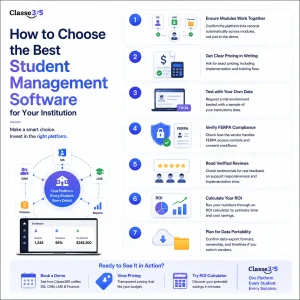
- Confirm the platform links records automatically across modules.
- Ask for the exact pricing structure in writing, including implementation and training fees.
- Request a trial environment loaded with a sample of your own data.
- Check how the vendor handles FERPA-related access controls and consent workflows. The U.S. Department of Education’s Student Privacy Policy Office administers FERPA and provides guidance on what schools should expect from third-party vendors handling student records.
- Read verified reviews, such as the ones on the Classe365 testimonials page, for specifics on support responsiveness and setup time.
- Run your own numbers through a tool like the Classe365 ROI calculator to estimate time and cost savings before committing.
- Confirm what happens to your data if you switch vendors later, including export formats and timelines.
To see how a unified SIS, CRM, LMS, and finance platform works in practice, book a demo with Classe365 or review current pricing to compare against your budget.
FAQ
Is student management software the same as school management software?
The terms are used interchangeably by most vendors and buyers. Both describe a platform that centralizes student records, attendance, grades, admissions, and communication. Some vendors use “school management software” to signal a broader operational scope that includes HR or facilities, but there is no strict industry standard for the distinction.
Can student management software work for a preschool or early learning center?
Yes, though the feature priorities differ. Early learning centers typically need daily sign-in and sign-out tracking, health and immunization records, and simplified billing rather than gradebook or transcript features built for K12 or higher education. Look for a platform with modular pricing so you are not paying for academic modules you will not use.
How is student management software different from a spreadsheet-based system?
A spreadsheet stores data but does not connect it. Student management software links a student’s record across attendance, grades, and billing automatically, so a change in one place updates everywhere it matters, and multiple staff can work from the same live data without version conflicts.
Does student management software require ongoing IT support to maintain?
Cloud-based platforms generally do not require dedicated IT staff, since the vendor handles hosting, updates, and backups. Self-hosted or on-premises systems do require internal technical support for maintenance, security patches, and server management.
What happens to historical student records when switching to a new platform?
Reputable vendors offer data migration support to import historical records, though the process requires cleaning duplicate or inconsistent data first. Always confirm export capabilities with your current system before signing a new contract, so you retain full ownership of your institutional data.
Can parents and students access the same platform, or do they need separate logins?
Most platforms provide separate portals or role-based logins for parents and students within the same underlying system. Parents typically see billing, attendance, and grade summaries, while students see assignments, schedules, and their own academic progress.
Is student management software secure enough for sensitive health and disciplinary records?
Reputable cloud platforms use encryption, role-based access controls, and audit logging that meet or exceed what most schools can maintain independently. Ask specifically how access to sensitive fields like health notes or disciplinary history is restricted by role before storing that data in any system.
How often should a school reevaluate its student management software?
Most schools revisit their platform choice every three to five years, or sooner if enrollment growth, new compliance requirements, or persistent support issues create friction. A short internal review each year, checking whether the system still matches your workflows, helps catch problems before a full switch becomes necessary.